
How can I ignore an anti-virus signature that is giving false positives?

Overview

This article outlines the procedure for configuring Sentinel Anti-malware to exclude specific anti-virus signatures that are generating false positive alerts.

Procedure

  1. Navigate to Sentinel Anti-malware > Ignore > Ignore Signatures in the management console.
  2. In the designated input field, enter the signature identifiers you wish to exclude. Enter one identifier per line.
  3. To suppress all variants of a specific signature, omit the trailing period and numeric suffix from the identifier.
  4. Click Update to apply and save the configuration changes.
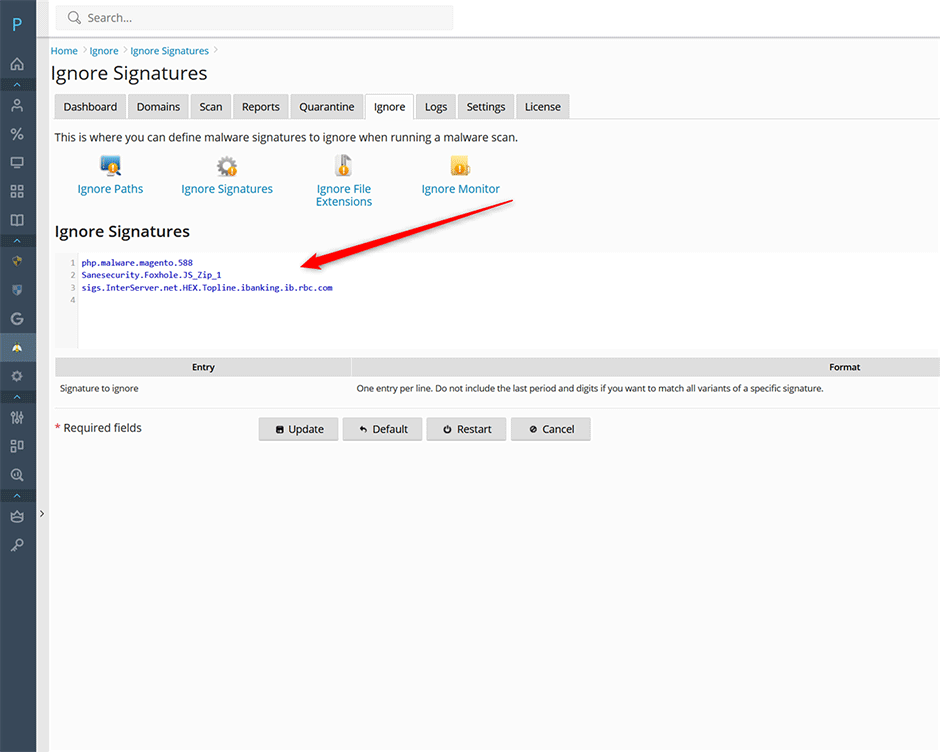
Ignore Signatures

Troubleshooting

  • Signature not excluded: Verify that the identifier exactly matches the source format. Ensure trailing periods and variant digits are removed if you intend to block all variants.
  • Configuration not saving: Confirm that Update was selected after entering the signatures. If changes do not persist, refresh the management interface or verify network connectivity to the configuration server.

  • signatures, ignore
  • 0 Корисниците го најдоа ова како корисно
Дали Ви помогна овој одговор?

Понудени резултати

How can I install or upgrade the extension?

We provide free installation and configuration for all our paid licenses. Open a support ticket...

How can I change the interface language of the extension?

Overview This article provides instructions on how to change the interface language within the...

How can I get detailed help about a specific setting?

Overview This article outlines how to access contextual assistance and detailed configuration...

How can I monitor ClamAV daemon memory and CPU usage from the command line?

Overview The clamdtop utility provides real-time monitoring of the ClamAV daemon's memory and...

How can I optimize MySQL/MariaDB using the Plesk Performance Booster tool?

Overview The Performance Booster utility enables administrators to optimize MariaDB...