
Overview
This article outlines the procedure for configuring Sentinel Anti-malware to exclude specific anti-virus signatures that are generating false positive alerts.
Procedure
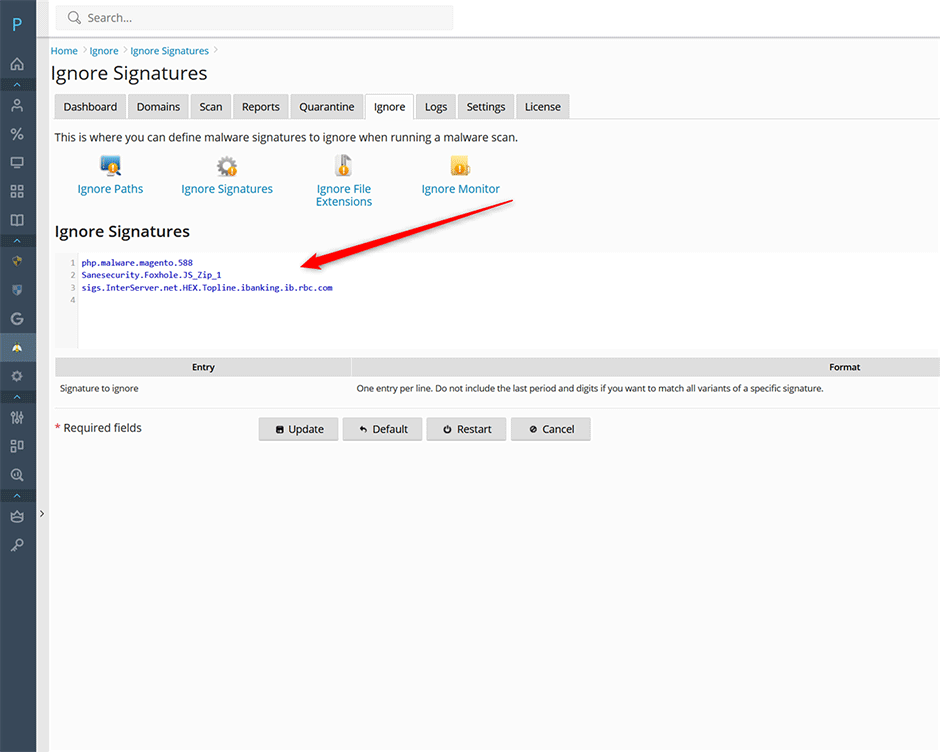
- Navigate to Sentinel Anti-malware > Ignore > Ignore Signatures in the management console.
- In the designated input field, enter the signature identifiers you wish to exclude. Enter one identifier per line.
- To suppress all variants of a specific signature, omit the trailing period and numeric suffix from the identifier.
- Click Update to apply and save the configuration changes.
Troubleshooting
- Signature not excluded: Verify that the identifier exactly matches the source format. Ensure trailing periods and variant digits are removed if you intend to block all variants.
- Configuration not saving: Confirm that Update was selected after entering the signatures. If changes do not persist, refresh the management interface or verify network connectivity to the configuration server.
