
How can I migrate Warden settings from one server to another?

Overview

This article provides step-by-step instructions for migrating Warden content filter policies, blacklists, whitelists, and Bayes training data between servers. Before beginning the migration process, ensure you have administrative privileges on both the source and destination environments.

Migrate Content Filter Policies, Blacklists, and Whitelists

Use the Policy Migrator interface to export configurations from a source server and import them into a destination server.
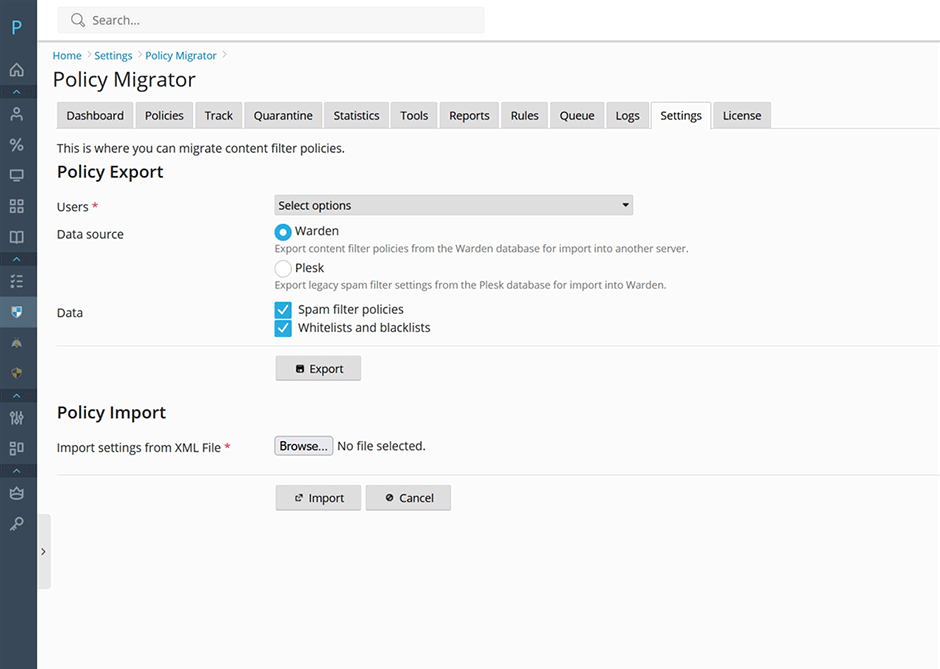
Policy Migrator

  1. Navigate to Warden > Settings > Content Filter Settings > Policy Migrator.
  2. Select the target users for migration.
  3. Select Warden as the data source.
  4. Click the Export button and save the generated XML file to your local workstation.
  5. On the destination server, navigate to Warden > Settings > Content Filter Settings > Policy Migrator.
  6. In the Policy Import section, click Browse, locate the exported XML file, and select it.
  7. Click the Import button to apply the configurations to the destination server.

Migrate Bayes Training Data

Bayes training data is transferred between servers using the command-line interface. Ensure the Warden service is fully installed and operational on the destination server before proceeding with the import.

  1. On the source server, export the Bayes database by executing the following command:
sa-learn -u amavis --backup > /tmp/amavis-bayes.db
  1. Transfer the /tmp/amavis-bayes.db file to the destination server.
  2. On the destination server, import the data into the Warden database by executing:
sa-learn -u amavis --restore /tmp/amavis-bayes.db

Troubleshooting and Common Issues

  • Prolonged Import Times: Restoring large Bayes databases is a resource-intensive operation. A database containing approximately 2 million tokens typically requires two hours to complete.
  • Service Dependency: If the restore command fails or returns an error, verify that the Warden service and all associated dependencies are correctly installed and running on the destination server before retrying.
  • blacklists, export, import, migration, whitelists, migrate, bayes
  • 2 Пользователи нашли это полезным
Помог ли вам данный ответ?

Связанные статьи

How can I install or upgrade the extension?

We provide free installation and configuration for all our paid licenses. Open a support ticket...

How can I add stronger Postfix restrictions so that the bulk of spam is rejected at the SMTPD level before it gets processed by Amavis?

Overview Warden enables administrators to enforce stricter Postfix SMTPD restrictions. These...

How can I change the interface language of the extension?

Overview This article provides instructions on how to change the interface language within the...

How can I configure greylisting with Warden Anti-spam and Virus protection?

Overview Greylisting is an email filtering mechanism designed to mitigate spam by temporarily...
