
Overview
Warden enables administrators to enforce stricter Postfix SMTPD restrictions. These restrictions reject bulk spam at the SMTP daemon level before it reaches Amavis, significantly reducing server load and improving mail processing efficiency. The recommended configuration has been validated on high-volume mail servers and is suitable for most production environments.
Prerequisites
- Ensure DNS resolution is fully operational. Multiple restrictions rely on DNS queries to validate client records (e.g., reverse DNS, MX/A records). Misconfigured or non-responsive DNS services may cause legitimate mail delivery failures.
- Review existing mail flow and client configurations before enabling stricter policies.
Applying and Managing SMTPD Restrictions
To apply the recommended restriction set:
- Navigate to Warden -> Settings -> Mail Server Settings.
- Click the Default button.
To revert to standard Postfix settings (recommended only if delivery issues occur):
- Navigate to Warden -> Settings -> Mail Server Settings.
- Click the Clear button.
Administrators can exempt specific clients from these restrictions by adding them to the whitelist under Warden -> Settings -> Mail Server Access. For comprehensive documentation on available parameters, refer to the Mail Server Settings and Mail Server Access Controls guides.
Configuration Changes
The following configuration changes are applied to /etc/postfix/main.cf when the recommended restrictions are enabled.
Default Configuration (Before)
smtpd_client_restrictions = permit_mynetworks, permit_sasl_authenticated
smtpd_sender_restrictions = check_sender_access hash:/var/spool/postfix/plesk/blacklists, permit_sasl_authenticated
smtpd_recipient_restrictions = permit_mynetworks, permit_sasl_authenticated, reject_unauth_destination
Recommended Configuration (After)
smtpd_delay_reject = yes
smtpd_helo_required = yes
smtpd_client_restrictions = permit_mynetworks, permit_sasl_authenticated, reject_unknown_reverse_client_hostname
smtpd_helo_restrictions = permit_mynetworks, permit_sasl_authenticated, reject_invalid_helo_hostname
smtpd_sender_restrictions = check_sender_access hash:/var/spool/postfix/plesk/blacklists, permit_sasl_authenticated, reject_unknown_sender_domain
smtpd_recipient_restrictions = permit_mynetworks, permit_sasl_authenticated, reject_unauth_destination, reject_unknown_recipient_domain
smtpd_data_restrictions = permit_mynetworks, permit_sasl_authenticated, reject_unauth_pipelining
Note: If DNSBL zones are configured under Tools & Settings -> Mail Server Settings -> DNS zones for DNSBL service, Warden automatically appends reject_unknown_reverse_client_hostname after any existing reject_rbl_client entries in the smtpd_client_restrictions parameter.
Restriction Ordering: Postfix evaluates SMTPD restrictions sequentially from left to right. The permit_mynetworks directive acts as a critical boundary. Parameters listed before permit_mynetworks apply to both internal and external clients, while parameters listed after it apply exclusively to external connections.
Restriction Details
- smtpd_delay_reject = yes: Defers restriction evaluation until the
RCPT TOcommand is received. This prevents compatibility issues with legacy SMTP clients that fail when rejected early in the handshake. It also ensures recipient address details are logged alongside rejection events for accurate troubleshooting. - smtpd_helo_required = yes: Mandates that remote clients issue a valid
HELOorEHLOcommand before proceeding. This is required to enforce smtpd_helo_restrictions. - reject_unknown_reverse_client_hostname: Rejects connections from IPs lacking a valid reverse DNS (PTR) record. This is less strict than reject_unknown_client_hostname, which requires forward-confirmed reverse DNS (FCrDNS). Temporary DNS failures return a 450 status code by default.
- reject_invalid_helo_hostname: Rejects connections where the provided
HELO/EHLOhostname is syntactically malformed or invalid. Default rejection code: 501. - reject_unknown_sender_domain: Rejects mail from sender domains that lack valid DNS MX or A records, or contain malformed MX entries (e.g., zero-length hostnames). Applies only when Postfix is not the final destination for the sender domain.
- reject_unknown_recipient_domain: Rejects mail destined for recipient domains lacking valid DNS MX or A records, or containing malformed MX entries. Applies only when Postfix is not the final destination for the recipient domain.
- reject_unauth_pipelining: Blocks clients that improperly pipeline SMTP commands without ESMTP support. This mitigates delivery attempts from bulk mailing software attempting to accelerate transmission through non-compliant pipelining.
Response Code Configuration
By default, most restrictions return a 450 (temporary failure) status code, allowing sending servers to retry delivery. Administrators may prefer a 550 (permanent failure) code for immediate rejection. The operational impact of changing response codes is documented in the following references:
- Postfix reject_unknown_reverse_client_hostname: replace default unknown_client_reject_code (450) to 550
- unknown_client_reject_code 450 vs. 550
To modify response codes via the Warden interface:
- Navigate to Warden -> Settings -> Mail Server Settings.
- Adjust the unknown_client_reject_code and unknown_address_reject_code parameters.
To modify response codes via the command line:
// Change reject_unknown_reverse_client_hostname response code from 450 to 550
postconf unknown_client_reject_code=550

// Change reject_unknown_sender_domain and reject_unknown_recipient_domain response codes from 450 to 550
postconf unknown_address_reject_code=550

// Apply configuration changes
postfix reload
Monitoring Rejections
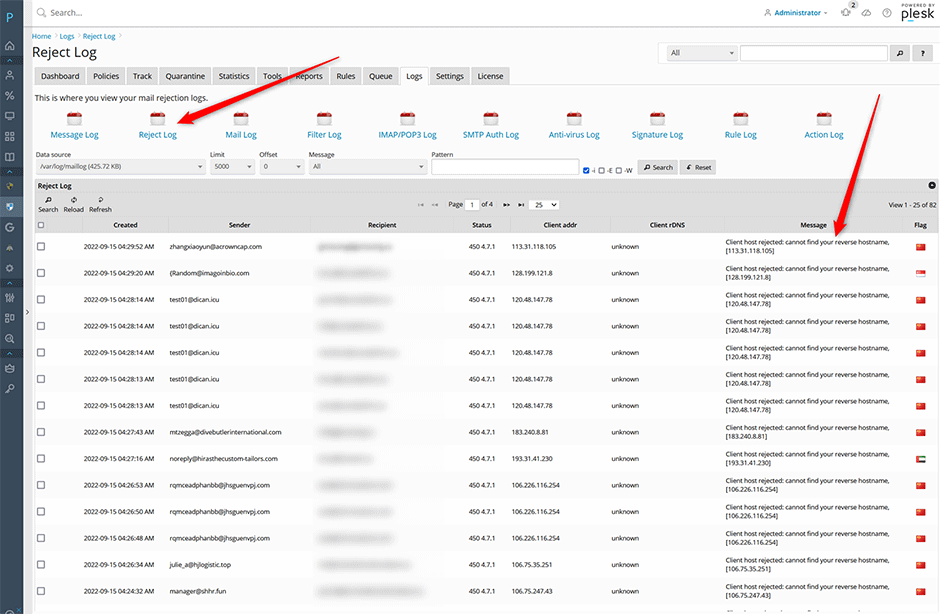
Mail rejected by SMTPD restrictions is logged in the Warden interface under Warden -> Logs -> Reject log. Administrators can filter entries using the message dropdown menu. Common rejection messages include:
- smtpd_client_restrictions: Client host rejected
- smtpd_helo_restrictions: Helo command rejected
- smtpd_sender_restrictions: Sender address rejected
- smtpd_recipient_restrictions: Recipient address rejected
- smtpd_data_restrictions: Data command rejected
Troubleshooting and Common Issues
- Legitimate mail is being rejected: Verify that the sending client's IP has a valid reverse DNS (PTR) record and that the sender/recipient domains contain properly configured MX or A records. Add trusted clients to the whitelist under Warden -> Settings -> Mail Server Access.
- DNS resolution failures cause temporary rejections: Ensure your authoritative and recursive DNS servers are responsive. Temporary DNS timeouts will trigger
450responses, causing sending servers to queue and retry messages. - Restrictions not applying as expected: Confirm that permit_mynetworks is correctly positioned in the restriction lists. Misplaced permit directives may inadvertently bypass security checks for internal or external traffic. Review the configuration in /etc/postfix/main.cf after applying changes via Warden.
- Response code adjustments required: If sending partners report excessive retries due to temporary failures, change the default response codes from
450to550using the CLI or Warden interface as documented above. Monitor delivery logs after making this change.
