
Overview
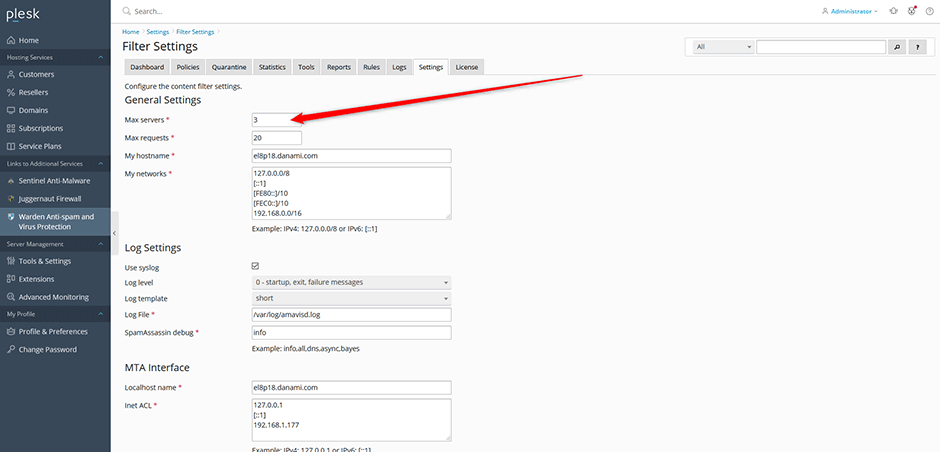
This article details how to manage Amavis memory consumption and email processing throughput by configuring the Max servers parameter within Warden. This setting determines the number of pre-forked child processes allocated to Amavis, directly influencing system resource utilization and mail queue performance.
Configuration Guidelines
To adjust the Amavis worker process count:
- Navigate to Warden > Settings > Content Filter > Filter Settings.
- Locate the Max servers configuration field.
- Select a value aligned with your server's expected email volume:
- Low Volume Servers: 1–2 processes
- Medium Volume Servers: 3–5 processes
- High Volume Servers: 6–8 processes
Resource Considerations
Each Amavis child process typically consumes between 250 MB and 300 MB of RAM. Increasing the Max servers value improves email processing speed but proportionally increases memory and CPU consumption. Evaluate available system resources before raising this setting to prevent resource exhaustion or service degradation.
Default System Memory Allocation
Warden automatically assigns a default Max servers value based on the total system memory detected. The following table outlines the standard allocation thresholds:
| System Memory | Max servers |
|---|---|
| 32 GB or more | 8 |
| 24 GB | 6 |
| 16 GB | 5 |
| 12 GB | 4 |
| 8 GB | 3 |
| 4 GB | 2 |
| Under 4 GB | 1 |
Troubleshooting & Common Issues
- Elevated Memory Utilization: If system RAM consistently approaches capacity, reduce the Max servers value to lower Amavis resource consumption and stabilize server performance.
- Email Queue Backups: If mail processing slows during peak hours and sufficient memory/CPU headroom exists, incrementally increase the Max servers setting. Monitor queue depth after each adjustment.
- CPU Contention: Excessive child processes may cause CPU throttling or impact other hosted services. Balance the process count with available CPU cores to maintain optimal throughput without degrading overall system stability.
