
Overview
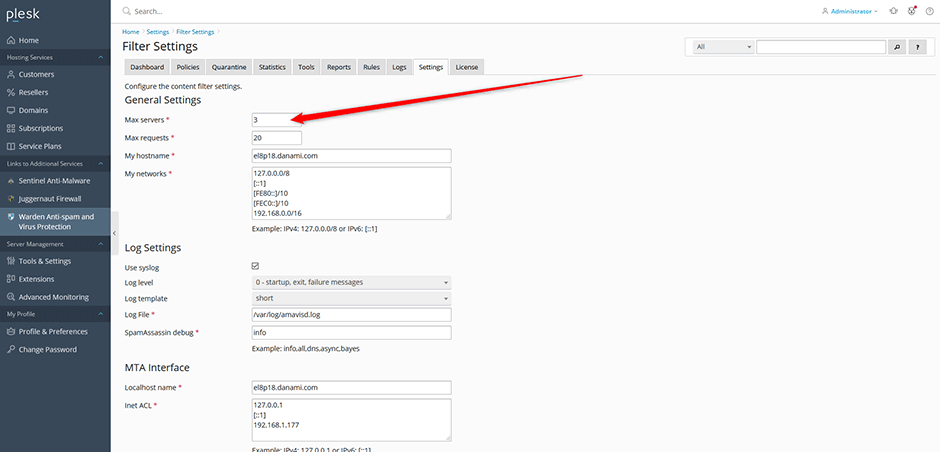
The email processing throughput of Amavis is governed by the Max servers parameter, located under Warden > Settings > Filter Settings. This configuration determines the number of pre-forked child processes allocated to handle mail filtering tasks. Increasing this value improves processing speed but requires additional system memory and CPU resources.
Configuration Recommendations
Select a value for Max servers based on your expected email volume:
- 1-2: Recommended for low-volume environments.
- 3-5: Recommended for medium-volume environments.
- 6-8: Recommended for high-volume environments.
Default Settings by System Memory
The Warden interface automatically configures the default value for Max servers based on available system memory:
| System Memory | Max server |
| 32 GB | 8 |
| 24 GB | 6 |
| 16 GB | 5 |
| 12 GB | 4 |
| 8 GB | 3 |
| 4 GB | 2 |
| Under 4 GB | 1 |
Troubleshooting & Resource Management
Memory Allocation Warning: Each Amavis child process typically consumes between 250 MB and 300 MB of RAM. Monitor system resources closely when increasing the Max servers value to prevent memory exhaustion or CPU throttling.
For detailed guidance on optimizing Amavis performance for high-volume mail processing, refer to the official documentation: Optimizing Amavis Performance for Large Email Volumes.
