
Overview
This article outlines recommended configuration adjustments to optimize Amavis and Warden mail processing performance. Implementing these changes can reduce CPU utilization, accelerate email throughput, and improve overall server stability under high-volume conditions.
Optimize Amavis Process Limits
Email processing speed is directly influenced by the maximum number of concurrent Amavis processes. Adjust this value based on your server's hardware resources and expected mail volume.
- Navigate to Warden > Settings > Filter Settings.
- Modify the Max servers parameter accordingly.
View detailed configuration guide
Enable a Local Caching DNS Resolver
Reducing external DNS query latency improves Amavis performance. Deploy a local caching resolver to handle DNS lookups efficiently and decrease resolution overhead.
Enable Postscreen
Postscreen provides an additional filtering layer that mitigates spam and connection floods before they reach the main mail queue. This reduces unnecessary processing load and enhances server reliability.
Switch to the Redis Storage Engine
For high-volume environments, migrating the anti-spam Bayes learning backend from MySQL to Redis significantly improves read/write performance. This change is recommended for advanced administrators managing heavy mail traffic.
Enable SpamAssassin Performance Plugins
Optimize rule evaluation speed and reduce CPU overhead by enabling the following plugins:
- Rule2XSBody: Compiles SpamAssassin rules into native code for faster execution. View setup guide
- Shortcircuit: Halts rule processing once a definitive match is found, skipping remaining tests to conserve CPU resources. View configuration guide
Configure Policy Banks for High-Volume Senders
Exclude trusted, high-volume senders (e.g., newsletters) from anti-spam scanning to prevent unnecessary processing delays.
- Navigate to Warden > Settings > Policy Banks.
- Create or modify a policy bank to whitelist specific sender addresses or domains.
View policy bank documentation
Optimize MySQL/MariaDB Performance
Database efficiency directly impacts mail processing. Utilize the built-in optimization tool to tune database parameters for Warden workloads.
- Navigate to Tools and Settings > General Settings > Performance Booster.
- Run the recommended optimization profile for MySQL/MariaDB.
View database optimization guide
Adjust Anti-Spam Learning Configuration
Servers hosting a large number of mailboxes should disable real-time Sieve learning to prevent CPU spikes during peak traffic and spam training cycles. Configure scheduled nightly training as an alternative.
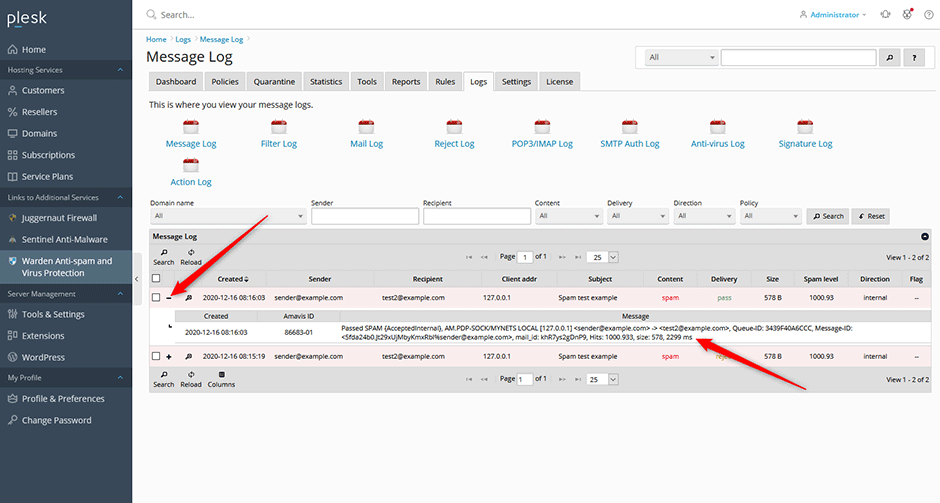
Monitor Email Processing Time
Verify optimization effectiveness by tracking individual message processing durations.
- Navigate to Warden > Logs > Message log.
- Locate the target email entry and click the + icon to expand details.
- Review the processing time displayed at the end of the message metadata (measured in milliseconds).
Troubleshooting & Common Issues
- Elevated CPU Usage: Verify that real-time learning is disabled and the Shortcircuit plugin is active. Review MySQL/MariaDB optimization status using the Performance Booster.
- Slow DNS Resolution: Confirm the local caching resolver is operational, properly configured in Amavis settings, and not experiencing upstream timeout issues.
- High Queue Latency: Adjust the Max servers value incrementally while monitoring system memory and CPU load to prevent resource exhaustion. Ensure Postscreen is enabled to filter connections early.
