Overview
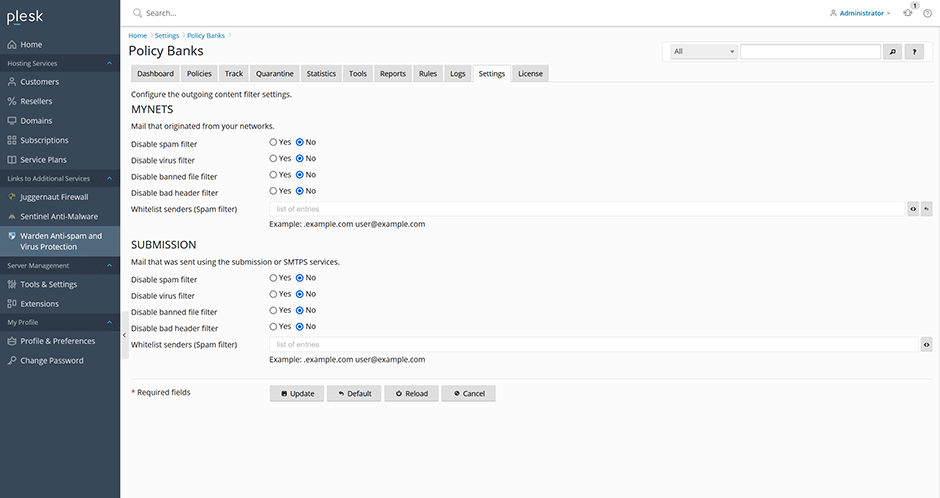
Policy banks are predefined Amavis configuration sets that dictate how email messages from specific senders or sources are processed. Administrators can configure policy banks to modify scanning behavior, such as exempting internal network clients from anti-spam and anti-virus checks or permitting specific senders to transmit file types that are otherwise restricted.
Built-in Policy Banks
Warden includes two default policy banks:
- MYNETS: Applies to email originating from networks defined in the system configuration. Network definitions can be managed under Warden -> Settings -> Content Filter Settings -> My networks.
- SUBMISSION: Applies to email submitted via SMTP submission services using ports 587 or 465.
Viewing Policy Assignments
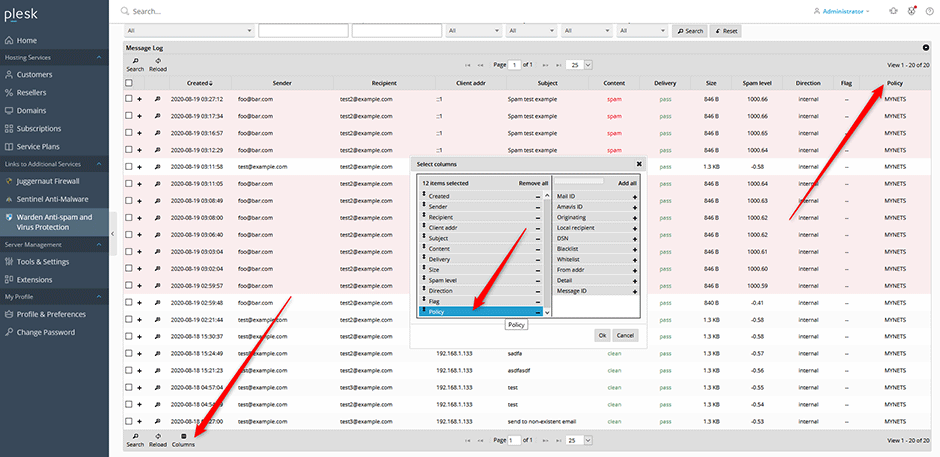
To identify which policy bank is applied to a specific message, you can display the policy information in the message log:
- Navigate to the message log grid.
- Click the columns button located at the bottom of the grid.
- Select the policy column from the available options.
Editing Policy Banks
To modify policy bank configurations for outgoing mail:
- Navigate to Warden -> Settings -> Content Filter Settings -> Policy Banks.
- Select the target policy bank and adjust the configuration parameters as required.