Overview
Sentinel supports the integration of third-party anti-virus signature providers to enhance ClamAV detection rates. This procedure outlines how to enable and configure additional signature sources within the Sentinel management console. For comprehensive documentation, refer to the official guide: Signature Providers Documentation.
Prerequisites
- Administrative access to the Sentinel interface.
- Active network connectivity to external signature repositories.
Procedure
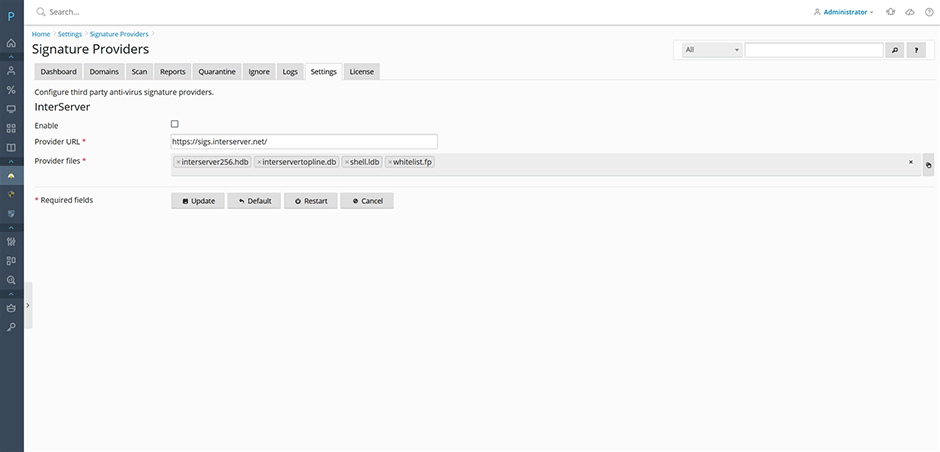
- Navigate to Sentinel Anti-malware > Settings > Anti-virus Settings > Signature Providers.
- Locate and enable the Interserver signature provider.
- Click the Update button, followed by the Restart button to restart the anti-virus signature service.
Verification & Monitoring
Monitor the signature download and loading process using the following methods:
- View real-time progress under Sentinel Anti-malware > Logs > Signature log.
- Confirm that new signatures are successfully downloaded to the /var/lib/clamav/ directory.
Configuration Notes
New signatures are automatically loaded into ClamAV within one hour of download. To force an immediate reload, use either of the following methods:
- Click the Signature reload button on the Sentinel dashboard.
- Execute the following command via terminal:
clamdscan --reloadTroubleshooting & Best Practices
False Positive Management: When initially enabling third-party signature providers, disable automatic quarantine to prevent false positives. Navigate to Quarantine Settings > Quarantine hits and adjust the configuration accordingly. Review quarantined items manually before re-enabling automated actions.