
Overview
This article outlines the procedure for configuring nightly Bayes training within the Warden anti-spam module. Prior to configuration, verify that legacy Plesk training scripts are uninstalled to prevent resource contention and duplicate execution.
Prerequisites: Remove Legacy Training Scripts
If legacy Plesk training components are currently installed, they must be removed before enabling the new nightly schedule. Concurrent execution of both training processes will result in excessive CPU consumption and potential system instability.
Execute the appropriate command for your operating system:
// AlmaLinux/RockyLinux/CloudLinux
yum remove psa-spamassassin

// Debian/Ubuntu
apt-get remove psa-spamassassin
Configure Nightly Bayes Training
Follow these steps to schedule and enable automated Bayes training:
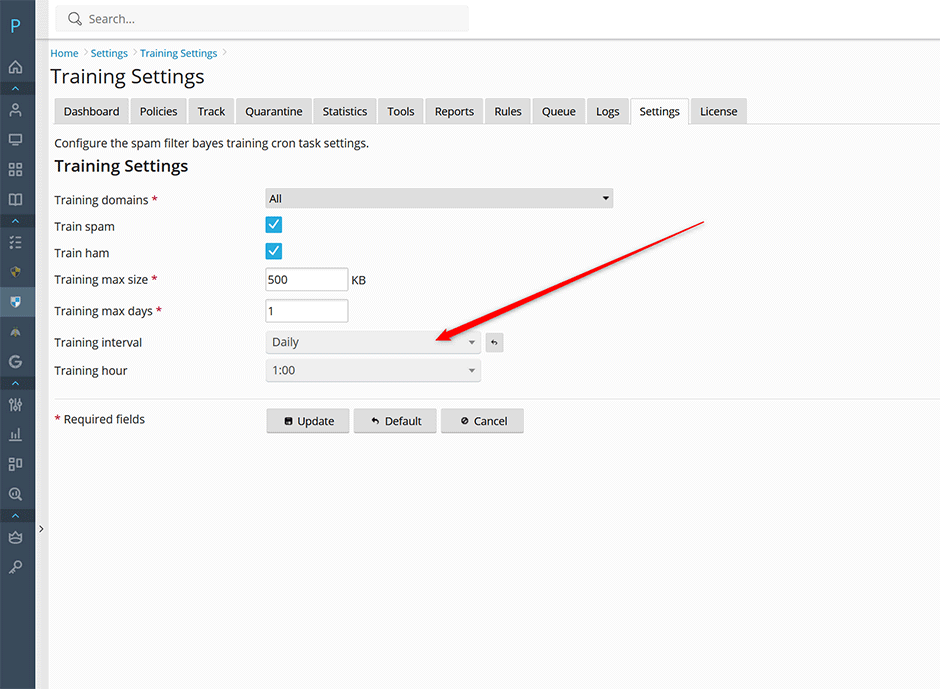
- Navigate to Warden > Settings > Anti-spam Settings > Training Settings.
- Set the training interval to Daily. Specify a preferred execution hour. Due to high CPU utilization during the training process, schedule this task during off-peak hours (typically overnight).
- Click the Update button to apply and save your configuration.
Troubleshooting
If the nightly training job fails to execute or causes unexpected performance degradation, verify that the legacy package has been completely removed and monitor system resource utilization during the scheduled window. Ensure no conflicting cron jobs are manually configured for SpamAssassin training.
