
Overview
This article provides instructions for disabling ClamAV heuristic scanning alerts within the Warden management platform. Disabling heuristics may be required to reduce false-positive detections during routine security scans.
Disabling Heuristics via the Web Interface
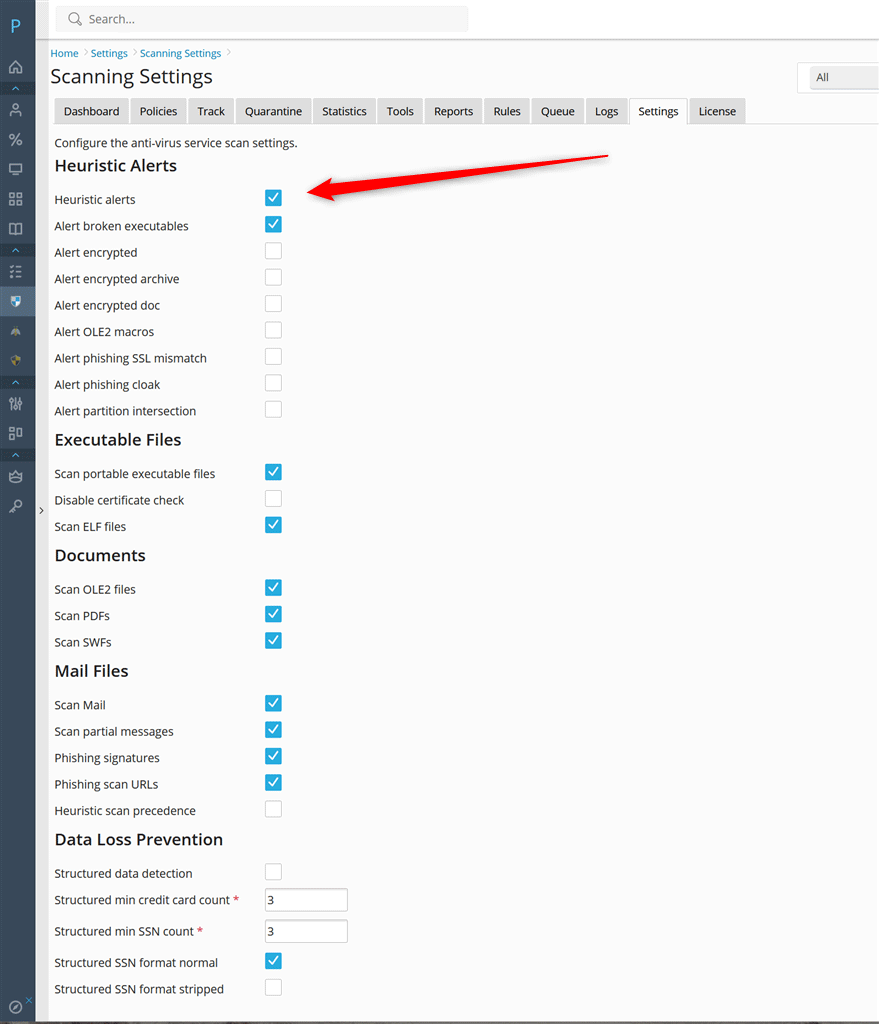
- Navigate to Warden > Settings > Anti-virus Settings > Scanning Settings.
- Clear the Heuristic alerts checkbox to disable all heuristic detection. To selectively disable specific heuristic types, clear the individual alert options listed under Heuristic alerts. Hover over each option to view detailed descriptions of the affected functionality.
- Click Update to apply and save your configuration changes.
Disabling Heuristics via Command Line
To apply this configuration change directly through the terminal, execute the following command:
warden --task=antivirus:scanning --HeuristicAlerts=no --restart=yesTroubleshooting & Notes
- The --restart=yes parameter automatically restarts the associated services to apply changes. If manual intervention is required, ensure the antivirus service is restarted after modifying configuration files.
- If heuristic alerts remain active after applying these settings, verify that no overriding policies are enforced at the system or group level.
