
Overview
This article provides step-by-step instructions for disabling antivirus scanning within Amavis via the Warden interface, stopping the ClamAV daemon to conserve system resources, and completely removing ClamAV packages from supported Linux distributions.
Prerequisites
- Verify that no other applications, security policies, or mail filtering rules depend on the ClamAV daemon before disabling or uninstalling it.
- Ensure you have root or sudo privileges to execute system commands and modify service configurations.
Disable Antivirus Scanning in Amavis
To disable antivirus scanning through the Warden control panel:
- Navigate to Warden > Settings > Content Filter Settings > Scanning Settings.
- Set both the Scanner template and Scanner backup template fields to None.
- Click the Update button to apply and save the configuration changes.
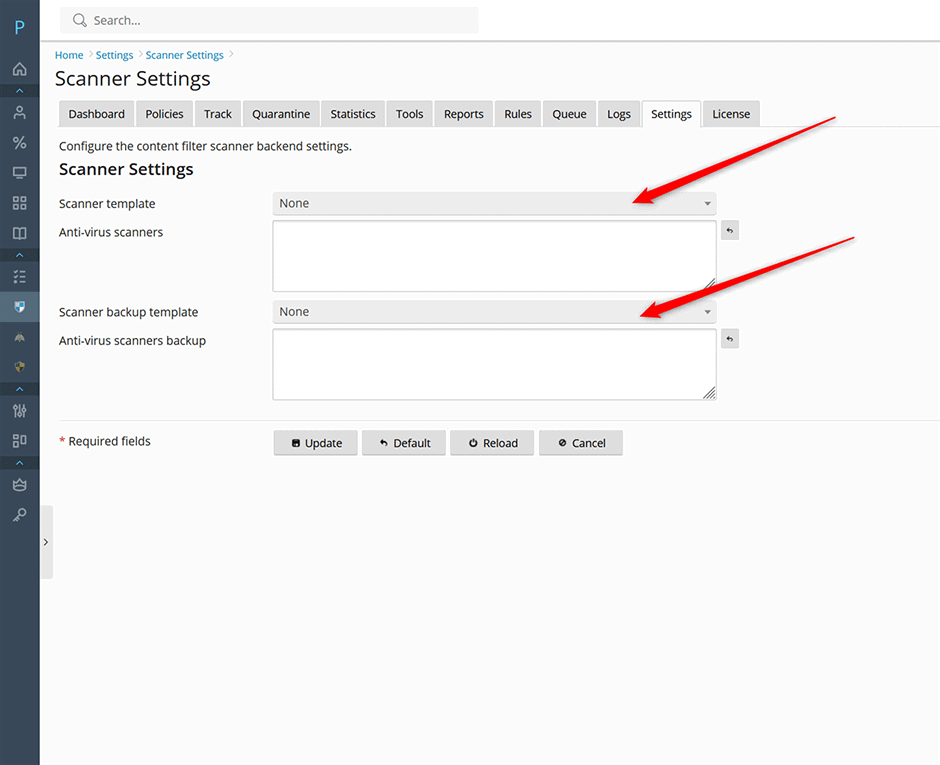
Disable the ClamAV Daemon
Disabling the ClamAV daemon stops background scanning processes and reduces memory consumption. Execute the appropriate commands for your operating system:
AlmaLinux/CloudLinux/RHEL
systemctl stop clamd@scan
systemctl stop clamav-freshclam
systemctl disable clamd@scan
systemctl disable clamav-freshclam
systemctl mask clamd@scan
systemctl mask clamav-freshclam
Debian/Ubuntu
systemctl stop clamav-daemon
systemctl stop clamav-freshclam
systemctl disable clamav-daemon
systemctl disable clamav-freshclam
systemctl mask clamav-daemon
systemctl mask clamav-freshclam
Uninstall ClamAV Completely
To permanently remove ClamAV from the system, use the package manager commands below. Ensure no dependent services require these packages before proceeding.
AlmaLinux/CloudLinux/RHEL
Note: The --nodeps flag is required to prevent the package manager from removing Amavis due to a soft dependency conflict.
rpm -e --nodeps clamav clamav-data clamav-filesystem clamav-lib clamav-update clamdDebian/Ubuntu
apt-get remove clamav clamav-base clamav-daemon clamav-freshclamTroubleshooting and Common Issues
- Service fails to stop or mask: Verify the exact service name using
systemctl list-units --type=service | grep clam. Ensure commands are executed with root privileges. - Amavis removed during ClamAV uninstall (RPM-based systems): If Amavis is unexpectedly removed, the
--nodepsflag was likely omitted. Reinstall Amavis and repeat the removal command exactly as specified above. - Scanning remains active after UI changes: Restart the Amavis service to ensure configuration updates are applied immediately.
- Package manager errors on Debian/Ubuntu: Run
apt-get updatebefore removal commands to resolve potential repository or dependency resolution issues.
