
Overview
Warden provides the capability to quarantine email messages that cannot be scanned by the anti-virus engine. Unchecked mail typically occurs when the anti-virus daemon is unavailable or when a message contains password-protected archives, which are frequently used to bypass security scans. Enabling quarantine ensures these messages are isolated rather than delivered with an "UNCHECKED" tag.
Prerequisites
- Administrative access to the Warden web interface
- Root or sudo privileges on the server for configuration file modifications
Enable Quarantine for Unchecked Mail
To configure Warden to quarantine unchecked messages instead of tagging and delivering them, follow these steps:
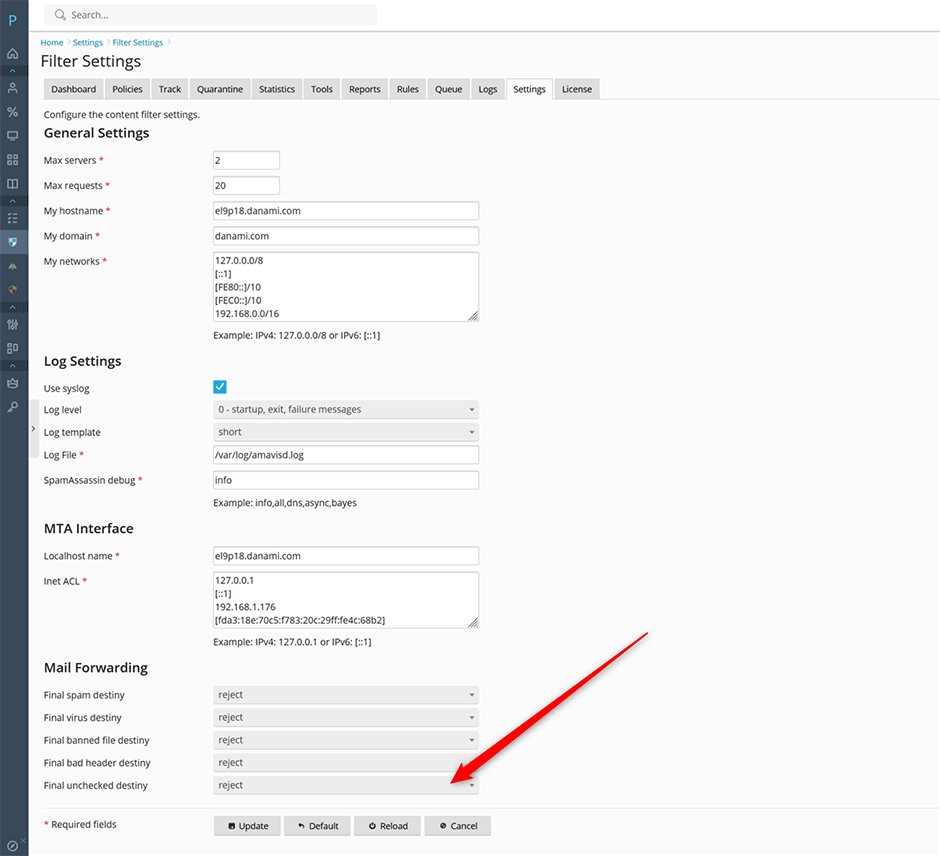
- Navigate to Warden > Settings > Content Filter > Content Filter Settings. Ensure that the Final unchecked destiny option is set to reject.
- Navigate to Warden > Settings > Content Filter > Policy Settings > Unchecked. Set the Receive unchecked emails option to No.
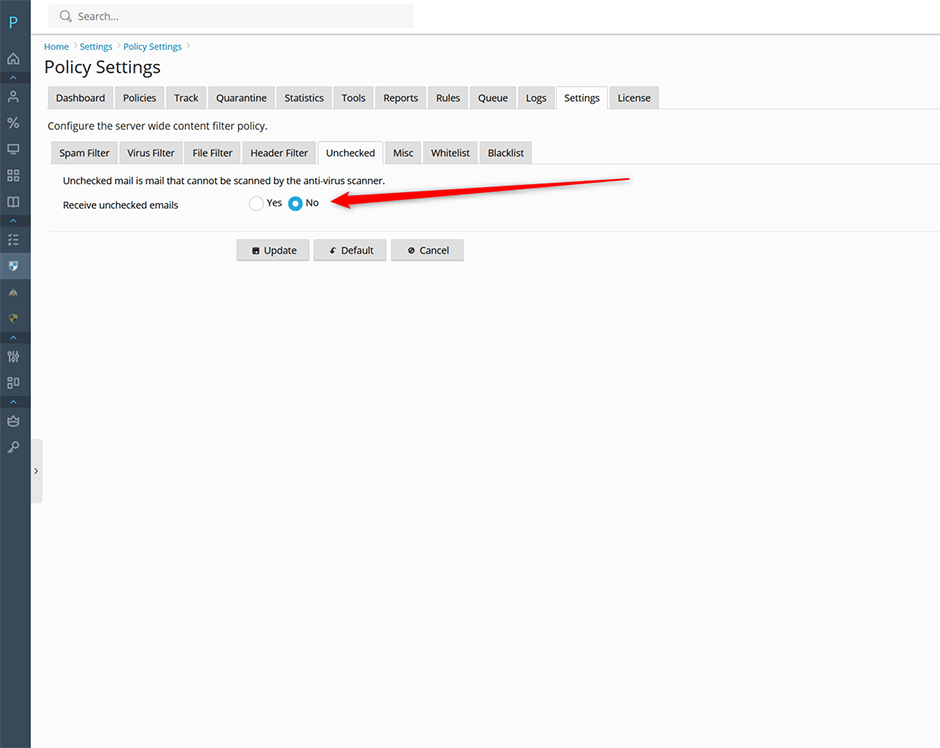
Once configured, messages that fail anti-virus scanning will be automatically quarantined rather than delivered to user mailboxes with an "UNCHECKED" tag.
Disable Quarantine for Unchecked Mail
The default server-wide policy setting for Receive unchecked emails is set to Yes. By default, unchecked messages are tagged and delivered to the recipient's mailbox. A copy of each message is retained in quarantine for investigation and automatically purged after 30 days.
To disable quarantine storage for unchecked mail entirely, modify the Amavis configuration file:
- Edit the appropriate configuration file based on your operating system:
- AlmaLinux/CloudLinux/RHEL: /etc/amavisd/warden.conf
- Debian/Ubuntu: /etc/amavis/conf.d/99-warden
- Locate the $unchecked_quarantine_method directive.
- Update the configuration by replacing the existing value:
with:$unchecked_quarantine_method = "local:unchecked-%m";$unchecked_quarantine_method = undef; - Restart the Amavis service to apply changes:
// AlmaLinux/CloudLinux/RHEL
systemctl restart amavisd

// Debian/Ubuntu
systemctl restart amavis
After restarting the service, unchecked mail will no longer be stored in the quarantine directory.
Troubleshooting & Common Issues
- Configuration Not Applying: Verify that the Amavis service restarted successfully and check for syntax errors in the configuration file before reloading the daemon.
- Messages Still Delivered as Unchecked: Confirm that both UI settings (Final unchecked destiny and Receive unchecked emails) are correctly configured prior to modifying backend files.
- Quarantine Retention Policy: When quarantine is enabled, unchecked messages are automatically deleted after 30 days. Adjust retention policies in the Warden interface if longer archival periods are required.
