
Overview
Warden supports third-party anti-virus signature providers to enhance malware detection capabilities. Enabling these signatures improves protection against phishing attempts, double extensions, macro and JavaScript-based malware, zero-day threats, and zero-hour exploits. For comprehensive documentation on each provider, refer to the official guide: Third-Party Signature Providers Documentation.
Prerequisites
- Sufficient server memory is required, particularly when enabling resource-intensive providers such as SecuriteInfo.
- Administrative access to the Warden control panel and command-line interface (CLI).
Configuration Steps
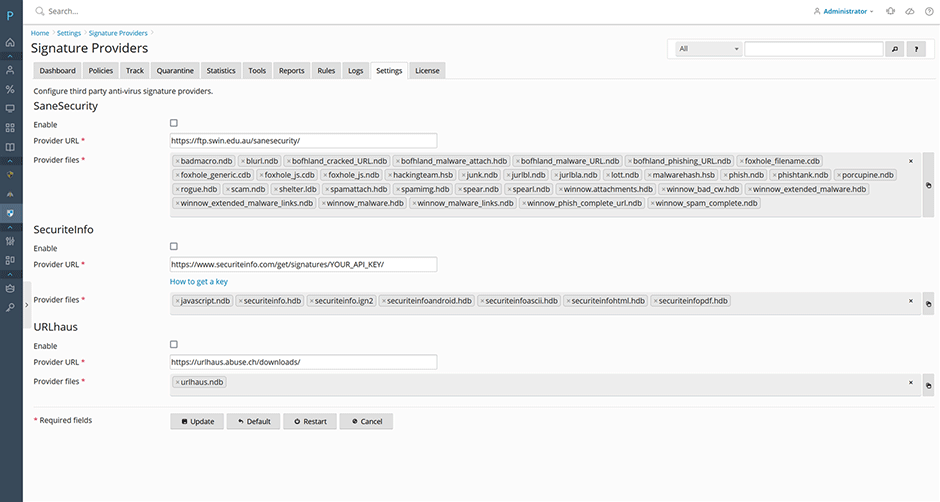
- Navigate to Warden Anti-spam and Virus Protection > Settings > Anti-virus Settings > Signature Providers.
- Select the desired third-party providers. The following configurations are recommended:
- Enable SaneSecurity and URLhaus for baseline enhanced protection.
- Enable SecuriteInfo if additional server memory is available to maximize detection rates.
- Note: SecuriteInfo offers paid signature updates (€29/year for up to 10 servers). Purchasing a subscription allows you to select
securiteinfo.mdbandsecuriteinfo0hour.hdbfrom the provider file list to download generic and zero-hour signatures. Accounts can be created and subscriptions managed at SecuriteInfo Subscription Portal.
- Click the Update button to apply the configuration, then click the Restart button to restart the anti-virus signature service.
- Monitor the download progress by navigating to Warden Anti-spam and Virus Protection > Logs > Signature log.
Verification and Manual Reload
Downloaded signatures are stored in the /var/lib/clamav/ directory and automatically load into ClamAV within one hour. To force an immediate reload, click the Signature widget reload button on the dashboard or execute the following command:
clamdscan --reloadTroubleshooting and Common Issues
- Signatures fail to load: Verify that sufficient disk space and server memory are available. High memory usage may prevent ClamAV from processing new signature files.
- Download errors in logs: Check the Signature log for timeout messages or network connectivity issues. Ensure outbound firewall rules allow connections to third-party provider endpoints.
- Manual reload fails: Confirm that the ClamAV daemon is actively running before executing the reload command. Restart the service if necessary and retry.
