
Overview
For high-volume mail servers, migrating the SpamAssassin Bayes storage backend from MySQL to Redis or Valkey significantly improves performance. This configuration stores spam training data and executes lookups in memory, reducing latency and increasing throughput.
Prerequisites:
- Memory Allocation: Ensure sufficient available RAM on the server. A typical deployment consumes less than 100 MB for Bayes data, while high-traffic servers may require over 1 GB.
- Network Security: Secure your Redis/Valkey installation before proceeding. Bind the service to the IPv4 loopback interface (
127.0.0.1) and ensure port 6379 is not exposed to external networks.
Export Current Bayes Data
Before switching backends, export the existing MySQL-stored Bayes data to a temporary file for later import.
sa-learn -u amavis --backup > /tmp/amavis-bayes.dbInstall Redis or Valkey
Select the installation method corresponding to your operating system. Note that Enterprise Linux 10 utilizes Valkey (an open-source fork) due to licensing changes, while older versions utilize Redis.
AlmaLinux/CloudLinux/RHEL 10
yum install valkey
systemctl enable valkey --now
AlmaLinux/CloudLinux/RHEL 9/8
yum install redis
systemctl enable redis --now
Debian/Ubuntu
apt-get install redis-server
systemctl enable redis-server --now
Configure Authentication
Edit the redis.conf or valkey.conf file to enforce password authentication. Locate and uncomment the following directive, replacing the placeholder with a strong, secure password:
# requirepass foobaredEnable Redis in Warden
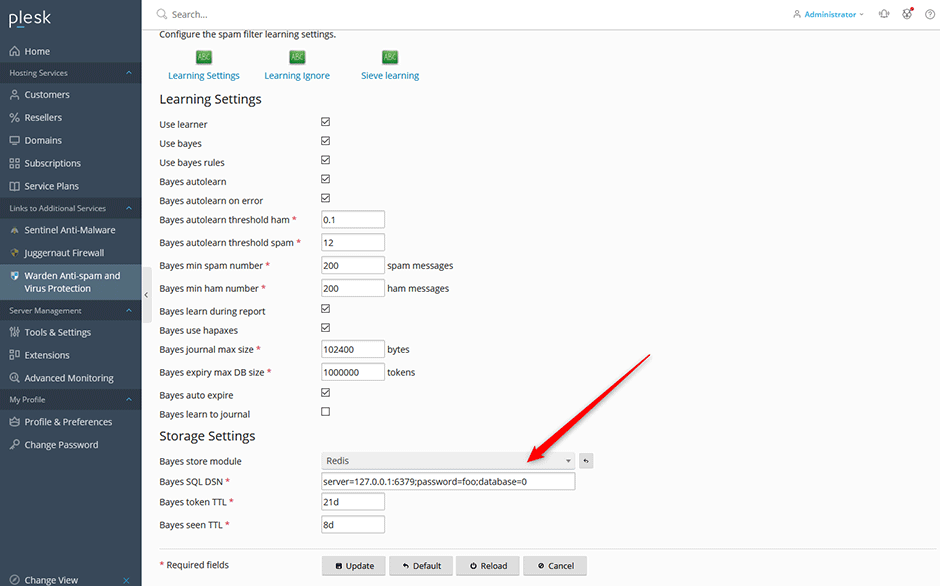
- Navigate to Warden > Settings > Learning Settings.
- Change the Bayes store module option to
Redis. - Enter the configured Redis password in the Bayes SQL DSN field.
- Set the Bayes Token TTL (time-to-live for entries):
- Low-volume servers: 180d (6 months)
- High-volume servers: 90d (3 months)
- Click the Update button to save your settings.
Verify Configuration
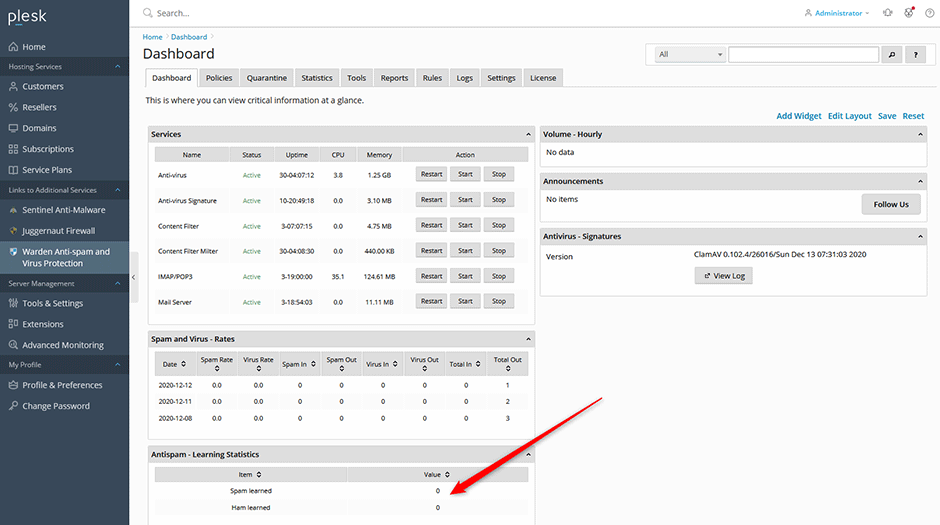
If the configuration is successful, the Anti-spam learning dashboard widget will reset to zero. The counter will increment throughout the day as real-time learning, auto-learning, and nightly training processes execute.
Monitor the dashboard to confirm that learning processes are actively updating the Redis backend.
Import Bayes Data
Restore the previously exported Bayes data into the Redis backend by executing the following command:
sa-learn -u amavis --restore /tmp/amavis-bayes.dbTroubleshooting & Common Issues
SpamAssassin 4.0.2 Redis Authentication Bug
SpamAssassin version 4.0.2 contains a known issue that prevents successful connections to password-protected Redis instances. This fix has been backported in RPM packages available via the danami-warden repository. Debian/Ubuntu users may need to apply the patch manually or upgrade their SpamAssassin installation. Refer to the official commit for details: GitHub Commit.
