
Overview
The error message milter-reject: DATA 451 4.7.1 Service unavailable - try again later indicates that an incoming email has been temporarily deferred by the mail server. This behavior is expected when greylisting spam protection is enabled. Greylisting is a standard anti-spam mechanism designed to filter out non-compliant sending servers while allowing legitimate mail to be delivered after a brief, automated retry period.
Error Identification
You may encounter this notification in the Warden reject log or within the system mail logs. The following examples illustrate typical occurrences:
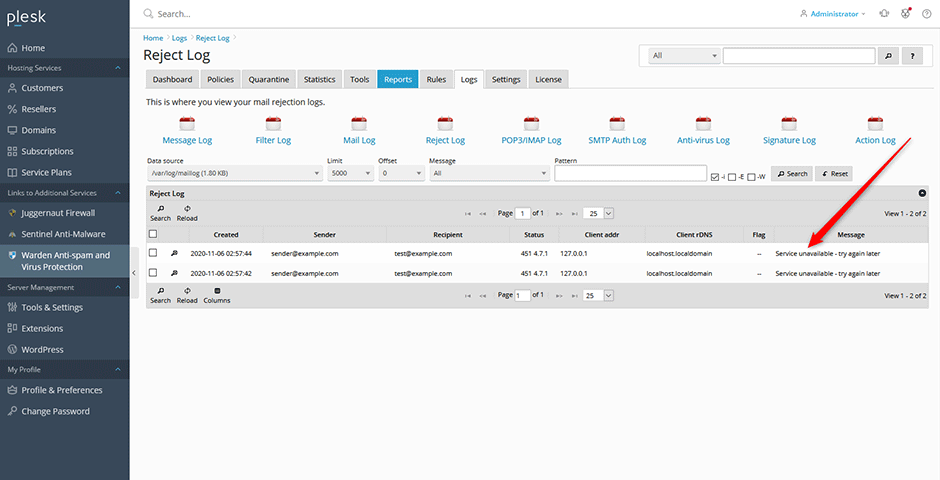
In the /var/log/maillog, the entry appears as follows:
Nov  6 02:57:42 el7p17 postfix/smtpd[18663]: 1934840B4BF3: milter-reject: DATA from localhost.localdomain[127.0.0.1]: 451 4.7.1 Service unavailable - try again later; from=<sender@example.com> to=<test@example.com> proto=SMTP helo=<localhost.localdomain>
Nov  6 02:57:44 el7p17 postfix/smtpd[18663]: A914C40B4BF3: milter-reject: DATA from localhost.localdomain[127.0.0.1]: 451 4.7.1 Service unavailable - try again later; from=<sender@example.com> to=<test@example.com> proto=SMTP helo=<localhost.localdomain>
How Greylisting Works
Greylisting operates by temporarily rejecting the initial connection attempt from unknown or unverified sending servers. The mechanism functions as follows:
- Initial Deferral: When a message arrives from an unrecognized sender, the server returns a temporary 451 error code.
- Sending Server Response: RFC-compliant mail servers interpret this response as a delivery delay and automatically queue the message for retry after a configured interval.
- Spam Filtering: Most spam bots and non-compliant servers do not implement standard SMTP retry logic. Consequently, these messages are dropped during transmission, significantly reducing unwanted email volume without impacting legitimate traffic.
Configuration Location
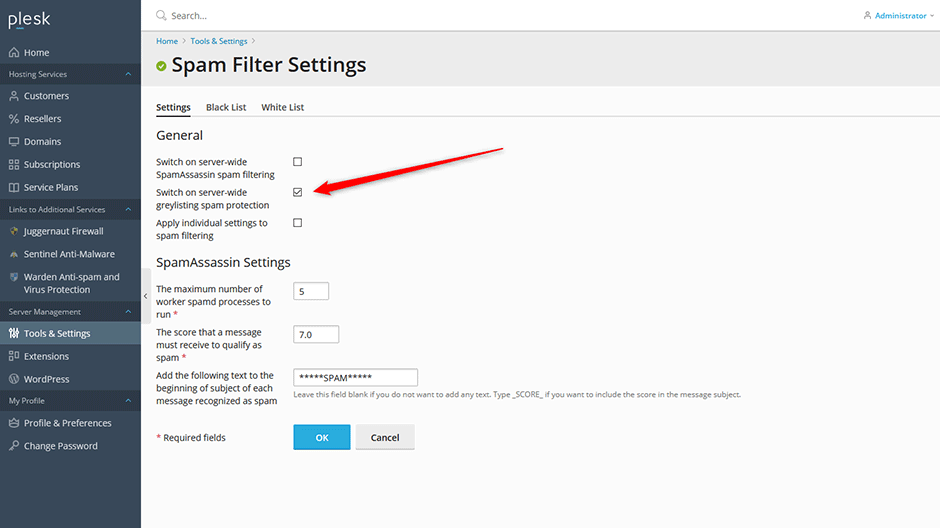
To verify or modify the greylisting setting, navigate to the following path in the control panel:
Tools & Settings -> Mail -> Spam Filter
Troubleshooting & Common Issues
- Delayed Email Delivery: Temporary deferrals are normal. Legitimate senders will automatically retry, and delivery typically completes within a few minutes to an hour.
- Disabling Greylisting: While greylisting provides additional spam protection, it can be safely disabled if immediate delivery is required.
