
How can I view the contents of a file in the quarantine?

Overview

This procedure outlines how to inspect, modify, or retrieve files that have been isolated within the Sentinel Anti-malware quarantine.

Procedure

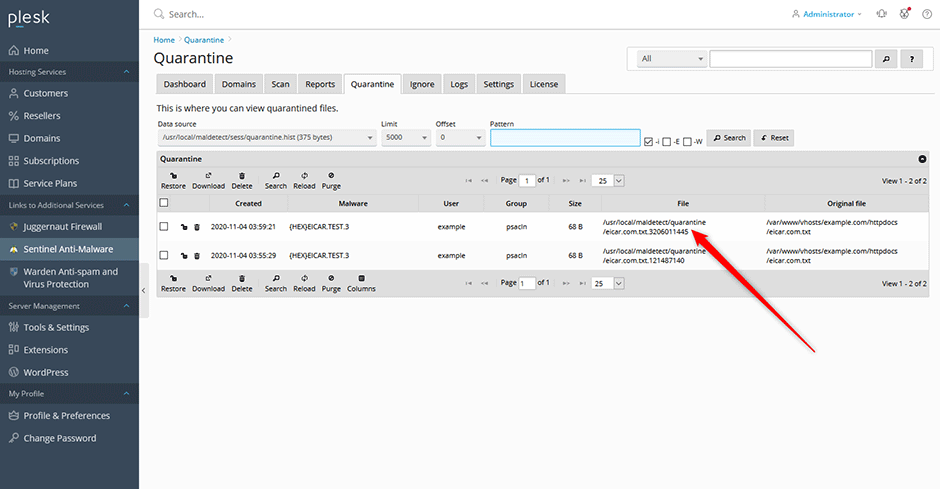
  1. Navigate to Sentinel Anti-malware > Quarantine.
  2. In the file grid, click the entry corresponding to the file you wish to inspect.
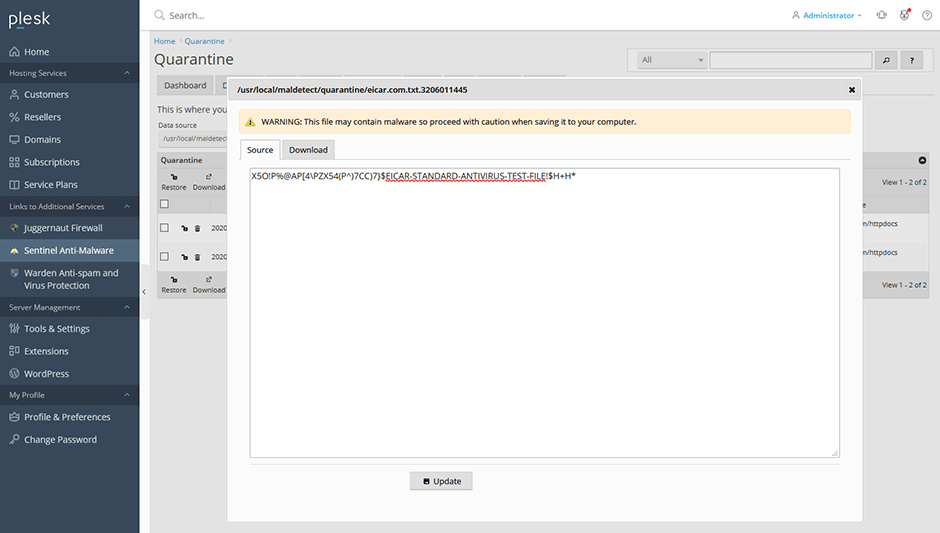
  3. A popup window will display. Use this interface to view or edit the source code, or download the file to your local system.
  • quarantine
  • 0 ユーザーが役に立ったと判断
この回答は役に立ちましたか?

関連記事

How can I install or upgrade the extension?

We provide free installation and configuration for all our paid licenses. Open a support ticket...

How can I change the interface language of the extension?

Overview This article provides instructions on how to change the interface language within the...

How can I get detailed help about a specific setting?

Overview This article outlines how to access contextual assistance and detailed configuration...

How can I monitor ClamAV daemon memory and CPU usage from the command line?

Overview The clamdtop utility provides real-time monitoring of the ClamAV daemon's memory and...

How can I optimize MySQL/MariaDB using the Plesk Performance Booster tool?

Overview The Performance Booster utility enables administrators to optimize MariaDB...
