
Overview
This article provides instructions for creating a custom rule in Warden to assign elevated spam scores to specific top-level domains (TLDs). Implementing this configuration ensures that email traffic originating from consistently spam-associated TLDs is automatically flagged or scored according to your defined thresholds.
Prerequisites
- Administrative access to the Warden control panel.
- A verified list of target TLDs that require elevated spam scoring.
Procedure: Creating a Custom TLD Spam Rule
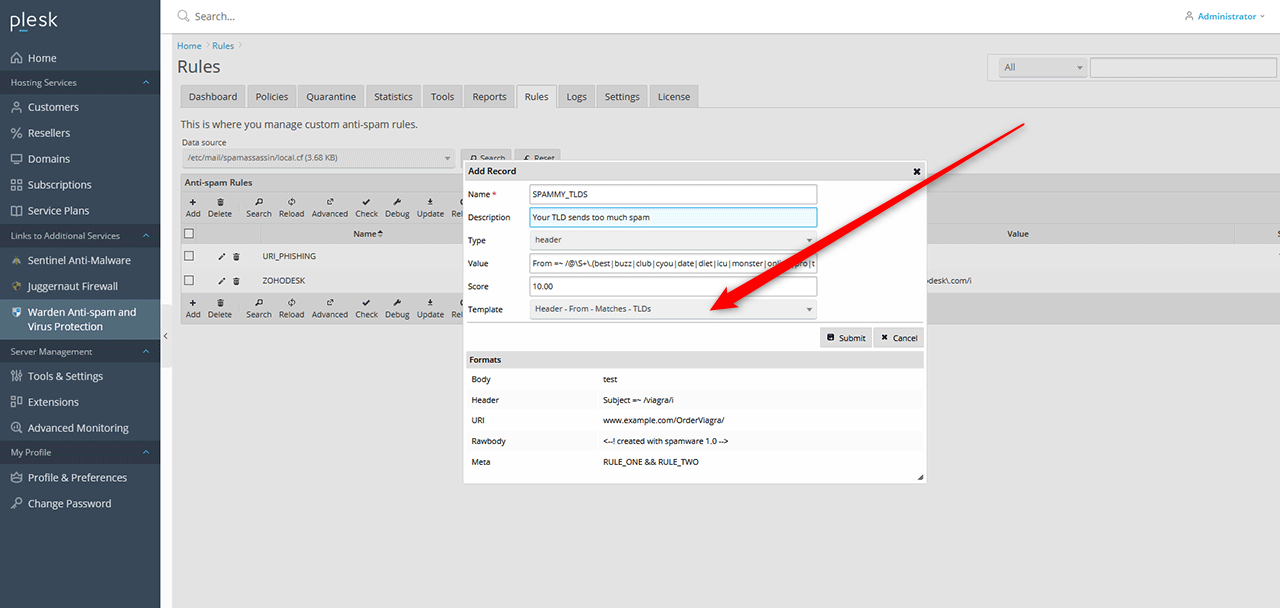
- Navigate to Warden Anti-spam and Virus Protection > Rules, then click the Add button in the rules grid.
- In the Template dropdown menu, select Header - From - Matches - TLDs.
- Enter SPAMMY_TLDS as the rule name. Note that spaces are not permitted in rule names.
- The value field will auto-populate based on the selected template. Modify this list to include or exclude specific TLDs as required.
- Configure the scoring threshold:
- Set the score to 10.00 to ensure messages from these TLDs are consistently flagged as spam.
- Set the score to 3.25 to apply a moderate increase in the spam score without automatic flagging.
- Click Submit to save and activate the new rule.
Troubleshooting and Best Practices
Many spam-associated top-level domains lack properly configured mail-related DNS records. To improve server performance and reduce processing load, consider rejecting these connections at the Postfix level by enforcing stricter SMTPD restrictions before messages reach Amavis. For detailed configuration steps, refer to Configuring Stronger Postfix SMTPD Restrictions.
