
Overview
Greylisting is an email filtering mechanism designed to mitigate spam by temporarily rejecting messages from unrecognized sending servers. Legitimate mail transfer agents (MTAs) are configured to automatically retry delivery after a specified delay, at which point the message is accepted. Greylisting applies to all non-authenticated incoming and outgoing email traffic.
Prerequisites
- Advanced User Requirement: Greylisting is recommended for advanced administrators only. Thoroughly review this documentation before implementation.
- Initial Delays Expected: Enabling greylisting will temporarily delay email delivery while the database populates with legitimate sender records. This process typically takes a few days.
- Scope Limitation: Warden supports server-wide and domain-level greylisting management. Mailbox-level (personal) greylisting is not supported and must remain disabled.
Enabling and Managing Greylisting
Warden utilizes Plesk's native greylisting functionality to manage configuration at the server and domain levels.
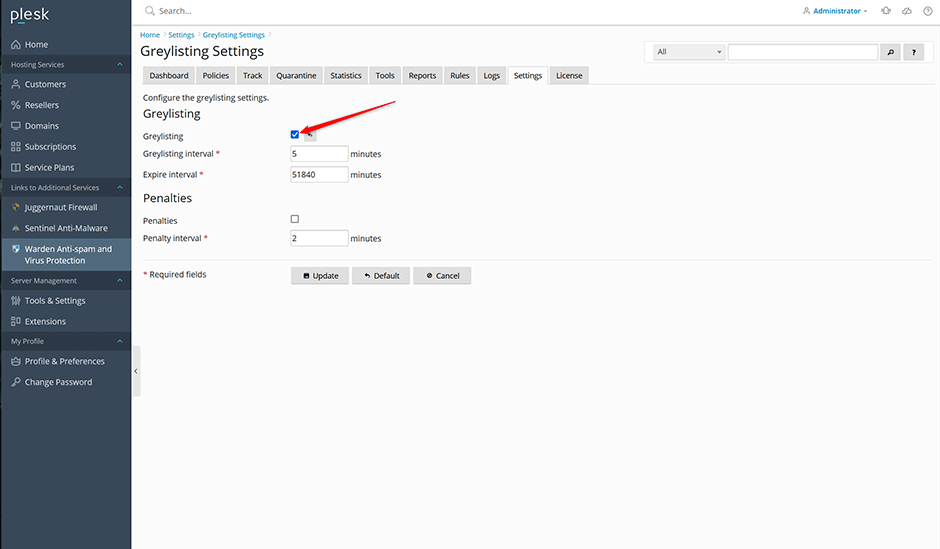
- Server-Wide Management: Navigate to Warden > Settings > Greylisting Settings. Enable or disable the global setting here. Disabling this option deactivates greylisting across all domains and hides the greylisting configuration tab in Warden.
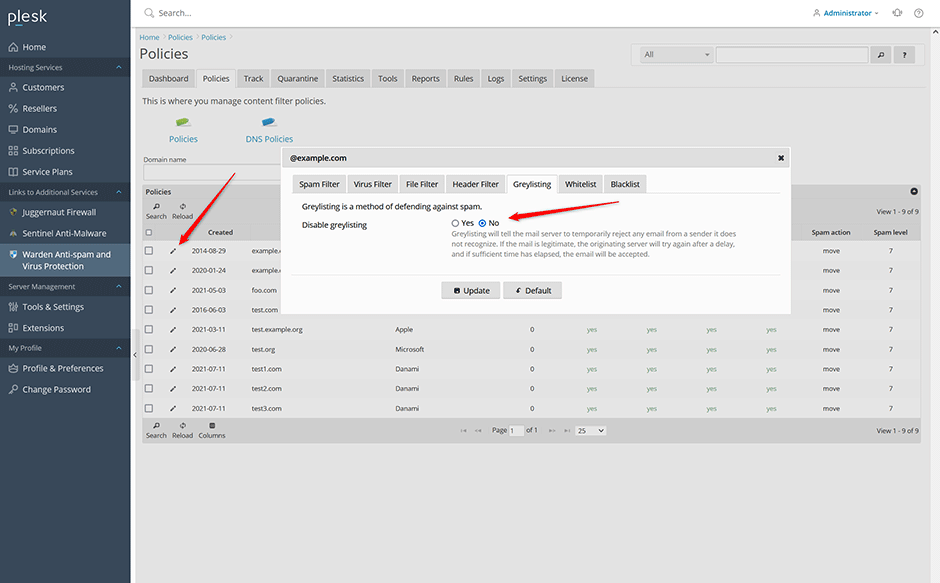
- Domain-Level Management: Navigate to Warden > Policies, click the edit icon next to the target domain, select the Greylisting tab, and toggle the Disable greylisting option.
Viewing Greylisted Emails
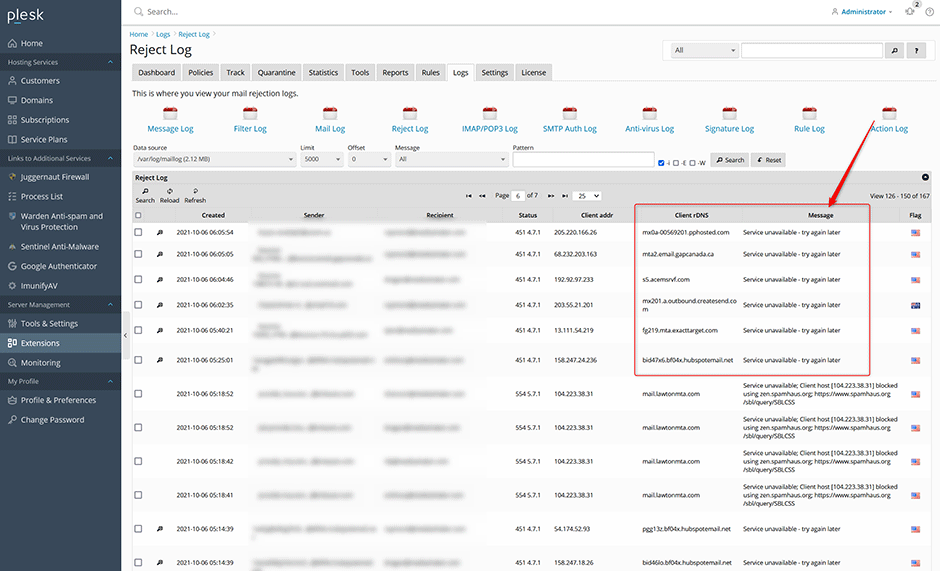
Greylisted messages are logged in Warden > Logs > Reject Log. These entries display a status of 451 4.7.1 with the message Service unavailable - try again later, indicating Postfix has instructed the remote server to retry delivery.
- Use the message filter dropdown on the Reject Log page and select Service unavailable - try again later to isolate greylisted entries.
- Legitimate greylisted emails typically generate at least three rejection attempts before successful delivery.
- Monitor the Client rDNS column in the reject log. This value is required for whitelisting sending servers.
Managing Multiple IP Addresses and Whitelists
Certain email providers utilize dynamic or multiple IP addresses for outbound mail. Without proper configuration, greylisting will defer each new IP address independently, causing extended delivery delays (typically 1–2 days). To prevent this, whitelist the provider's reverse DNS (PTR) records using wildcard patterns.
Example: Amazon SES may route traffic through various endpoints such as:
a15-177.smtp-out.amazonses.com
a14-30.smtp-out.amazonses.com
a15-229.smtp-out.amazonses.com
e252-50.smtp-out.amazonses.com
To whitelist all Amazon SES endpoints, apply a wildcard to the Client rDNS pattern:
plesk bin grey_listing --update-server -domains-whitelist add:"*.amazonses.com"Recommended Whitelist Entries for Common Providers:
// Adobe
plesk bin grey_listing --update-server -domains-whitelist add:"*.adobe.com"

// Amazon
plesk bin grey_listing --update-server -domains-whitelist add:"*.amazonses.com"

// Ebay
plesk bin grey_listing --update-server -domains-whitelist add:"*.ebay.com"

// Google
plesk bin grey_listing --update-server -domains-whitelist add:"*.google.com"

// Github
plesk bin grey_listing --update-server -domains-whitelist add:"*.github.com"

// Linkedin
plesk bin grey_listing --update-server -domains-whitelist add:"*.linkedin.com"

// Paypal
plesk bin grey_listing --update-server -domains-whitelist add:"*.paypal.com"

// Shopify
plesk bin grey_listing --update-server -domains-whitelist add:"*.shopify.com"

// Telus
plesk bin grey_listing --update-server -domains-whitelist add:"*.telus.com"
Configuration and CLI Management
Greylisting parameters (e.g., expire-interval, grey-interval, penalty-interval) can be adjusted via the Warden UI at Warden > Settings > Greylisting Settings or through the Plesk command-line interface. Note that the --update-mailname option is unsupported as it relies on legacy Plesk spam filtering components.
View Current Configuration:
plesk bin grey_listing --info-serverEnable Greylisting for a Specific Domain:
plesk bin grey_listing --update-domain example.com -status onDisable Greylisting for a Specific Domain:
plesk bin grey_listing --update-domain example.com -status offWhitelisting and Blacklisting Mail Servers
Add to Whitelist: (Applies to Client rDNS records, not email addresses)
plesk bin grey_listing --update-server -domains-whitelist add:"mail.example.com"Remove from Whitelist:
plesk bin grey_listing --update-server -domains-whitelist del:"mail.example.com"Add to Blacklist:
plesk bin grey_listing --update-server -domains-blacklist add:"mail.badserver.com"Remove from Blacklist:
plesk bin grey_listing --update-server -domains-blacklist del:"mail.badserver.com"Adjusting Default Blacklist Patterns
Plesk applies default blacklist patterns to block dynamic IP ranges typically associated with residential connections. These patterns may inadvertently block legitimate transactional email providers. Review and modify these patterns as needed:
*[0-9][0-9]-[0-9][0-9]-[0-9][0-9]*
*[0-9][0-9].[0-9][0-9].[0-9][0-9]*
*[0-9][0-9][0-9]-[0-9][0-9][0-9]-[0-9][0-9][0-9]*
*[0-9][0-9][0-9].[0-9][0-9].[0-9[0-9]][0-9]*
dsl|broadband|hsd
dynamic|static|ppp|dyn-ip|dial-up
Recommended Adjustments for Legitimate Providers:
// Remove pattern matching SparkPost (e.g., mta-70-12-15.sparkpostmail.com)
plesk bin grey_listing --update-server -domains-blacklist del:"*[0-9][0-9]-[0-9][0-9]-[0-9][0-9]*"

// Remove pattern matching Pinterest (e.g., outbound-147-160-155-33.pinterestmail.com)
plesk bin grey_listing --update-server -domains-blacklist del:"*[0-9][0-9][0-9]-[0-9][0-9][0-9]-[0-9][0-9][0-9]*"

// Remove "static" from the dynamic IP pattern to allow Mailgun (e.g., mail25.static.mailgun.info), then reapply remaining patterns
plesk bin grey_listing --update-server -domains-blacklist del:"dynamic|static|ppp|dyn-ip|dial-up"
plesk bin grey_listing --update-server -domains-blacklist add:"dynamic|ppp|dyn-ip|dial-up"
Automating Greylisting for New Domains
To maintain server-wide greylisting while automatically disabling it for newly provisioned domains, configure a Plesk Event Handler:
- Navigate to Tools & Settings > Event Manager > Add Event Handler.
- Configure the following parameters:
Event: Default domain (the first domain added to a subscription) created
Priority: lowest(0)
User: root
Command: /usr/local/psa/bin/grey_listing --update-domain <NEW_DOMAIN_NAME> -status off
Troubleshooting and Common Issues
- Extended Delivery Delays: Initial activation requires time to populate the greylisting database. Delays of 1–2 days are normal until legitimate senders retry delivery or are added to the whitelist.
- Repeated Greylisting for Single Providers: If a provider uses multiple IP addresses, each new IP triggers a fresh greylist delay. Resolve this by adding a wildcard whitelist entry matching the provider's Client rDNS pattern.
- False Positive Blacklists: Default blacklist patterns may block legitimate transactional mailers (e.g., SparkPost, Mailgun). Review the Reject Log for entries with status 451 4.7.1 and message Command rejected, then adjust blacklist patterns accordingly.
- Mailbox-Level Configuration: Personal/mailbox-level greylisting is unsupported in Warden/Plesk. Ensure only server-wide or domain-level settings are modified.
