
Overview
This article provides instructions for configuring Warden to reject and prevent the forwarding of messages classified as spam or spammy. The configuration specifically targets redirected mail utilizing the Sender Rewriting Scheme (SRS) by applying custom header checks, scoring rules, and plugin shortcircuiting.
Prerequisites
- Root or sudo access to the server console.
- Warden installed and operational.
- Postfix mail server managed by Warden.
Configuration Steps
Execute the following commands sequentially to implement the spam rejection policy for forwarded messages:
1. Add a header check rule: Configure Postfix to detect previously flagged spam and prepend an additional tracking header.
warden --task=mailserver:checks --oper=header_add --pattern='/^X-Spam-Flag:\s+YES/' --action=PREPEND --text='X-Already-Spam: YES' --reload=yes2. Reset the server-wide policy: Ensure the spam kill level is enabled globally.
warden --task=contentfilter:policy --default=yes3. Create a header rule for classified spam: Define a custom rule to identify messages already marked as spam.
warden --task=antispam:rules:customrules --oper=rule_add --name='__IS_ALREADY_SPAM' --description='Mail is already classified as spam' --type=header --value='X-Already-Spam =~ /YES/i'4. Create a header rule for redirects: Define a custom rule to detect SRS-formatted redirected mail (Plesk applies Sender Rewriting Scheme (SRS) to redirects).
warden --task=antispam:rules:customrules --oper=rule_add --name='__IS_REDIRECT' --description='Mail is a redirect' --type=header --value='Return-Path =~ /^<SRS0=/i'5. Create a meta rule for scoring: Combine the previous rules to apply an elevated spam score when both conditions are met.
warden --task=antispam:rules:customrules --oper=rule_add --name='REDIRECT_SPAM' --description='Mail is redirect spam' --type=meta --value='(__IS_REDIRECT && __IS_ALREADY_SPAM)' --score=206. Enable the Shortcircuit plugin: Activate the plugin to allow rule-based processing termination.
warden --task=antispam:plugins --Shortcircuit=17. Configure the shortcircuit rule: Apply the shortcircuit to the REDIRECT_SPAM rule. This terminates further processing upon a match, conserving CPU resources and preventing autolearning for redirected spam.
warden --task=antispam:plugin:shortcircuit --shortcircuit='REDIRECT_SPAM spam' --reload=yesExpected Behavior
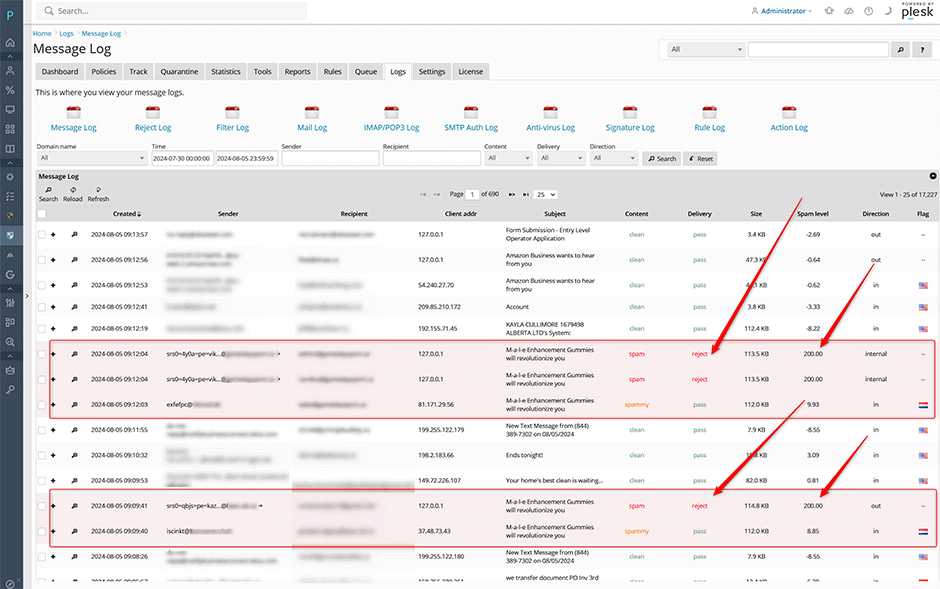
Upon completion, incoming messages classified as spam or spammy will trigger the REDIRECT_SPAM rule when forwarded. These messages will be rejected at the server level and will not be relayed to external recipients.
Troubleshooting
- Verify rule application: Run the Warden CLI to list custom rules and confirm that __IS_ALREADY_SPAM, __IS_REDIRECT, and REDIRECT_SPAM are present.
- Check plugin status: Ensure the Shortcircuit plugin remains enabled by reviewing the active plugin configuration via Warden.
- Review mail logs: Monitor system mail logs for rejection entries corresponding to the REDIRECT_SPAM rule and verify that forwarded spam is being dropped as expected.
- Service reload issues: If configuration changes do not take effect immediately, manually restart the relevant mail filtering services or execute a full Warden service reload.
