
Overview
Warden provides a comprehensive suite of reports for monitoring SMTP authentication and POP3/IMAP login activity. These reports are accessible via the Reports tab and can be pinned to the Warden dashboard for persistent visibility.
Prerequisites
Note: All mail authentication reports utilize the systemd journal as their primary data source. The journal must be functioning correctly and free of errors to generate accurate results. For guidance on resolving empty or missing mail log data, refer to How can I fix empty mail log information in Warden?.
Report Selection Guide
Select the appropriate report based on your monitoring objectives:
- Successful SMTP Authentication & Mail Transmission
- SMTP Auth - Success - User: Identifies email accounts that successfully authenticate and send mail.
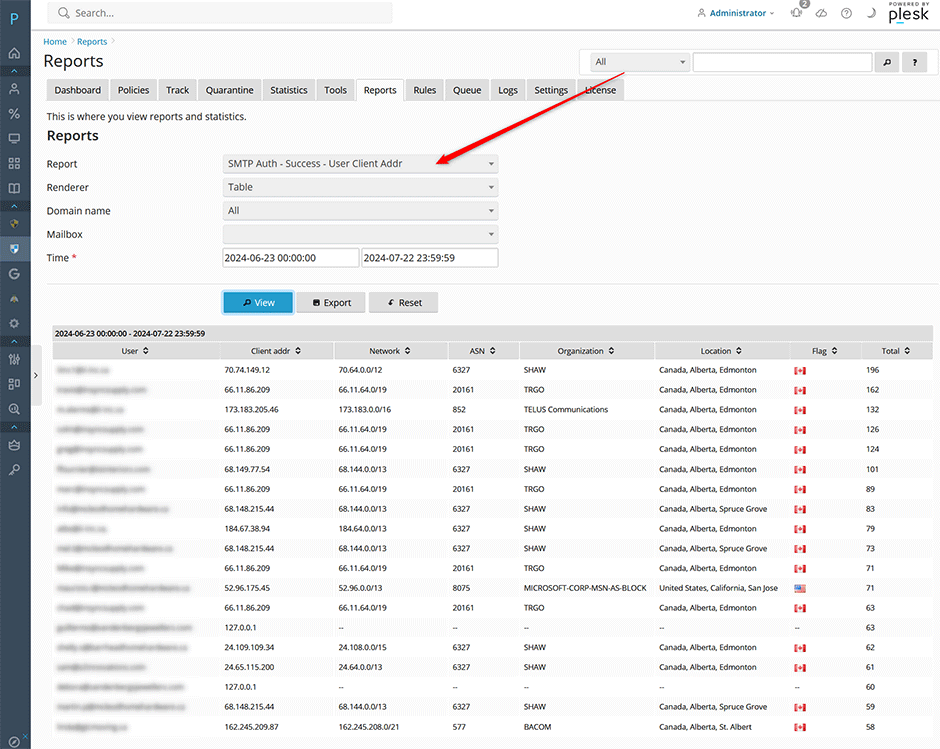
- SMTP Auth - Success - User Client Addr: Tracks successful SMTP authentications alongside the originating client IP address.
- Successful POP3/IMAP Authentication
- POP3/IMAP - Success - User: Identifies email accounts that successfully authenticate to retrieve mail via POP3 or IMAP.
- POP3/IMAP - Success - User Client Addr: Tracks successful POP3/IMAP authentications alongside the originating client IP address.
- SMTP Authentication Failures & Brute Force Detection
- SMTP Auth - Failure - User: Identifies email accounts targeted by failed SMTP authentication attempts.
- SMTP Auth - Failure - UserClient Addr: Tracks failed SMTP authentication attempts alongside the originating client IP address.
- POP3/IMAP Authentication Failures & Brute Force Detection
- POP3/IMAP - Failure - User: Identifies email accounts targeted by failed POP3 or IMAP authentication attempts.
- POP3/IMAP - Failure - User Client Addr: Tracks failed POP3/IMAP authentication attempts alongside the originating client IP address.
Interface Preview
Troubleshooting & Common Issues
- Empty or Incomplete Report Data: Verify that the systemd journal is actively capturing mail authentication events. Check for journal rotation misconfigurations, insufficient disk space, or recent service restarts that may have interrupted log collection.
- Missing Client IP Addresses: Ensure network address translation (NAT) or reverse proxy configurations are not obscuring the original client source addresses before they reach the mail server.
