
How can I turn off the "System Integrity checking detected a modified system file" alert?

Overview

This article provides the steps required to disable the "System Integrity checking detected a modified system file" alert by modifying the Login Failure Daemon configuration.

Prerequisites

  • Administrative access to the management console or configuration interface.
  • Permissions to restart system services or daemons.

Procedure

To disable system integrity checking and suppress the associated alert, follow these steps:

  1. Navigate to Settings > Login Failure Daemon > Directory Watching.
  2. Locate the Integrity checking interval configuration parameter.
  3. Set the value of Integrity checking interval to 0.
  4. Save the updated configuration.
  5. Restart the login failure daemon service to apply the changes.
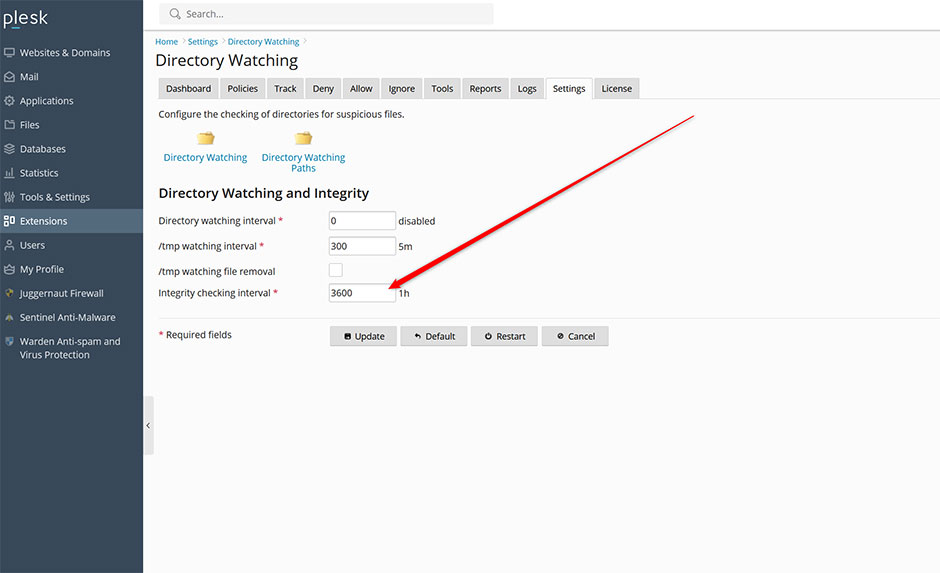
Integrity checking interval

Troubleshooting

  • Alert persists after configuration change: Verify that the login failure daemon has fully restarted. Check system logs to confirm the new interval value is active.

  • alert
  • 1 Utenti hanno trovato utile questa risposta
Hai trovato utile questa risposta?

Articoli Correlati

Where are the configuration files for Juggernaut Firewall located?

Configuration files are located in the /etc/csf/ directory with the main firewall configuration...

Can I use Juggernaut Firewall to block Wordpress bruteforce attacks?

Yes we support blocking attacks like these very easily. See below for more information: How can...

How can I install or upgrade the extension?

We provide free installation and configuration for all our paid licenses. Open a support ticket...

How can I change the interface language of the extension?

Overview This article provides instructions on how to change the interface language within the...

How can I get detailed help about a specific setting?

Overview This article outlines how to access contextual assistance and detailed configuration...