
Overview
This guide outlines the procedures for configuring Warden and SpamAssassin to score incoming email based on Autonomous System Numbers (ASNs). Administrators can adjust scoring thresholds for specific organizations, enable ASN lookups, append custom headers, and monitor spam trends using built-in reporting tools.
Prerequisites
- Administrative access to the Warden interface.
- Root or sudo access to the mail server for configuration file edits.
- SpamAssassin 3.4.x: Requires an external ASN lookup provider.
- SpamAssassin 4.0.x: Requires a free MaxMind API key and downloaded MaxMind databases. Refer to the MaxMind license setup guide for details.
Enable ASN Lookup Provider
Configure the appropriate lookup method based on your installed SpamAssassin version.
SpamAssassin 3.4.x Configuration
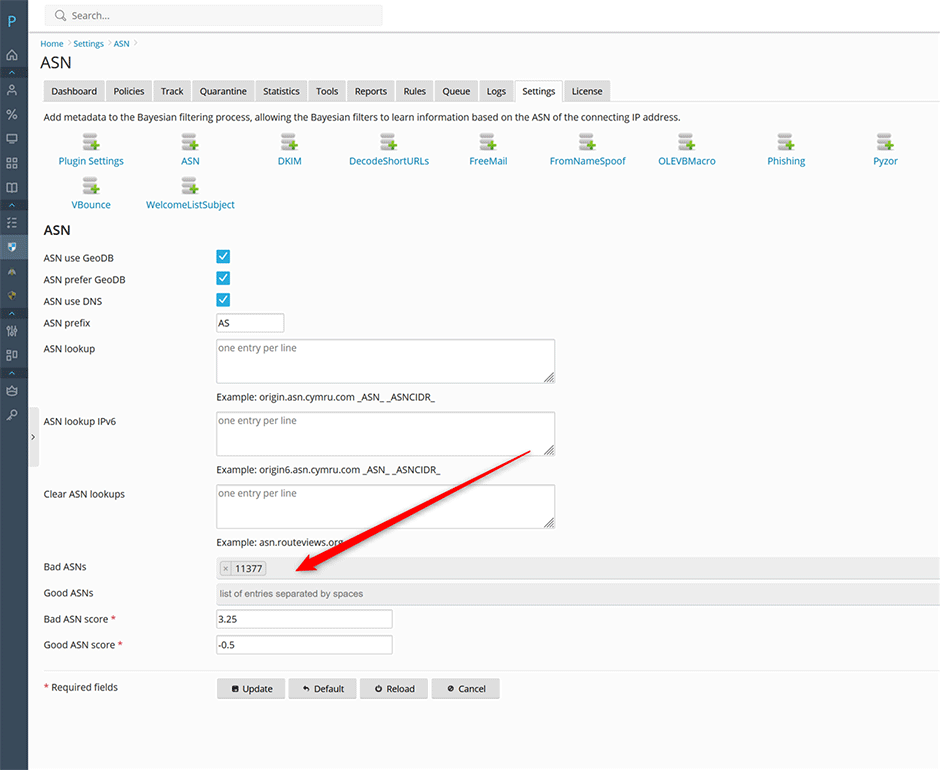
- Navigate to Warden > Settings > Plugin Settings > ASN.
- Set the ASN lookup field to:
origin.asn.cymru.com _ASN_ _ASNCIDR_ - If IPv6 support is required, set the ASN lookup IPv6 field to:
origin6.asn.cymru.com _ASN_ _ASNCIDR_ - Click Update to save the configuration.
SpamAssassin 4.0.x Configuration
SpamAssassin 4.0 utilizes local MaxMind ASN databases for IP-to-ASN resolution, eliminating the need for external lookup services. Ensure your MaxMind API key is registered and the database files are downloaded before proceeding.
Configure ASN Scoring Rules
- In the Bad ASNs field, enter the target ASN(s). Use the spacebar to separate multiple entries.
- Adjust the scoring threshold based on your filtering policy:
- Maintain the default Bad ASN score of
3.25to incrementally increase spam scores for listed ASNs. - Set the Bad relay score to
10.0to automatically flag all mail from these ASNs as spam.
- Maintain the default Bad ASN score of
- Click Update to apply the rules.
Verify Configuration and Test
Enable verbose logging in Amavis to confirm that the ASN plugin is actively processing messages. Detailed instructions are available in the Amavis verbose mode guide.
Check Message Logs
- Locate a processed message in the Warden log.
- Click the plus icon to expand the detailed log entry.
- Verify the presence of an asn parameter. Example output:
asn=AS11377_SENDGRID_
In this example, traffic originates from ASN 11377 (SendGrid).
Lookup ASN for an IP Address
Once the MaxMind databases are installed, you can resolve ASNs directly within Warden:
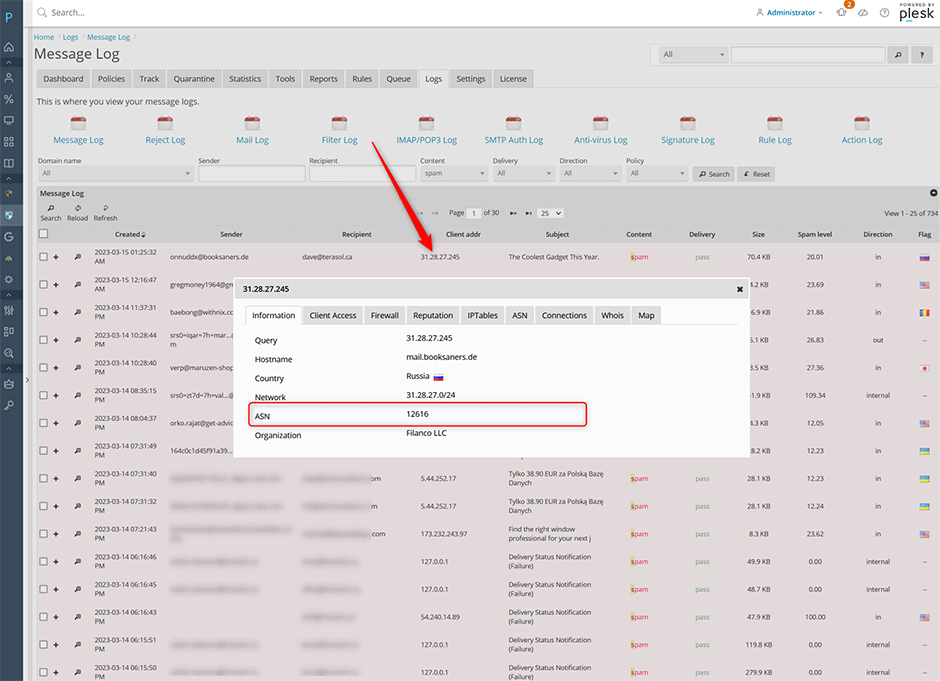
- In the message log, click the client addr field.
- Select Information from the context menu to view ASN details.
Add X-ASN Header to Message Headers
To append ASN information directly to email headers, modify the SpamAssassin and Amavis configuration files.
Step 1: Update SpamAssassin Configuration
Edit /etc/mail/spamassassin/local.cf and locate the ifplugin Mail::SpamAssassin::Plugin::ASN section. Add the appropriate directive based on your version:
For SpamAssassin 3.4.x:
add_header all ASN _ASN_ _ASNCIDR_For SpamAssassin 4.0.x: (Note: The _ASNCIDR_ tag is unavailable when using local MaxMind databases.)
add_header all ASN _ASN_Step 2: Update Amavis Configuration
Edit the appropriate Warden configuration file for your operating system:
- AlmaLinux/CloudLinux/RHEL: /etc/amavisd/warden.conf
- Debian/Ubuntu: /etc/amavis/conf.d/99-warden
Add the following line immediately before the 1; # ensure a defined return statement:
$allowed_added_header_fields{lc('X-Spam-ASN')} = 1;Step 3: Restart Amavis
Apply the changes by restarting the Amavis service:
// AlmaLinux/CloudLinux/RHEL
systemctl restart amavisd

// Debian/Ubuntu
systemctl restart amavis
The X-ASN header will now be appended to all messages processed by Amavis.
Monitor Spam by Organization
Utilize Warden reporting tools to analyze traffic patterns and identify high-volume spam sources:
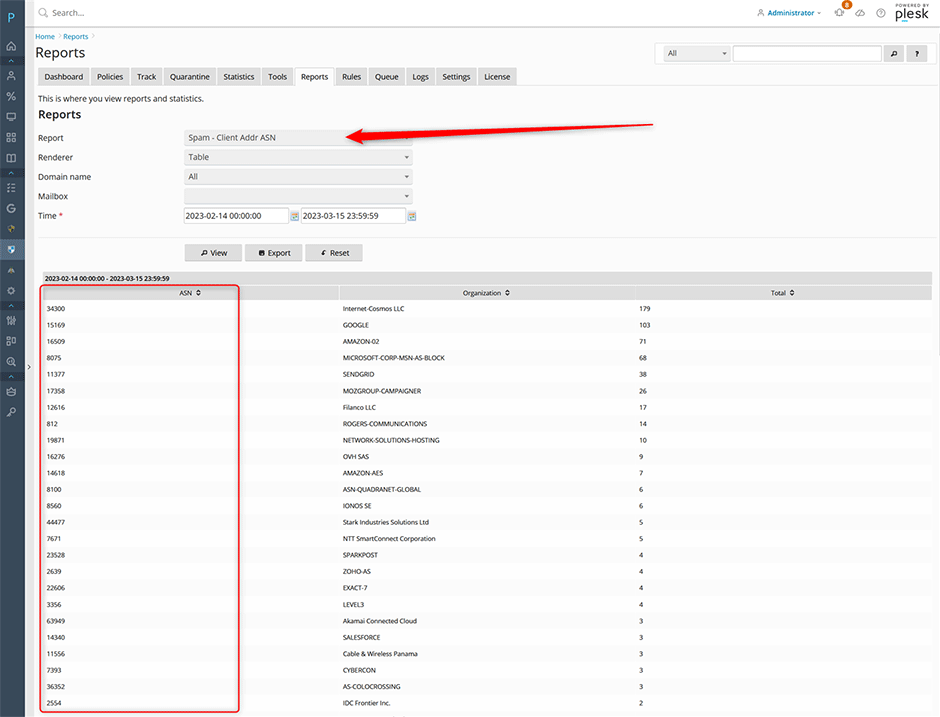
- Navigate to Warden > Reports.
- Select the Spam - Client Addr ASN report to view organizations generating the highest volume of flagged spam.
- Select the Clean - Client Addr ASN report to review traffic classified as legitimate. If specific organizations are delivering unflagged spam, create a custom X-ASN rule to increase their scoring threshold and ensure proper classification.
Troubleshooting
- ASN rules are not matching: Verify that verbose mode is enabled in Amavis and check the message log for the
asn=parameter. Ensure the ASN value exactly matches the entry in the Bad ASNs field. - X-ASN header is missing: Confirm that the
add_headerdirective was placed inside the correct plugin block in /etc/mail/spamassassin/local.cf. Verify that Amavis was restarted after modifying warden.conf or 99-warden. - SpamAssassin 4.0.x lookup failures: Ensure the MaxMind database files are correctly downloaded, updated, and accessible by the Amavis service user.
