
Overview
DNS Blackhole Lists (DNSBLs) provide an efficient method for filtering spam at the connection or content level. Configuring DNSBLs within Postscreen is recommended, as it processes queries in parallel, utilizes caching, and applies weighted scoring similar to SpamAssassin. When Postscreen is active, port 25 handles incoming mail from other servers, while end users must submit outgoing mail via port 587 (TLS) or port 465 (SSL). Enabling Postscreen automatically activates port 587 if it is disabled. Local mail generated via the PHP mail() function or sendmail remains unaffected.
Method 1: Enable DNSBLs via Postscreen (Recommended)
- Navigate to Warden > Settings > Mail Server Settings > Postscreen.
- Select the checkbox labeled Turn on spambot protection based on DNS blackhole lists.
- In the DNSBL sites field, enter the following list:
b.barracudacentral.org, psbl.surriel.com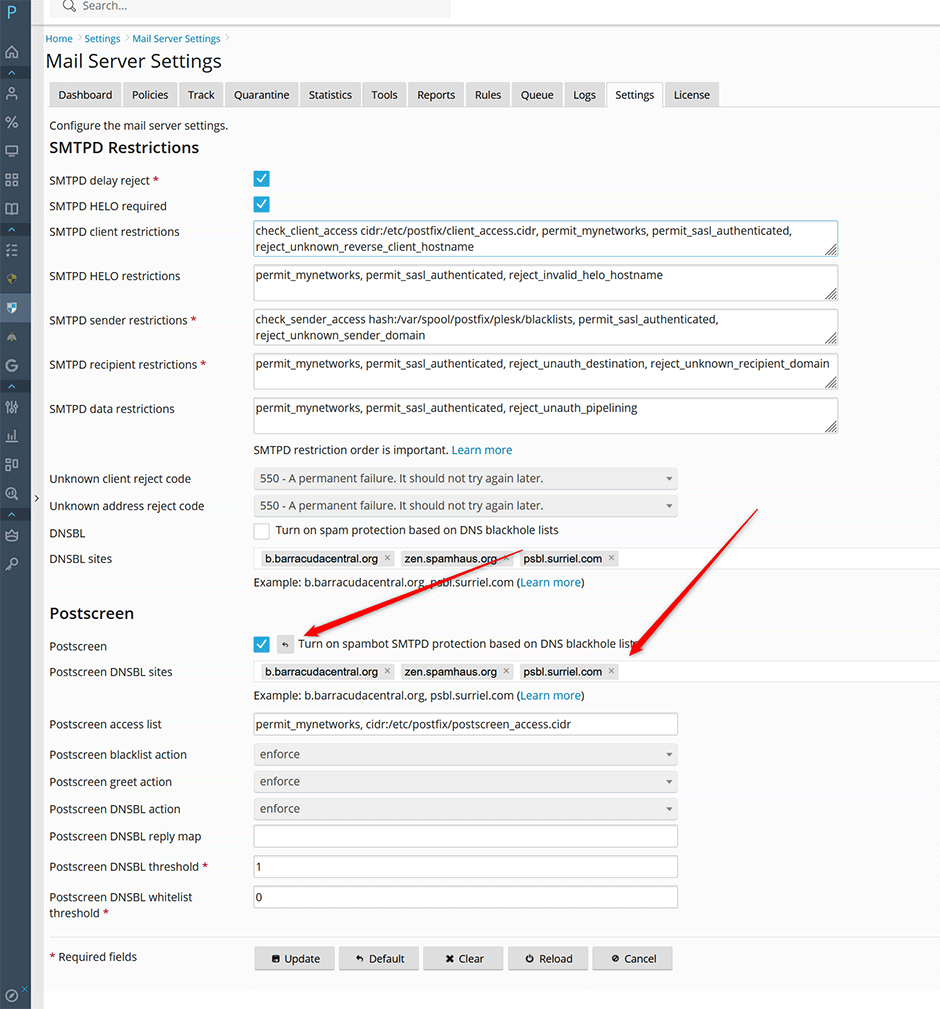
Method 2: Enable DNSBLs via Postfix (Alternative)
- Navigate to Warden > Settings > Mail Server Settings > DNSBLs.
- Select the checkbox labeled Turn on spam protection based on DNS blackhole lists.
- In the DNSBL sites field, enter the following list:
b.barracudacentral.org, psbl.surriel.com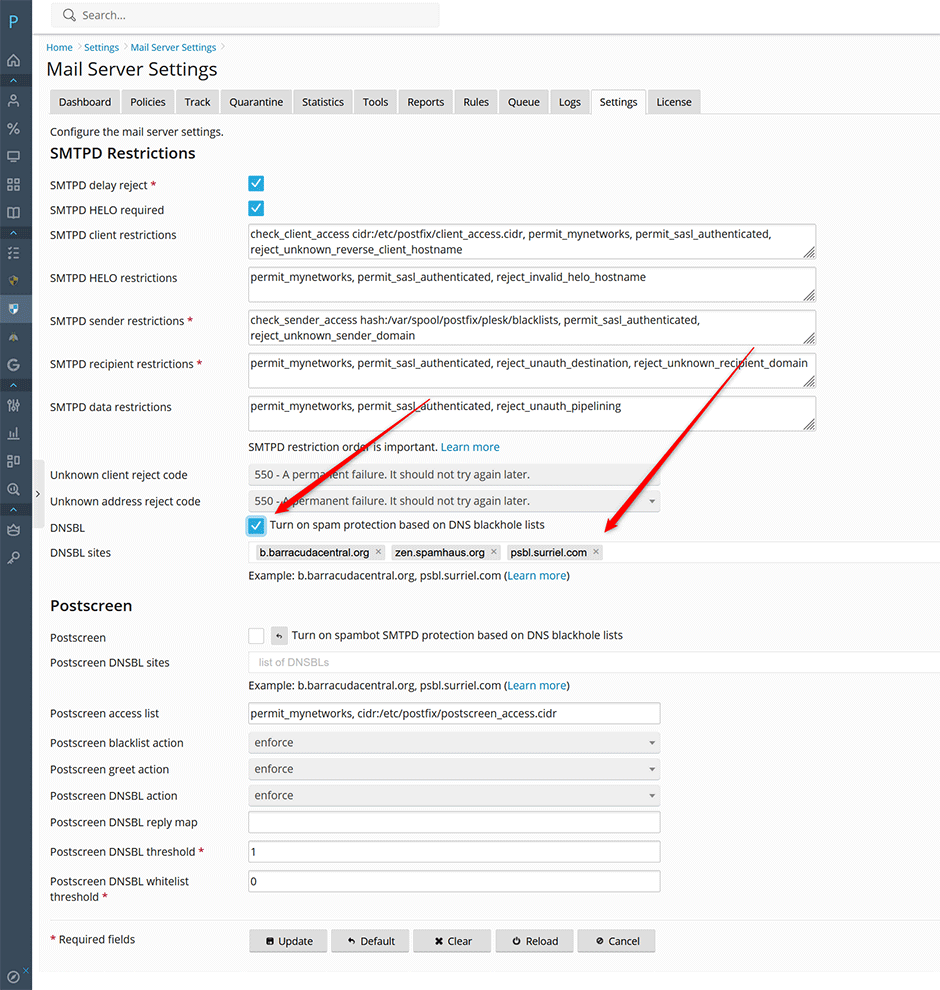
Method 3: Configure via Command Line Interface
Administrators can configure DNSBLs using the Warden CLI. To view available parameters, execute:
warden --task=mailserver:mailserver --helpEnable DNSBLs in Postscreen (Recommended)
warden --task=mailserver:mailserver --postscreen=1 --postscreen_dnsbl_sites='b.barracudacentral.org,psbl.surriel.com' --reload=yesEnable DNSBLs in Postfix (Alternative)
warden --task=mailserver:mailserver --dnsbl=1 --dnsbl_sites='b.barracudacentral.org,psbl.surriel.com' --reload=yesMethod 4: Configure at the Content Filter Level (Advanced)
This method configures DNSBLs directly within Amavis/SpamAssassin. While less efficient than Postscreen or Postfix integration, it allows filtering to respect existing policy whitelists rather than enforcing hard blocks.
- Edit the SpamAssassin configuration file located at /etc/mail/spamassassin/local.cf.
- Add a rule block for each DNSBL. Each line must use a consistent rule name (under 50 characters, no spaces). Example:
header        DNSBL_CUSTOM_1    eval:check_rbl('dnsrbl','dnsrbl.org.')
describe      DNSBL_CUSTOM_1    Entries listed in dnsrbl.org DNSBL
tflags        DNSBL_CUSTOM_1    net
score         DNSBL_CUSTOM_1    3.25
Configuration Parameters:
- DNSBL_CUSTOM_1: Replace with a unique rule name for each list.
- eval:check_rbl or eval:check_rbl_txt: Functions used to perform the lookup. The
_txtvariant retrieves TXT records containing listing details or URLs. - First Argument: Used for sub-query handling. Assign a unique identifier.
- Second Argument: The DNS zone providing the blacklist data. This value must end with a period (
.).
After modifying the configuration, restart the Amavis service:
// AlmaLinux/CloudLinux/RHEL
systemctl restart amavisd

// Debian/Ubuntu
systemctl restart amavis
Troubleshooting & Common Issues
- Public DNS Resolver Conflict: Do not use zen.spamhaus.org if your server relies on public DNS resolvers (e.g., 8.8.8.8, 1.1.1.1). Spamhaus blocks open/public resolvers to prevent abuse and false positives. For resolution steps, refer to the official documentation: Fixing zen.spamhaus.org Open Resolver Errors.
- Submission Port Requirements: When Postscreen is enabled, port 25 is reserved for server-to-server communication. Ensure all mail clients and applications are configured to submit outgoing mail via port 587 (TLS) or port 465 (SSL).
- Configuration Not Applying: Verify that the service was reloaded after CLI changes using the
--reload=yesflag, or manually restart Postfix/Amavis if modifications were made directly to configuration files.
