
Overview
Juggernaut Firewall integrates with CSF/LFD to periodically download and apply IP address and CIDR blocklists from published sources. This feature enhances network security by automatically blocking known malicious IPs.
For comprehensive documentation, refer to the official guide: IP Block Lists Documentation.
Prerequisites
- Administrative access to the Juggernaut Firewall interface.
- For AbuseIPDB integration: A valid API key from AbuseIPDB.
Enabling IP Blocklists
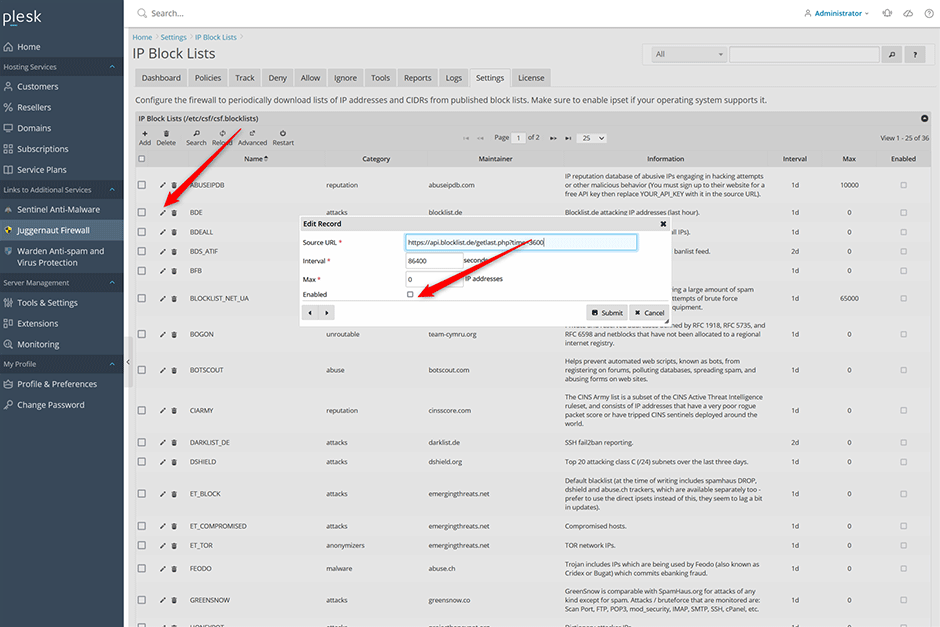
- Navigate to Juggernaut Firewall -> Settings -> Login Failure Daemon -> IP Block Lists.
- Click the edit icon next to the desired blocklist.
- Select the enable checkbox and click Submit.
Note: The following blocklists are recommended for standard deployment: ABUSEIPDB, BDEALL, DSHIELD, INTERSERVER_ALL, SPAMDROP, STOPFORUMSPAM, TOR.
Verifying Downloads and Storage
Monitor the Login Failure Daemon (LFD) download activity via Logs -> LDF log. Successful downloads will display IPSET loading and switching entries:
2022-01-19 01:28:53 PM	5105	IPSET: switching set new_6_ABUSEIPDB to bl_6_ABUSEIPDB
2022-01-19 01:28:53 PM	5105	IPSET: loading set new_6_ABUSEIPDB with 99 entries
2022-01-19 01:28:52 PM	5105	IPSET: switching set new_ABUSEIPDB to bl_ABUSEIPDB
2022-01-19 01:28:52 PM	5105	IPSET: loading set new_ABUSEIPDB with 74140 entries
Blocklist entries are stored in the /var/lib/csf/ directory. CSF automatically optimizes downloaded lists by removing duplicate IP addresses across multiple sources. To verify the entry count for a specific blocklist via command line, execute:
# wc -l /var/lib/csf/csf.block.ABUSEIPDB
74140 /var/lib/csf/csf.block.ABUSEIPDB
Configuring AbuseIPDB Integration
The AbuseIPDB blocklist requires API authentication and specific configuration steps:
- Register for a free account at AbuseIPDB.
- Generate an API key via your account dashboard: API Key Generation.
- In Juggernaut Firewall, navigate to Settings -> Network Tools Settings -> Reputation Settings -> AbuseIPDB API key and input your generated key.
- Select the "Block Reporting" checkbox to automatically report failed trigger blocks back to AbuseIPDB.
- Navigate to Settings -> IP Blocklists, click edit next to ABUSEIPDB, and replace YOUR_API_KEY in the source URL with your actual API key.
- Select the enable checkbox, then click the restart button on the grid to apply changes and restart the Login Failure Daemon.
Source URL Configuration Example:
// Default Source URL
https://api.abuseipdb.com/api/v2/blacklist?plaintext&limit=65000&confidenceMinimum=100&key=YOUR_API_KEY

// Replace YOUR_API_KEY with the API key that you generate
https://api.abuseipdb.com/api/v2/blacklist?plaintext&limit=65000&confidenceMinimum=100&key=db413d60408bd4cba20840285402385sdjfasjdpu09374934gsdfg99de1f
Plan Limitations and Optimization
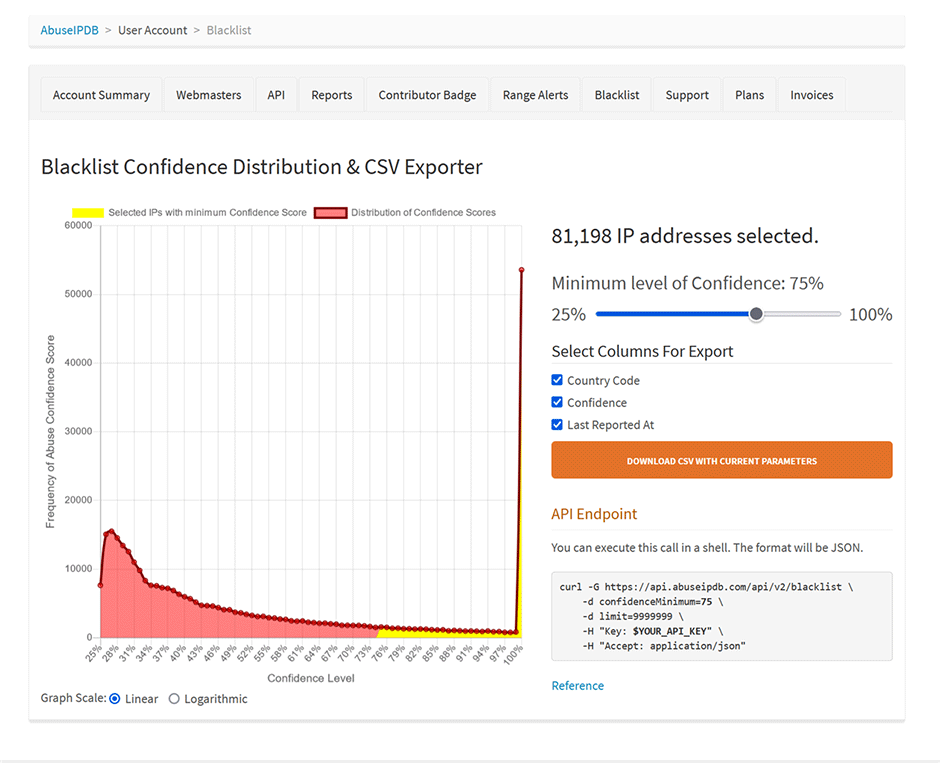
The AbuseIPDB free plan restricts downloads to a maximum of 10,000 IP addresses. Paid plans allow increased limits by adjusting the limit parameter and lowering the confidenceMinimum threshold in the source URL.
Important: Before increasing the blocklist size, update the maximum ipset element capacity to prevent loading errors. Navigate to Juggernaut Firewall -> Settings -> General Settings -> Ipset maxelem and set a value exceeding your intended limit (e.g., 100,000).
// Paid source URL example with limit set to 100,000 IP addresses and a confidenceMinimum set to 75
https://api.abuseipdb.com/api/v2/blacklist?plaintext&limit=100000&confidenceMinimum=75&key=db413d60408bd4cba20840285402385sdjfasjdpu09374934gsdfg99de1f
To evaluate IP address distribution across different confidence thresholds, review the AbuseIPDB blacklist analytics dashboard: Blacklist Confidence Distribution.
Common Issues
- IPSET Loading Errors: If LFD fails to load a large blocklist, verify that the Ipset maxelem value in General Settings exceeds the total number of IPs defined in your source URL's limit parameter.
- Duplicate IP Entries: CSF automatically deduplicates entries across multiple enabled blocklists. The actual stored count may be lower than the sum of individual list sizes, which is expected behavior.
- API Authentication Failures: Ensure the API key entered in Reputation Settings matches the key embedded in the AbuseIPDB source URL. Invalid or expired keys will result in empty downloads.
