Overview
This article provides resolution steps for the following error encountered during firewall restart operations:
IPSET: [ipset v7.5: Error in line 65538: Hash is full, cannot add more elements]This error typically occurs when the configured IP set capacity is exceeded by large blocklists or country-based filtering rules.
Resolution
To resolve this issue, increase the allocated hash size and maximum element limits for ipset. Follow these steps:
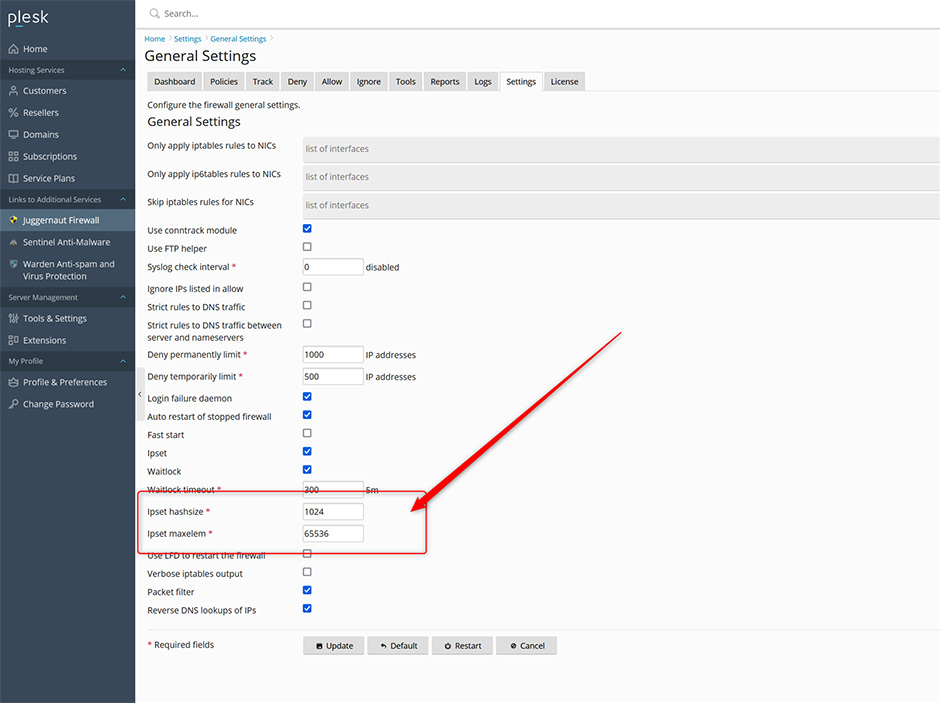
- Navigate to Juggernaut -> Settings -> Firewall -> General Settings.
- Locate the configuration fields for Ipset hashsize and Ipset maxelem. Ipset maxelem can be safely set to a value like: 300000
- Increase both values to accommodate your current blocklist or country filter requirements.
- Save the configuration and restart the firewall service.
Troubleshooting & Alternative Solutions
If increasing the limits does not resolve the error, consider the following alternative approach:
- Reduce Blocklist Size: Temporarily remove or disable recently added blocklists or country filters to verify if they are exceeding system capacity.