
Overview
This article provides instructions for overriding default rule scores within the Warden anti-spam configuration. Adjusting rule scores allows administrators to customize filtering sensitivity and align spam detection with specific organizational requirements.
Prerequisites
- Administrative access to the Warden control panel or CLI environment.
- Familiarity with SpamAssassin scoring mechanisms and target rule names.
Override a Rule Score via the Web Interface
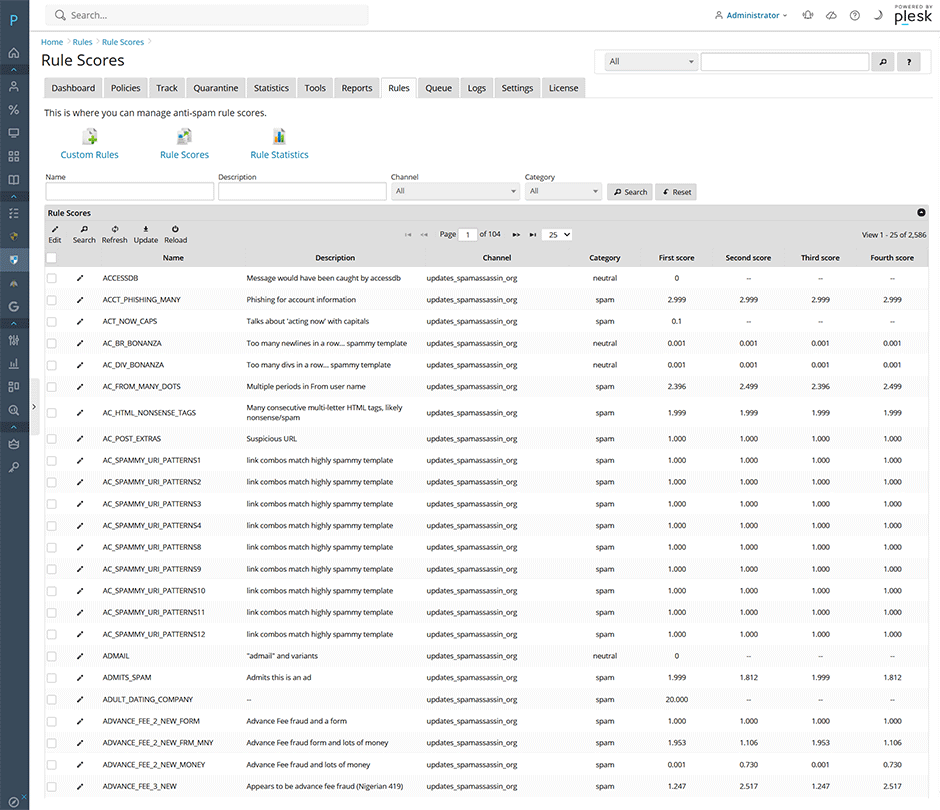
- Navigate to Warden > Rules > Rule Scores.
- Search for the target rule by name and click the edit icon.
- Enter the new score value. Setting a score of 0 will completely disable the rule.
- Click Submit to apply and save the configuration changes.
Understanding Rule Score Configuration
SpamAssassin evaluates up to four distinct score values for each rule. The system automatically selects the appropriate score based on active runtime features during the scan process:
- Single Score Provided: This value is applied universally, regardless of configuration state.
- Four Scores Provided: SpamAssassin dynamically selects the applicable score based on whether Bayesian classification and network tests are active. This enables rule authors to optimize scoring according to available runtime data.
| Score Position | Runtime Condition |
|---|---|
| First Score | Bayesian classifier and network tests are disabled. |
| Second Score | Bayesian classifier is disabled; network tests are enabled. |
| Third Score | Bayesian classifier is enabled; network tests are disabled. |
| Fourth Score | Both Bayesian classifier and network tests are enabled. (Default/Most Common) |
Override a Rule Score via Command Line Interface
For automated or script-based configuration, use the Warden CLI. Refer to the official CLI documentation for complete parameter details.
// Set a custom score for a specific rule
warden --task=antispam:rules:rulescores --oper=score_edit --name='DCC' --score='3.25' --reload=yes

// Disable a specific rule by setting its score to zero
warden --task=antispam:rules:rulescores --oper=score_edit --name='DCC' --score='0' --reload=yes
Troubleshooting & Common Issues
- Changes not applying: Verify that the --reload=yes flag is included in CLI commands, or confirm that Submit was successfully clicked in the web interface.
- Unexpected scoring behavior: Confirm which runtime features (Bayesian classifier, network tests) are active. If only a single score is configured, it will override all conditional logic regardless of feature state.
- Rule remains active after setting to zero: Ensure the correct rule name is specified and that no duplicate or fallback rules are triggering the same detection pattern.
