
Overview
This article provides instructions for resolving a configuration warning that prevents saving settings through the Juggernaut extension interface.
Error Message
RESTRICT_UI option enabled in [/etc/csf/csf.conf]. Config items [...] could not be saved though the user interface.Cause
This warning is triggered when the RESTRICT_UI parameter is configured to limit or disable web-based modifications. This setting is typically managed under **Juggernaut -> Settings -> Initial Settings**. When active, configuration changes cannot be applied through the extension interface and must be handled directly in the system configuration file.
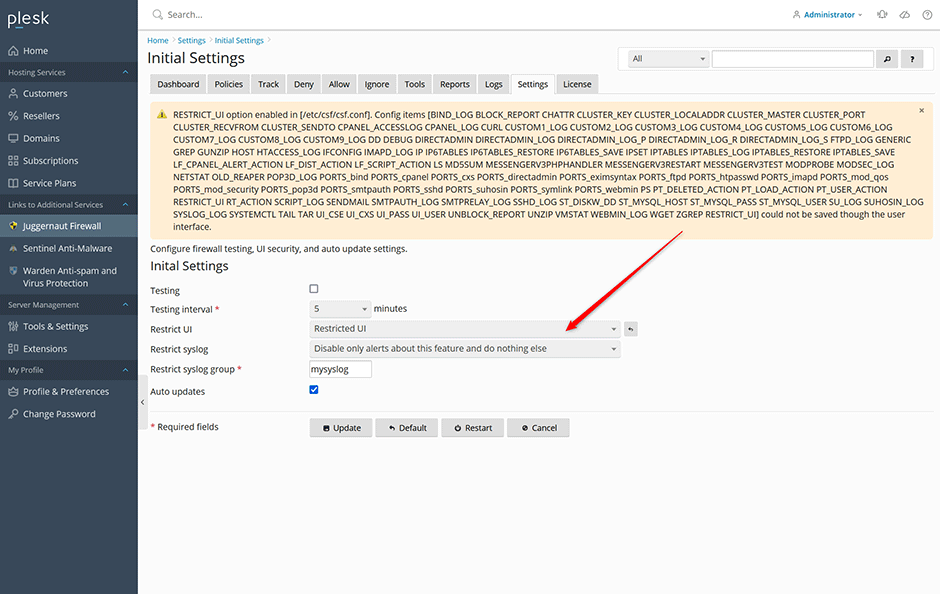
Resolution
To restore full functionality and allow configuration changes through the extension interface, update the RESTRICT_UI parameter in the CSF configuration file.
- Open the configuration file located at /etc/csf/csf.conf using a text editor with appropriate permissions.
- Locate the RESTRICT_UI directive within the file.
- Change the value to "0" to enable unrestricted UI access.
- Save the configuration file and apply the changes.
Configuration Reference
The following values are supported for the RESTRICT_UI parameter:
# 0 = Unrestricted UI
# 1 = Restricted UI
# 2 = Disabled UI
RESTRICT_UI = "0"
Troubleshooting
- If the warning persists after updating the configuration, verify that the file was saved correctly and contains no syntax errors.
