
Overview
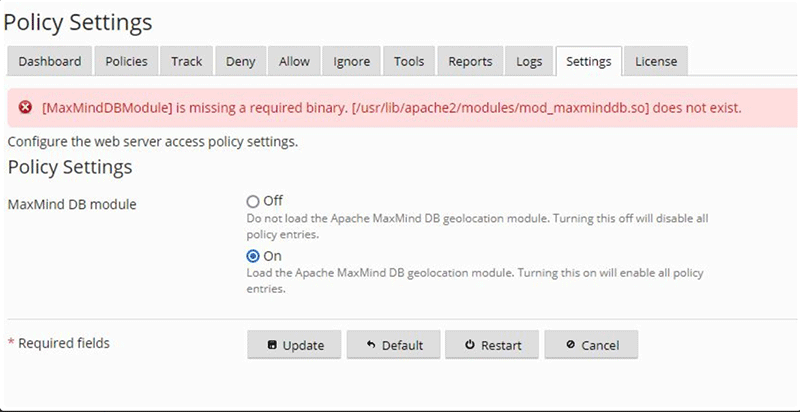
The error message "MaxMindDBModule is missing a required binary" indicates that the mod_maxmind Apache module was not installed correctly from the danami-juggernaut repository. This issue typically arises due to firewall restrictions blocking communication with Danami repository servers or incorrect system time configuration on the host.
Prerequisites
- Root or sudo access to the server.
- ConfigServer Security & Firewall (CSF) installed and active.
- System clock synchronized with a reliable NTP source.
Resolution Steps
Follow the steps below to resolve repository connectivity issues and ensure successful module installation.
Step 1: Verify Firewall Configuration
Confirm that the server firewall is not blocking traffic to repo.danami.com. Execute the following commands to check for blocked IP addresses:
// IPv4
csf --grep 49.12.243.182

// IPv6
csf --grep 2a01:4f8:c012:d181::1
Step 2: Configure Persistent Firewall Rules
To ensure uninterrupted access to the Danami repository servers on ports 80 and 443, append the following entries to the /etc/csf/csf.dyndns configuration file:
tcp|in|s=80|s=repo.danami.com # Juggernaut repository server
tcp|out|d=80|d=repo.danami.com # Juggernaut repository server
tcp|in|s=443|s=repo.danami.com # Juggernaut repository server
tcp|out|d=443|d=repo.danami.com # Juggernaut repository server
tcp|in|s=80|s=repo1.danami.com # Juggernaut repository server
tcp|out|d=80|d=repo1.danami.com # Juggernaut repository server
tcp|in|s=443|s=repo1.danami.com # Juggernaut repository server
tcp|out|d=443|d=repo1.danami.com # Juggernaut repository server
tcp|in|s=80|s=repo2.danami.com # Juggernaut repository server
tcp|out|d=80|d=repo2.danami.com # Juggernaut repository server
tcp|in|s=443|s=repo2.danami.com # Juggernaut repository server
tcp|out|d=443|d=repo2.danami.com # Juggernaut repository server
Step 3: Restart the Firewall Daemon
Apply the updated firewall rules by restarting the Login Failure Daemon (LFD):
systemctl restart lfdOperating System-Specific Installation
If the error persists after configuring the firewall, execute the Juggernaut installer script to identify underlying installation errors. If the script completes without errors, proceed with manual package installation using the instructions below.
AlmaLinux / CloudLinux / RHEL
/usr/local/psa/admin/bin/modules/juggernaut/install.shTo manually install the package from the danami-juggernaut repository:
yum clean all
yum install mod_maxminddb
Debian / Ubuntu
/opt/psa/admin/bin/modules/juggernaut/install.shTo manually install the package from the danami-juggernaut repository:
apt-get clean all
apt-get update
apt-get install libapache2-mod-maxminddb
Troubleshooting & Common Issues
- Incorrect System Time: Verify that the server's date and time are accurate. Significant time discrepancies can cause SSL/TLS handshake failures with repository servers.
- Repository Connectivity: If manual installation fails, verify network connectivity to repo.danami.com, repo1.danami.com, and repo2.danami.com using standard network diagnostic tools.
- Package Cache Issues: Clear the local package manager cache before attempting reinstallation, as demonstrated in the OS-specific commands above.
