
Overview
Juggernaut Firewall enables web server-level geo-filtering by denying or allowing IP addresses based on country, continent, or Autonomous System Number (ASN). This functionality relies on the Apache mod_maxminddb module and MaxMind GeoIP2 databases. The following documentation outlines the configuration process, policy management, testing procedures, and troubleshooting steps.
Prerequisites
- A valid MaxMind license key for GeoLite2 databases.
- Administrative access to Plesk and Juggernaut Firewall.
- Apache configured as the PHP handler (Nginx proxy mode must forward requests to Apache).
Configure MaxMind License & Databases
- Create a free account and obtain a license key at the MaxMind signup page.
- Generate your license key via the license key portal. When prompted regarding geoipupdate, select **No**.
- In Juggernaut Firewall, navigate to Settings > Geolocation Settings. Enter the license key in the MaxMind license key field. Note: Newly created API keys may require up to 15 minutes to propagate.
- Click **Update** to save the key and initiate the download of the MaxMind City and ASN databases.
Enable the Apache MaxMind Module
Note: The MaxMind databases must be fully downloaded before enabling the Apache module.
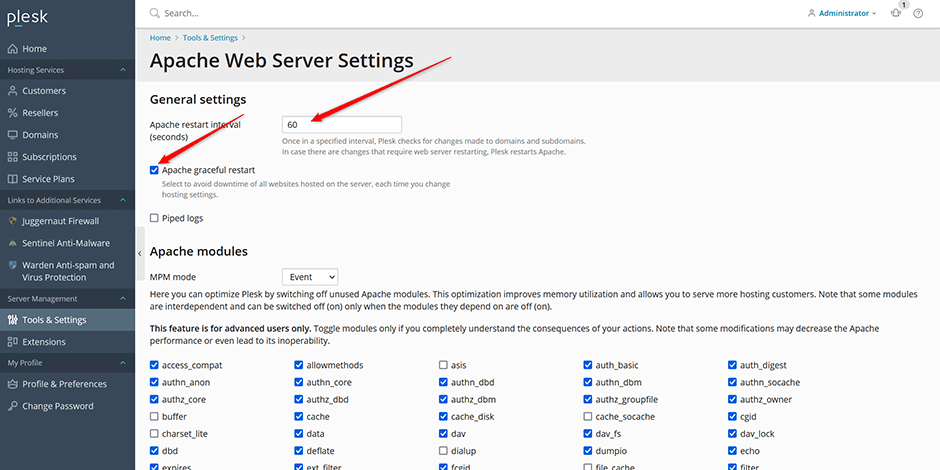
- In Plesk, navigate to Tools & Settings > General Settings > Apache Web Server. Configure the following:
- Apache restart interval: Set to 60 seconds (recommended for high-traffic servers).
- Apache graceful restart: Ensure this is enabled to minimize service disruption during configuration updates.
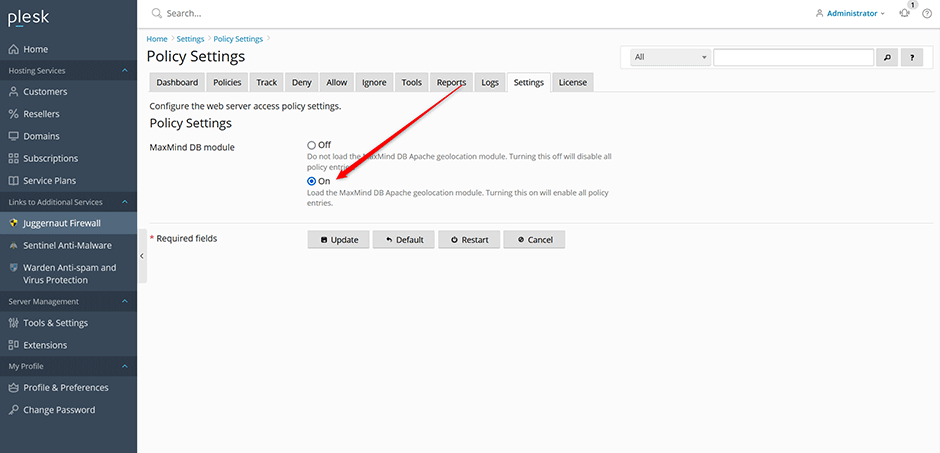
- In Juggernaut Firewall, navigate to Settings > Web Server > Policy Settings. Set the MaxMind DB module option to **On** and click **Update**.
Policy Configuration Guidelines
- Server-Wide vs. Domain-Level: Policies applied to the "server wide" entry affect all domains and cannot be overridden at the domain level.
- Allow Entries: Allow rules are restrictive. Only explicitly permitted countries, continents, or ASNs will receive access; all others are denied by default.
- External Services: Verify that search engine crawlers and third-party APIs required by your applications are not inadvertently blocked.
- Permissions: Policy management is disabled for non-administrators by default. Grant access via Juggernaut Firewall > Settings > Permissions. Ensure Plesk Apache restart settings are properly configured before delegating permissions.
- Webmail Policy: Requires server-wide geo-filtering. Enabling a webmail policy will automatically activate server-wide filtering if disabled.
- PHP Handler Requirement: Domains must use the Apache PHP handler. Nginx proxy mode must forward requests to Apache for geo-filtering to function.
- Authorization Logic: Apache uses the AuthMerging And directive. Access requires satisfying all applicable policies and authentication rules (e.g., .htaccess credentials).
- Conflicting Rules: If a location contains both deny and allow policies, both conditions must be satisfied to grant access.
Create and Manage Geo-Filtering Policies
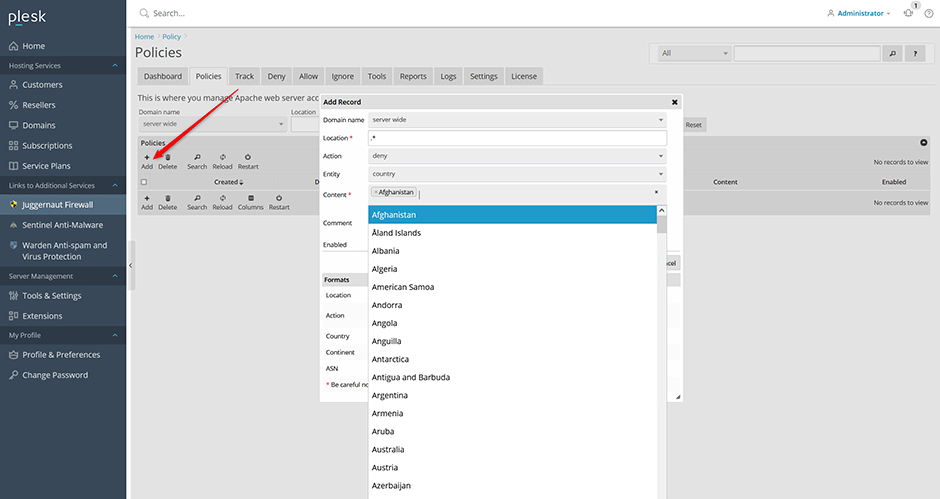
- Navigate to Juggernaut Firewall > Policies. Select a domain to create a new policy. Geo-filtering will automatically enable for the domain upon creating its first entry.
- Configure the Location field using basic regular expressions (internally utilizes Apache's LocationMatch directive):
- .*: Applies to the entire domain.
- /wp-login.php: Restricts access to a specific URI.
- /wp-admin/.*: Restricts access to a directory and its contents.
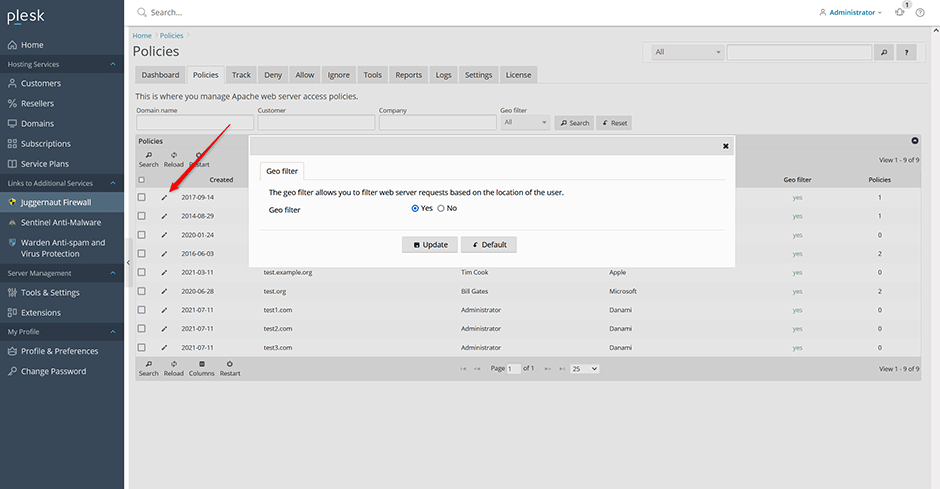
To enable or disable geo-filtering globally or per domain, click the edit icon next to the server-wide entry or specific domain on the Policies page. Options include Yes, No, or Default (inherits server-wide settings). Disabling geo-filtering for a domain deactivates all associated policies. Note that enabling geo-filtering introduces a minor performance overhead due to per-request geolocation queries; enable it only where necessary.
Policy Examples
Allow North America access to WordPress login:
Location: /wp-login.php
Action: allow
Entity: continent
Content: North America
Allow Rogers Communications Network (ASN 812) access to WordPress admin:
Location: /wp-admin/.*
Action: allow
Entity: ASN
Content: 812
Deny China from accessing the entire domain:
Location: .*
Action: deny
Entity: country
Content: China
Test Geo-Filtering Policies
To accurately test policies, configure Apache to recognize forwarded IP addresses using the mod_remoteip module.
AlmaLinux/CloudLinux/RHEL:
- Create the file /etc/httpd/conf.d/remoteip.conf with the following contents:
LoadModule remoteip_module modules/mod_remoteip.so
RemoteIPHeader X-Forwarded-For
Restart Apache:
systemctl restart httpdDebian/Ubuntu:
- Enable the module:
a2enmod remoteipRestart Apache:
systemctl restart apache2Execute Test Command:
Run the following command on the server hosting Juggernaut Firewall. Replace <ipaddress> with an IP from a blocked region and <URL> with the target endpoint.
curl -k -I --header "X-Forwarded-For: <ipaddress>" "<URL>"Example Output (Canada blocked):
curl -k -I --header "X-Forwarded-For: 216.138.192.20" "https://www.example.com/"

HTTP/1.1 403 Forbidden
Server: nginx
Date: Tue, 27 Jul 2021 07:03:02 GMT
Content-Type: text/html
Content-Length: 1020
Connection: keep-alive
Last-Modified: Fri, 29 Aug 2014 13:20:26 GMT
ETag: "3fc-501c48428f649"
Accept-Ranges: bytes
Access Geolocation Data via PHP
Once the Apache module is active and geo-filtering is enabled, MaxMind geolocation data for connecting IPs is available in the $_SERVER array:
ASN_DB_NETWORK => 104.208.0.0/13
MM_ASORG => MICROSOFT-CORP-MSN-AS-BLOCK
MM_ASN => 8075
CITY_DB_NETWORK => 104.215.128.0/17
MM_COUNTRY_NAME => Singapore
MM_CONTINENT_NAME_EN => Asia
MM_COUNTRY_CODE => SG
MM_LATITUDE => 1.30360
MM_CONTINENT_CODE => AS
MM_LONGITUDE => 103.85540
MM_CITY_NAME => Singapore
MMDB_INFO => result found
MMDB_ADDR => 104.215.148.63
PHP Lookup Script:
<?php

$maxmind = array(
  'CITY_DB_NETWORK',
  'MM_LATITUDE',
  'MM_CONTINENT_CODE',
  'MM_LONGITUDE',
  'MM_CITY_NAME',
  'MM_COUNTRY_NAME',
  'MM_CONTINENT_NAME_EN',
  'MM_COUNTRY_CODE',
  'ASN_DB_NETWORK',
  'MM_ASN',
  'MM_ASORG',
  'MMDB_INFO',
  'MMDB_ADDR'
);

foreach ($_SERVER as $key => $value)
{
    if (in_array($key, $maxmind))
    {
        echo $key .' => '. $value . PHP_EOL;
    }
}
?>
Save the script as maxmind.php within a domain directory and execute via command line:
curl -k --header "X-Forwarded-For: 104.215.148.63" "https://www.example.com/maxmind.php"Troubleshooting
AlmaLinux/CloudLinux/RHEL
The Apache module package is named mod_maxminddb. To disable the module, edit /etc/httpd/conf.d/maxminddb.conf and comment out the LoadModule directive:
#LoadModule maxminddb_module modules/mod_maxminddb.so

<IfModule maxminddb_module>
  MaxMindDBFile CITY_DB /usr/share/GeoIP/GeoLite2-City.mmdb
  MaxMindDBEnv MM_CONTINENT_CODE CITY_DB/continent/code
  MaxMindDBEnv MM_CONTINENT_NAME_EN CITY_DB/continent/names/en
  MaxMindDBEnv MM_COUNTRY_CODE CITY_DB/country/iso_code
  MaxMindDBEnv MM_COUNTRY_NAME CITY_DB/country/names/en
  MaxMindDBEnv MM_CITY_NAME CITY_DB/city/names/en
  MaxMindDBEnv MM_LONGITUDE CITY_DB/location/longitude
  MaxMindDBEnv MM_LATITUDE CITY_DB/location/latitude
  MaxMindDBNetworkEnv CITY_DB CITY_DB_NETWORK

  MaxMindDBFile ASN_DB /usr/share/GeoIP/GeoLite2-ASN.mmdb
  MaxMindDBEnv MM_ASN ASN_DB/autonomous_system_number
  MaxMindDBEnv MM_ASORG ASN_DB/autonomous_system_organization
  MaxMindDBNetworkEnv ASN_DB ASN_DB_NETWORK
</IfModule>
Restart Apache:
systemctl restart httpdDebian/Ubuntu
The Apache module package is named libapache2-mod-maxminddb. Manage the module using the following commands:
a2enmod maxminddba2dismod maxminddbRestart Apache after making changes:
systemctl restart apache2