
Overview
This guide outlines how to configure distributed attack tracking for individual FTP and SMTP authentication accounts. These settings monitor successful login attempts originating from multiple IP addresses within a defined timeframe. When configured thresholds are exceeded, all associated source IPs are automatically blocked to mitigate credential stuffing, account compromise, and distributed spam campaigns.
Distributed FTP Tracking
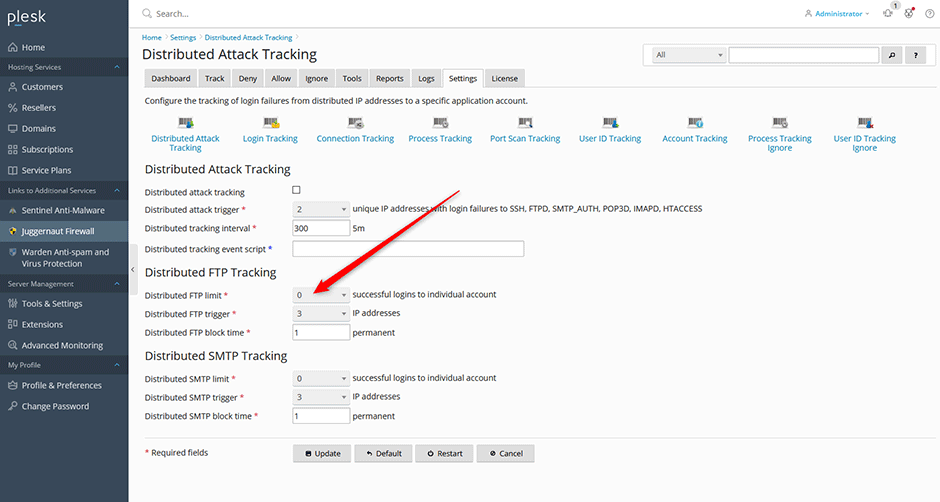
The Distributed FTP tracking feature monitors successful FTP logins for individual accounts. If the number of successful logins reaches or exceeds LF_DISTFTP within the LF_INTERVAL timeframe from at least LF_DISTFTP_UNIQ unique IP addresses, all originating IPs are automatically blocked.
- Navigate to Juggernaut Firewall > Settings > Login Failure Daemon > Tracking Settings > Distributed Attack Tracking.
- Select the Distributed FTP limit checkbox and configure the desired Distributed FTP trigger threshold.
- Click Update to save your configuration changes.
- Click Restart to apply the settings by restarting the firewall and login failure daemon services.
Distributed SMTP Tracking
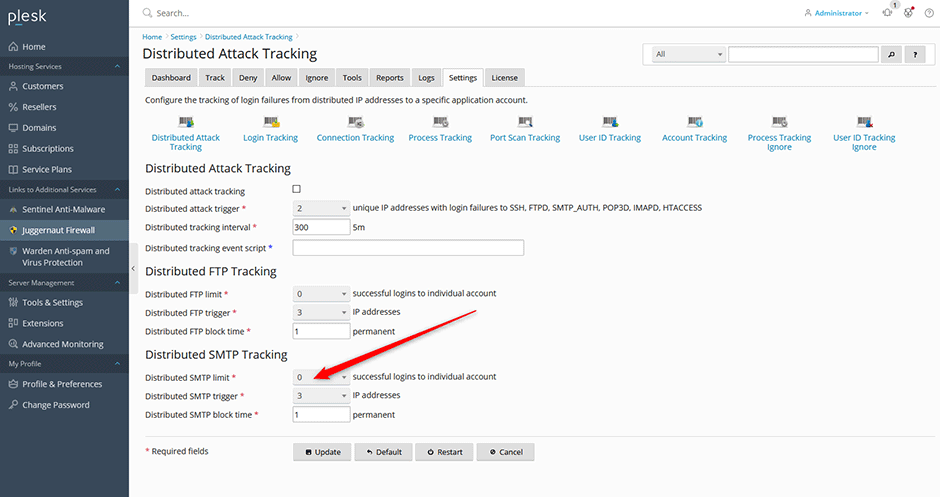
The Distributed SMTP tracking feature monitors successful SMTP logins (Postfix only). If the number of successful logins to an individual account reaches or exceeds LF_DISTSMTP within the LF_DIST_INTERVAL timeframe from at least LF_DISTSMTP_UNIQ unique IP addresses, all originating IPs are automatically blocked. This configuration helps mitigate distributed spam campaigns and compromised SMTP accounts.
- Navigate to Juggernaut Firewall > Settings > Login Failure Daemon > Tracking Settings > Distributed Attack Tracking.
- Select the Distributed SMTP limit checkbox and configure the desired Distributed SMTP trigger threshold.
- Click Update to save your configuration changes.
- Click Restart to apply the settings by restarting the firewall and login failure daemon services.
Troubleshooting & Common Issues
- Third-Party Email Relay Blocking: If your server is configured to relay email for third-party services (e.g., Gmail users routing through your server), their IP addresses may trigger the distributed SMTP threshold and become blocked. Adjust the Distributed SMTP trigger value or whitelist trusted relay IPs if legitimate traffic is being restricted.
- Threshold Calibration: A default trigger value of 5 is recommended for most environments. Increase this value if your users legitimately access accounts from multiple devices, networks, or mobile connections within the monitoring interval.
- Service Restart Required: Configuration changes will not take effect until you click Restart to reload the firewall and login failure daemon services. Failure to restart may result in delayed enforcement of new thresholds.
