
Overview
Distributed Attack Tracking monitors login failures originating from multiple IP addresses targeting a specific application account. When the cumulative number of failed attempts reaches the configured threshold, all participating IP addresses are automatically blocked. This feature supports the following services:
- LF_SSHD
- LF_FTPD
- LF_SMTPAUTH
- LF_POP3D
- LF_IMAPD
- LF_HTACCESS
Configuration Steps
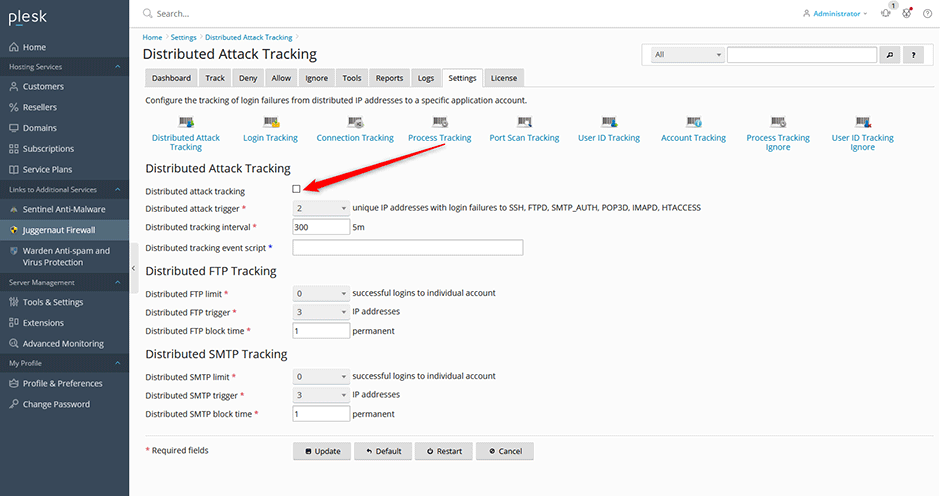
- Navigate to Juggernaut Firewall > Settings > Login Failure Daemon > Tracking Settings > Distributed Attack Tracking.
- Select the Distributed attack tracking checkbox and configure the desired value for Distributed attack trigger.
- Click Update to save your configuration changes.
- Click Restart to apply the settings by restarting the firewall and login failure daemon services.
Troubleshooting
- Verify that the Distributed attack tracking option is enabled and the trigger threshold aligns with your security requirements.
- Confirm that both the firewall and login failure daemon services have been successfully restarted after configuration changes.
- Review authentication logs to ensure failed attempts are being correctly attributed to the targeted account and service.
