
Overview
The error "Modsecurity is not configured. Modsecurity log file not found" typically indicates that the ModSecurity module is either uninstalled or has not been properly initialized for Juggernaut Firewall. Follow the procedures below to install, enable, and configure ModSecurity.
Prerequisites
- Root or administrative access to the server
- A Plesk environment with Juggernaut Firewall installed
Installation and Configuration
Execute the following steps to install ModSecurity and integrate it with your firewall configuration.
Step 1: Install ModSecurity via Command Line
// install modsecurity
plesk installer add --components modsecurity

// re-run the juggernaut installer to configure modsecurity for juggernaut
/usr/local/psa/admin/bin/modules/juggernaut/install.sh
Step 2: Enable ModSecurity in Plesk
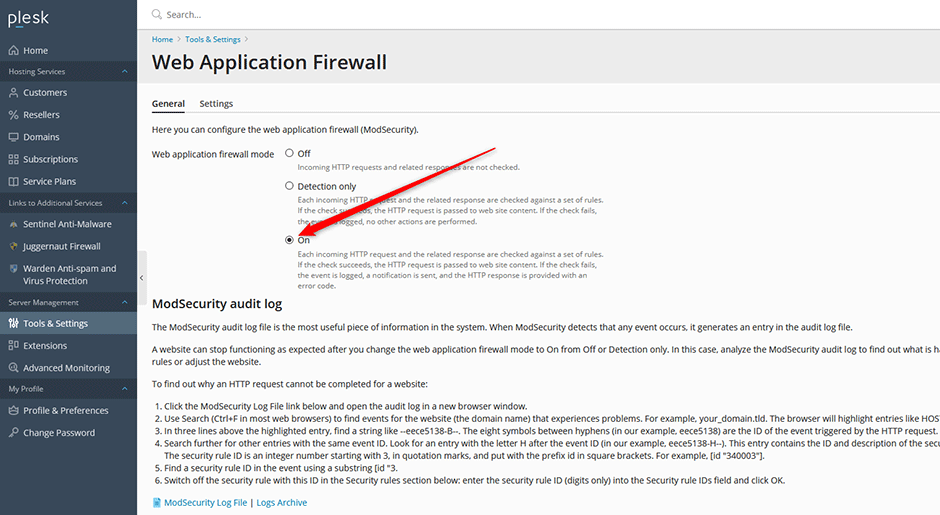
- Navigate to Tools & Settings > Web Application Firewall (ModSecurity).
- Set the Web application firewall mode option to on.
Step 3: Configure Rule Sets and Protection Level
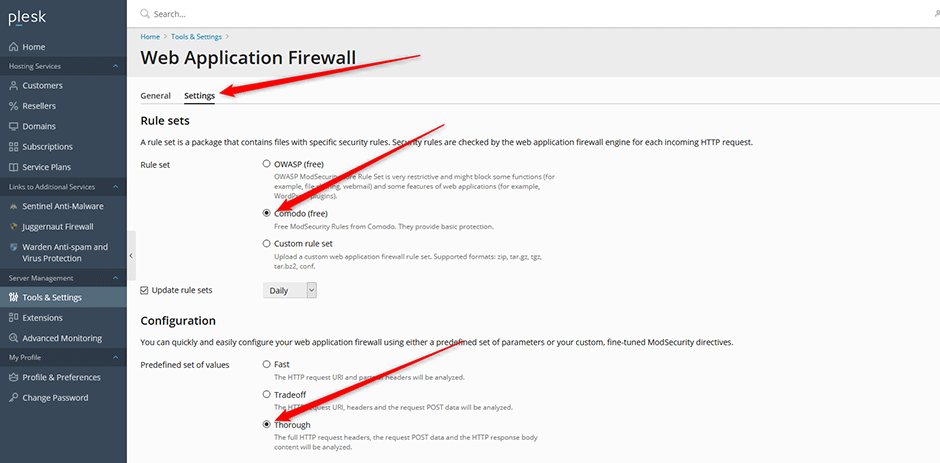
- Select the Web Application Firewall Settings tab.
- Choose a rule set and configuration profile. Select either Tradeoff or Thorough. Note: The Comodo ruleset is recommended for standard deployments, as OWASP rules are highly restrictive and intended for advanced users only.
- Click OK to save the settings.
Troubleshooting
- If the configuration error persists, verify that the Juggernaut installer script completed successfully without interruption.
- Confirm that the ModSecurity log directory exists and has appropriate read/write permissions for the web server process.
- Restart the Apache or Nginx service if changes do not apply immediately after configuration updates.
