
Overview
Juggernaut Firewall relies on specific Linux kernel modules to enforce network traffic rules and maintain system security. Verifying that these modules are loaded and supported by your operating environment is a mandatory step prior to deployment or following major system updates. This article provides two validated methods for confirming kernel module compatibility: using the Juggernaut Extension interface and executing a command-line diagnostic script.
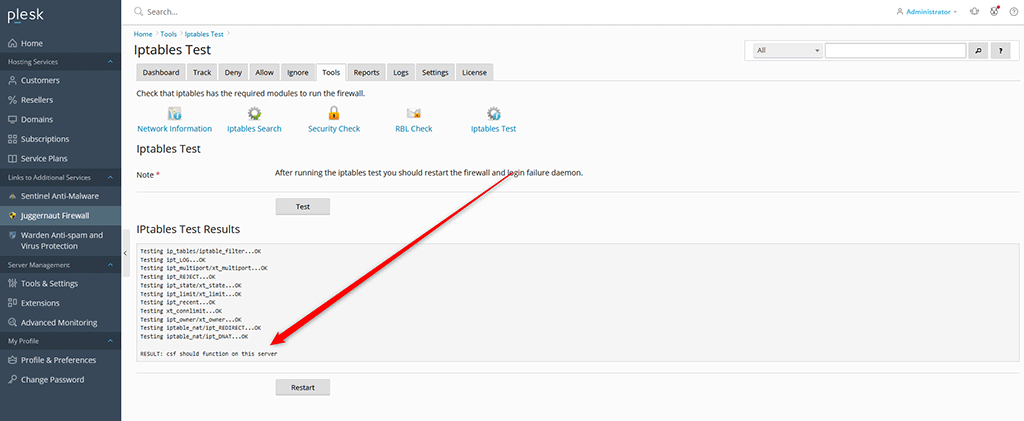
Method 1: Verify via Juggernaut Extension Interface
- Navigate to Juggernaut Firewall.
- Select the Tools tab.
- Click on Iptables Test.
- Press the Test button to initiate the diagnostic check.
Method 2: Verify via Command Line
- Access the server terminal with root or sudo privileges.
- Execute the configuration test script located at /etc/csf/csftest.pl.
# /etc/csf/csftest.pl
Testing ip_tables/iptable_filter...OK
Testing ipt_LOG...OK
Testing ipt_multiport/xt_multiport...OK
Testing ipt_REJECT...OK
Testing ipt_state/xt_state...OK
Testing ipt_limit/xt_limit...OK
Testing ipt_recent...OK
Testing xt_connlimit...OK
Testing ipt_owner/xt_owner...OK
Testing iptable_nat/ipt_REDIRECT...OK
Testing iptable_nat/ipt_DNAT...OK

RESULT: csf should function on this server
A successful execution will display a series of module tests followed by the confirmation message: RESULT: csf should function on this server. If any modules return a failure status, consult your operating system documentation to load or compile the missing kernel modules.
Troubleshooting & Common Issues
- Missing Kernel Modules: If the diagnostic reports failures, verify that your OS kernel includes netfilter/iptables support. On cloud or virtualized environments, ensure the provider's custom kernel has not disabled required modules.
- Permission Denied Errors: The test script requires elevated privileges. Ensure you are executing the command as root or prefix it with
sudo.
