
Overview
Juggernaut Firewall enables administrators to restrict inbound network traffic based on geographic location by blocking IP ranges associated with specific countries. This functionality relies on CIDR blocks generated from the MaxMind GeoLite2 Country database.
Prerequisites
- A valid free MaxMind license key is required to access the GeoIP database.
- If IPv6 is enabled on your server, ensure IPv6 address lookups are configured to block corresponding networks.
- Note: The Linux kernel must support and have the ipset module loaded when blocking a large number of countries. Failure to do so may result in configuration errors or performance degradation.
Deny Countries to All Ports
To block all inbound traffic from selected countries across every port, follow these steps:
- Navigate to Juggernaut Firewall > Settings > Login Failure Daemon > Country Settings.
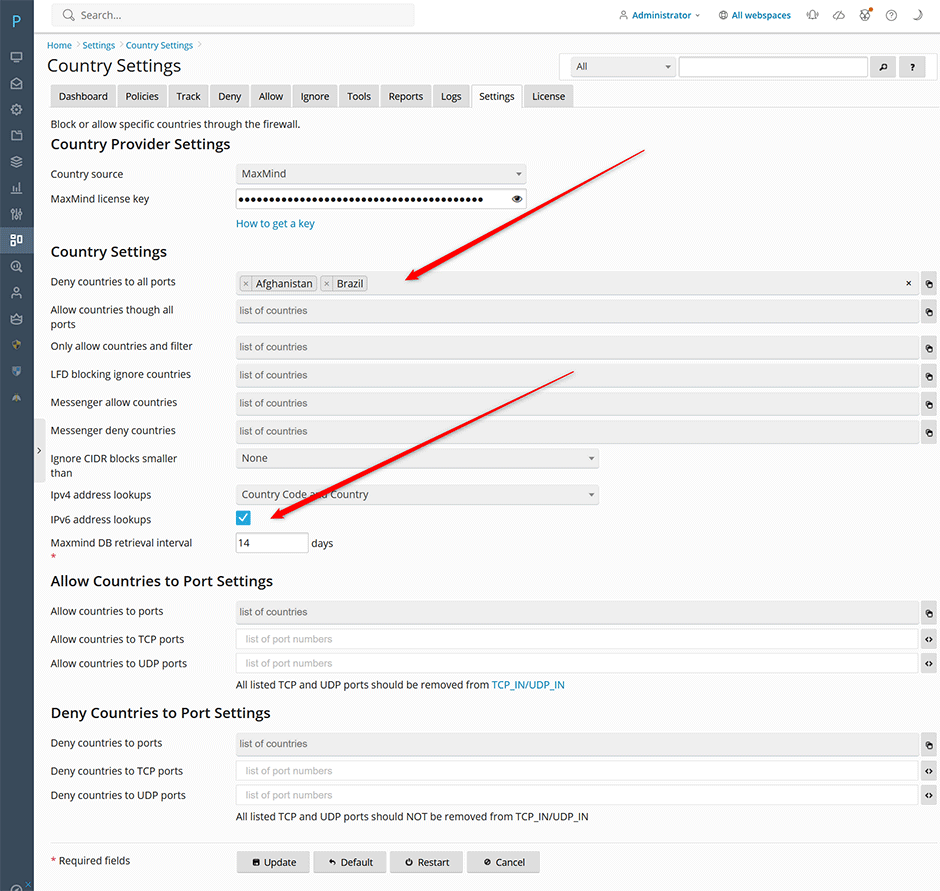
- Select the countries you wish to block and add them to the Deny countries to all ports list.
- If IPv6 is enabled on your server, check the IPv6 address lookups option to include IPv6 network ranges in the blocklist.
- Click Update to save the configuration changes.
- Click Restart to apply the new rules and restart both the firewall and login failure daemon services.
Deny Countries to Specific Ports
To restrict access from specific countries only on designated ports, configure the following settings:
- Navigate to Juggernaut Firewall > Settings > Login Failure Daemon > Country Settings.
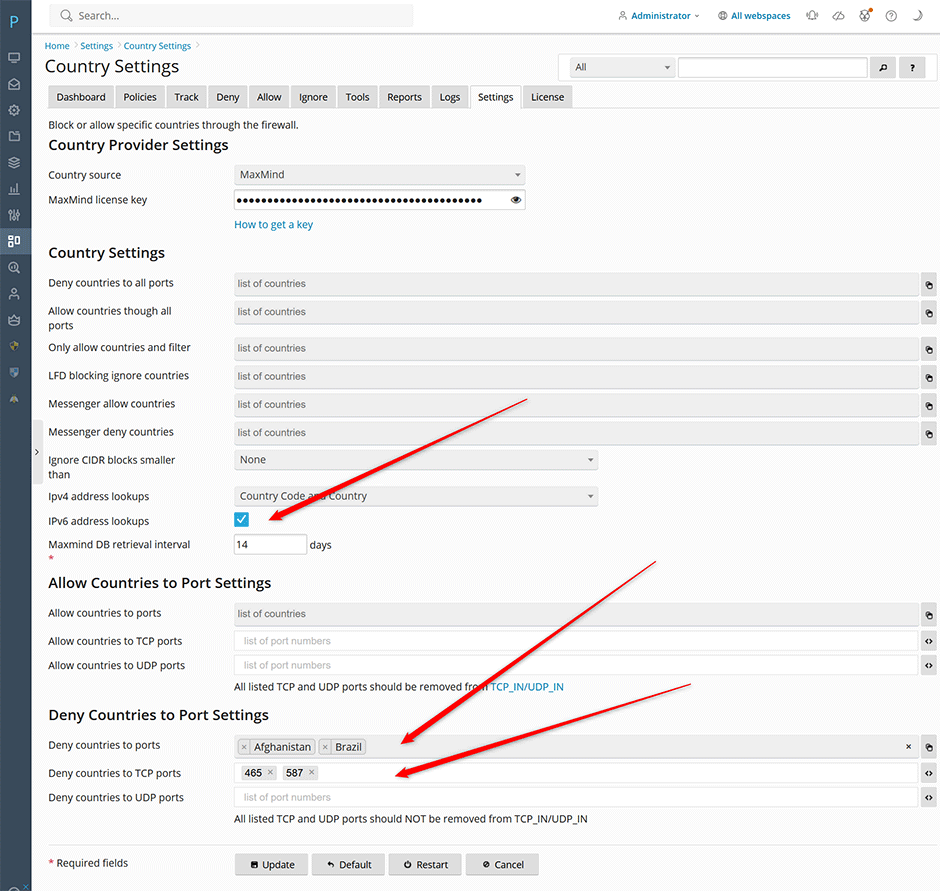
- If IPv6 is enabled on your server, check the IPv6 address lookups option to include IPv6 network ranges in the blocklist.
- Select the countries you wish to restrict and add them to the Deny countries to ports list.
- Specify the target ports by entering them into the Deny countries to TCP ports and Deny countries to UDP ports fields. These values correspond to the CC_DENY_PORTS_TCP and CC_DENY_PORTS_UDP configuration variables.
- Click Update to save the configuration changes.
- Click Restart to apply the new rules and restart both the firewall and login failure daemon services.
Troubleshooting and Common Issues
- MaxMind License Key Validation: Ensure your MaxMind license key is correctly entered in the Juggernaut Firewall configuration. An invalid, expired, or unverified key will prevent CIDR block generation.
- Kernel IPset Support: If you encounter errors when applying rules for multiple countries, verify that the ipset kernel module is loaded. You can check this by running the following command in your terminal:
lsmod | grep ipset - IPv6 Connectivity Issues: If IPv6 lookups are enabled but traffic is not being blocked as expected, confirm that your server's network interface and firewall rules properly support IPv6 routing and packet filtering.
