
Overview
This article outlines the procedure for enabling PHP mail logging to track the origin of outbound scripts. By configuring the mail.add_x_header directive, the server will append an X-PHP-Originating-Script header to outgoing emails. This header contains the user ID (UID) and script filename responsible for generating the message, facilitating accurate auditing and troubleshooting.
Prerequisites
- Root or sudo access to the server
- Knowledge of installed PHP versions and their corresponding configuration paths
- Access to the mail message log interface and Warden queue dashboard
Enable Mail Header Logging
Follow these steps to activate header logging across all active PHP configurations:
- Update the base PHP configuration file (if standard OS packages are installed):
// turn on for the OS default php version if you have the base PHP packages installed sed -i -e "s/^mail.add_x_header = Off/mail.add_x_header = On/" /etc/php.ini - Update all Plesk-managed PHP versions:
// turn on for all of the Plesk PHP versions sed -i -e "s/^mail.add_x_header = Off/mail.add_x_header = On/" /opt/plesk/php/*/etc/php.ini - Restart PHP-FPM services to apply the configuration changes:
// restart any PHP FPM instances
systemctl restart plesk-php73-fpm
systemctl restart plesk-php74-fpm
systemctl restart plesk-php80-fpm
Verify Header in Message Logs
After applying the configuration, outbound messages generated by PHP will include the X-PHP-Originating-Script header. To view this information:
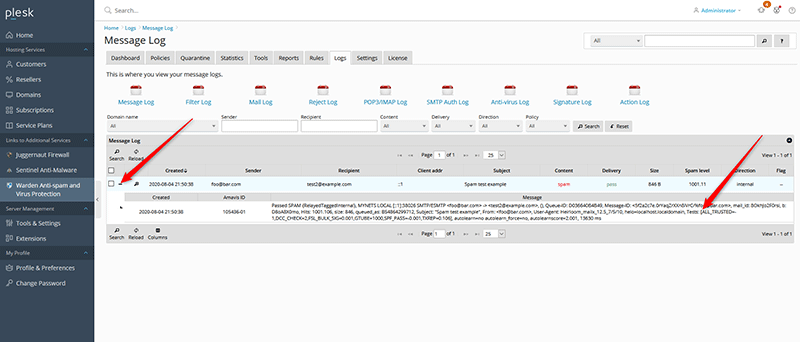
- Navigate to the message log interface.
- Select a relevant message entry and click the plus icon to expand details.
- Locate the X-PHP-Originating-Script header, which displays the UID of the executing user and the script filename.
Identify User and Script Location
The header follows the format: X-PHP-Originating-Script: [UID]:[script_name]. For example:
X-PHP-Originating-Script: 10000:class.phpmailer.phpTo resolve the UID to a system account and locate the script directory, perform the following steps:
- Resolve the User Account: Query the system password file using the logged UID.
grep UID /etc/passwd - Locate the Script File: Search the corresponding vhost directory for the script name. Replace the path and filename with your specific values.
find /var/www/vhosts/example.com/httpdocs -type f -name "class.phpmailer.php"
View Header Information in the Warden Queue
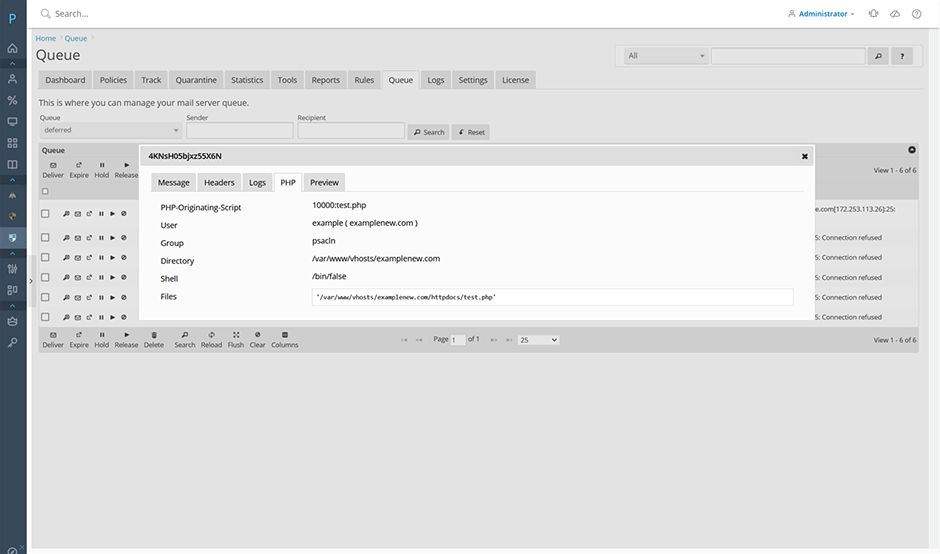
The Warden queue interface automatically parses the X-PHP-Originating-Script header when available. When viewing a queued message, navigate to the **PHP** tab. The system will resolve the local user information and scan the associated vhost directory for matching script files.
Troubleshooting
- Header not appearing in logs: Verify that the correct php.ini file was modified and confirm that all relevant PHP-FPM services were successfully restarted.
- UID resolution fails: Ensure the UID matches an active system user by checking /etc/passwd. Mismatches may indicate a deleted account or misconfigured virtual host permissions.
- Script file not found: Confirm that the search path corresponds to the correct vhost directory. Adjust the base path in the
findcommand if your hosting structure differs from the default layout.
