
How can I enable automatic quarantine using Sentinal Anti-malware?

Overview

Sentinel Anti-malware provides an automatic quarantine feature that isolates detected viruses and malware immediately upon identification. This guide outlines the steps to enable automated threat isolation within your environment.

Prerequisites

  • Administrative access to the Sentinel Anti-malware control panel.
  • Note: Before enabling automatic quarantine, it is strongly recommended to perform a full scan of all domains with quarantine disabled. This allows you to identify and resolve any potential false positives before automated isolation is active.

Procedure: Enabling Automatic Quarantine

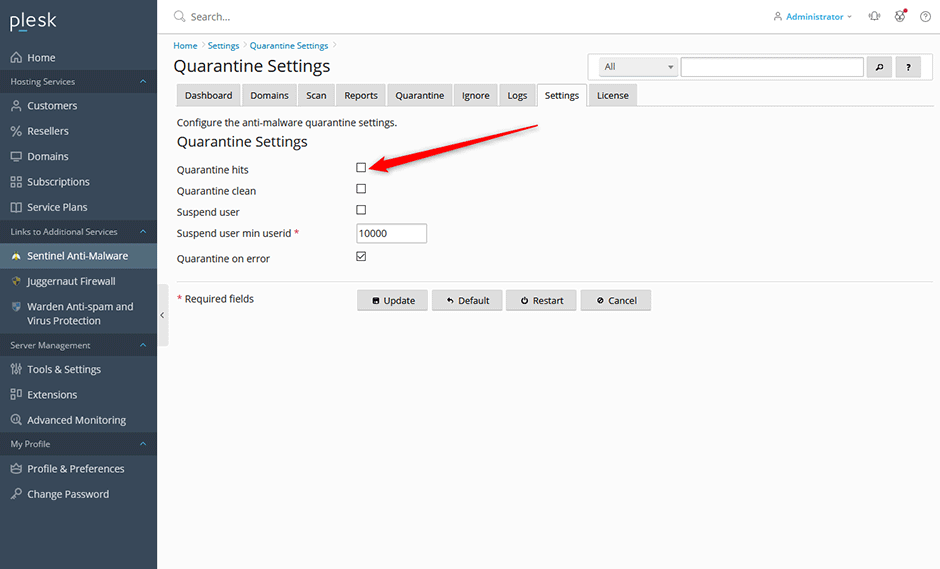
  1. Navigate to Sentinel Anti-malware -> Settings -> Quarantine Settings.
  2. Select the Quarantine hits checkbox.
  3. Click Update to save your configuration changes.
  4. Click Restart to reload the real-time monitoring service with the new settings.
  • quarantine
  • 0 Users Found This Useful
Was this answer helpful?

Related Articles

How can I install or upgrade the extension?

We provide free installation and configuration for all our paid licenses. Open a support ticket...

How can I change the interface language of the extension?

Overview This article provides instructions on how to change the interface language within the...

How can I get detailed help about a specific setting?

Overview This article outlines how to access contextual assistance and detailed configuration...

How can I monitor ClamAV daemon memory and CPU usage from the command line?

Overview The clamdtop utility provides real-time monitoring of the ClamAV daemon's memory and...

How can I optimize MySQL/MariaDB using the Plesk Performance Booster tool?

Overview The Performance Booster utility enables administrators to optimize MariaDB...
