
Overview
The ClamAV anti-virus signature service may halt if the server is running an unsupported or end-of-life (EOL) version of ClamAV. As of September 14, 2025, ClamAV discontinued signature updates for version 0.103.x. Servers attempting to download signatures with this version will be blocked by the ClamAV Content Delivery Network (CDN).
Reference: ClamAV End-of-Life Policy Change
Symptoms
Navigate to Warden > Logs > Signature logs in the control panel. The following error messages indicate that the signature service has stopped due to an outdated installation or CDN block:
- You are running an out of date version of ClamAV / FreshClam
- WARNING: Your ClamAV installation is OUTDATED!
The signature log will display output similar to the following:
Tue Oct 14 12:01:46 2025 -> freshclam daemon 0.103.12 (OS: linux-gnu, ARCH: x86_64, CPU: x86_64)
Tue Oct 14 12:01:46 2025 -> ClamAV update process started at Tue Oct 14 12:01:46 2025
Tue Oct 14 12:01:47 2025 -> WARNING: Your ClamAV installation is OUTDATED!
Tue Oct 14 12:01:47 2025 -> WARNING: Local version: 0.103.12 Recommended version: 1.0.9
Tue Oct 14 12:01:47 2025 -> DON'T PANIC! Read https://docs.clamav.net/manual/Installing.html
Tue Oct 14 12:01:47 2025 -> WARNING: FreshClam previously received error code 429 or 403 from the ClamAV Content Delivery Network (CDN).
Tue Oct 14 12:01:47 2025 -> This means that you have been rate limited or blocked by the CDN.
Tue Oct 14 12:01:47 2025 ->  1. Verify that you're running a supported ClamAV version.
Tue Oct 14 12:01:47 2025 ->     See https://docs.clamav.net/faq/faq-eol.html for details.
Tue Oct 14 12:01:47 2025 ->  2. Run FreshClam no more than once an hour to check for updates.
Tue Oct 14 12:01:47 2025 ->     FreshClam should check DNS first to see if an update is needed.
Tue Oct 14 12:01:47 2025 ->  3. If you have more than 10 hosts on your network attempting to download,
Tue Oct 14 12:01:47 2025 ->     it is recommended that you set up a private mirror on your network using
Tue Oct 14 12:01:47 2025 ->     cvdupdate (https://pypi.org/project/cvdupdate/) to save bandwidth on the
Tue Oct 14 12:01:47 2025 ->     CDN and your own network.
Tue Oct 14 12:01:47 2025 ->  4. Please do not open a ticket asking for an exemption from the rate limit,
Tue Oct 14 12:01:47 2025 ->     it will not be granted.
Tue Oct 14 12:01:47 2025 -> WARNING: You are still on cool-down until after: 2025-10-14 21:01:27WARNING: Your ClamAV installation is OUTDATED!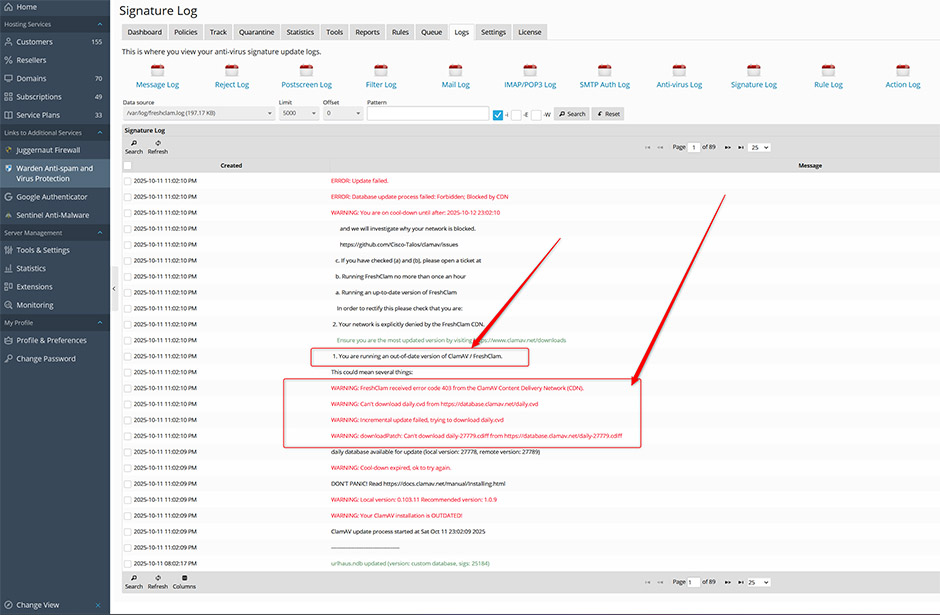
Resolution
Select the procedure that corresponds to your operating system.
Ubuntu 22.04
Major ClamAV upgrades may not apply automatically via standard package updates. Execute the following command to manually upgrade ClamAV to a supported version:
apt install clamav clamav-freshclam clamav-docs clamav-daemon clamav-base clamdscanEnd-of-Life Operating Systems
The following operating systems have reached end-of-life status. ClamAV no longer provides signature updates for these environments:
- CentOS 7.x
- CloudLinux 7.x
- Red Hat Enterprise Linux 7.x
- Debian 10.x
- Ubuntu 20.04
To restore signature updates, upgrade or migrate the server to a supported operating system version using one of the following methods:
- CentOS 7.x / CloudLinux 7.x: Perform an in-place upgrade to AlmaLinux 8. Refer to: In-Place Upgrade to AlmaLinux 8.
- Debian 10.x / Ubuntu 20.04: Perform a distribution upgrade to the latest supported release. Refer to: Distribution Upgrade Procedure.
- All Other EOL Systems: Migrate hosted services to a new server running a supported OS using the Plesk Migrator. Refer to: Plesk Migration and Transfer Guide.
Post-Upgrade Configuration
Servers upgraded from CentOS 7 to AlmaLinux or CloudLinux 8 require additional configuration steps for Warden. Complete the required post-upgrade tasks documented here: Warden Post-Upgrade Tasks.
Troubleshooting & Common Issues
- CDN Rate Limiting (HTTP 429/403): This error occurs exclusively when running unsupported ClamAV versions. Upgrading to a supported version resolves the block automatically.
- Persistent Cooldown Messages: The CDN enforces a temporary cooldown period after repeated failed update attempts. Allow 24 hours for the cooldown to expire, or restart the freshclam service immediately after upgrading ClamAV.
- Update Frequency: Configure FreshClam to check for updates no more than once per hour. The daemon automatically verifies DNS records before initiating downloads.
