
How can I remove the amavisd-milter from the Postfix config for debugging purposes without having to uninstall Warden?

Overview

This procedure temporarily disables the amavisd-milter within the Postfix configuration without requiring a Warden uninstallation. Disabling this milter prevents mail from being processed by Amavis, which is recommended when troubleshooting mail delivery issues to isolate whether Warden or Amavis is contributing to the problem.

Procedure

  1. Navigate to Warden > Settings > Content Filter Settings > Milter Settings.
  2. Clear the checkboxes for SMTP milter and Non-SMTP milter.
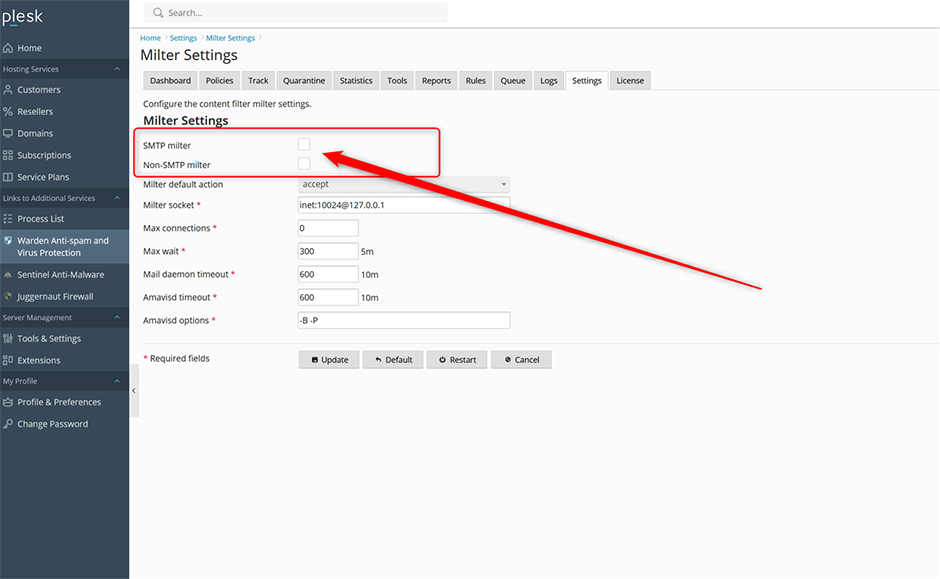
Milter Settings

Post-Debugging Requirements

Note: After completing your debugging process, you must re-enable the milters to restore normal mail filtering. Return to Warden > Settings > Content Filter Settings > Milter Settings and select both the SMTP milter and Non-SMTP milter checkboxes.

  • debugging, amavisd-milter
  • 0 Bu dökümanı faydalı bulan kullanıcılar:
Bu cevap yeterince yardımcı oldu mu?

İlgili diğer dökümanlar

How can I fix the error: Host '127.0.0.1' is not allowed to connect to this MariaDB server?

Overview This article provides resolution steps for the MariaDB connection error Host...

How can I fix the error: Parse error at /etc/clamav/clamd.conf Unknown option ScanImage?

Overview The clamav-daemon.service may fail to start due to unrecognized configuration...

How can I fix the error: The domain limit of this license key has been reached?

Overview The Admin and Pro editions of Danami products enforce a maximum domain limit within the...

After upgrading from Centos 7 to AlmaLinux 8 Amavis is treating mail with low scores as spam. How can I fix this?

Overview Following an upgrade from CentOS 7 to AlmaLinux 8, Amavis may incorrectly classify...