
Overview
This article provides instructions for configuring Juggernaut Firewall to automatically block malicious bots that generate excessive CPU load through website scraping. Enabling the apache-useragents trigger allows the system to identify and restrict incoming requests containing known problematic user-agent strings.
Prerequisites
- Administrative access to the Juggernaut Firewall management interface.
- Familiarity with custom trigger configurations within the Login Failure Blocking module.
Configuration Steps
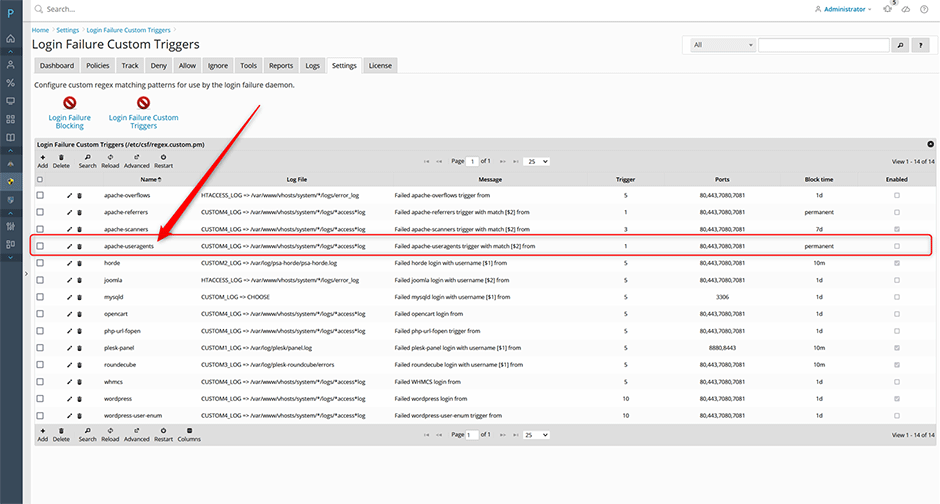
- Navigate to Juggernaut Firewall -> Settings -> Login Failure Blocking -> Login Failure Custom Triggers.
- Locate the apache-useragents trigger and click the edit button.
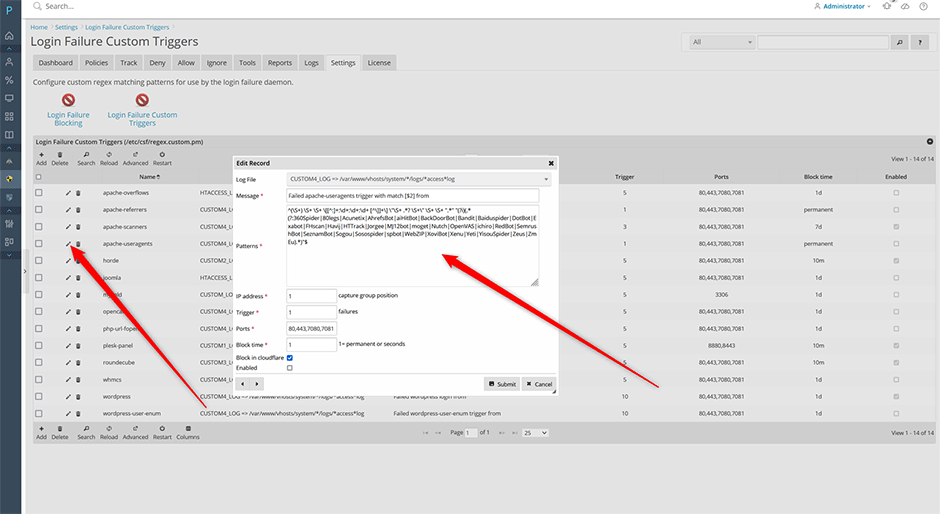
- Select the Enabled checkbox to activate the trigger.
- Click the Submit button to save your settings.
- Click the Restart button to restart the login failure daemon and apply the changes immediately.
Customizing the User-Agent Pattern
The default configuration includes a predefined list of known malicious user-agent strings. Administrators can modify this pattern to align with specific server requirements or emerging bot signatures.
Troubleshooting
- Changes not taking effect: Verify that the login failure daemon was restarted after modifying trigger settings. The service must be restarted for new rules to load into memory.
- Legitimate traffic blocked: Review the custom pattern configuration and adjust string matches or regular expressions to exclude valid user-agent strings used by approved applications, monitoring tools, or search crawlers.
