
Overview
The ModSecurity audit log captures detailed transaction data for security analysis, compliance auditing, and incident response. Administrators can control which transactions are recorded, what specific data is included in each entry, and how long records are retained using dedicated configuration directives within the firewall interface.
Audit Logging Directives
The following directives determine the scope and content of ModSecurity audit logging:
SecAuditEngine
Configures the behavior of the audit logging engine. Available values include:
- On: Logs all transactions by default.
- Off: Disables transaction logging by default.
- RelevantOnly: Logs only transactions that trigger a warning or error, or return an HTTP status code defined as relevant via SecAuditLogRelevantStatus.
SecAuditLogRelevantStatus
Defines which HTTP response status codes are considered relevant for audit logging when the engine is set to RelevantOnly. This parameter accepts a regular expression.
SecAuditLogParts
Specifies which sections of transaction data are included in the log. The default value is ABCFHZ. Available parts include:
- A: Audit log header (mandatory).
- B: Request headers.
- C: Request body (logged only if present and ModSecurity is configured to intercept it).
- D: Reserved for intermediary response headers (not implemented).
- E: Intermediary response body (logged only if ModSecurity intercepts response bodies). Note: This differs from the final response body if ModSecurity modifies the output.
- F: Final response headers (excludes Date and Server headers, which are appended by Apache during content delivery).
- G: Reserved for the actual response body (not implemented).
- H: Audit log trailer.
- I: Replacement for part C. Logs identical data to C, except for multipart/form-data requests, where it logs a sanitized application/x-www-form-urlencoded representation containing parameter names but excluding file contents. Recommended for reducing audit log storage consumption.
- J: Reserved for uploaded file information using multipart/form-data encoding (not implemented).
- Z: Final boundary marker indicating the end of the entry (mandatory).
Configuration Example
To configure ModSecurity to log only 5XX and 4XX status codes while optimizing storage by excluding large file uploads, apply the following custom directives:
- Navigate to Tools & Settings -> Web Application Firewall (ModSecurity) -> Settings.
- In the Custom directives textarea, enter the following configuration:
SecAuditEngine RelevantOnly
SecAuditLogRelevantStatus "^(?:5|4)"
SecAuditLogParts ABIFHZ
SecAuditLogType Concurrent
SecAuditLogStorageDir /var/log/modsecurity/audit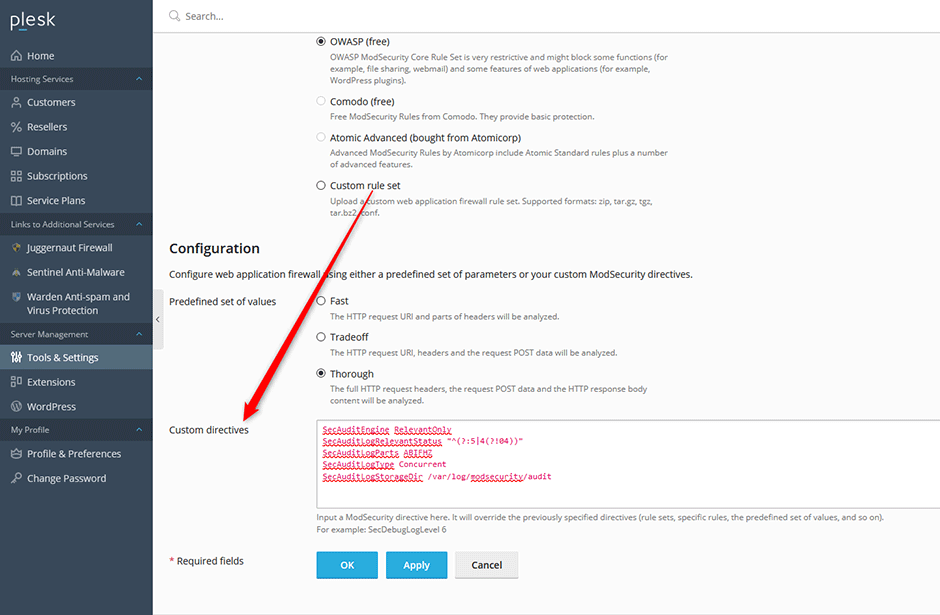
Data Retention Settings
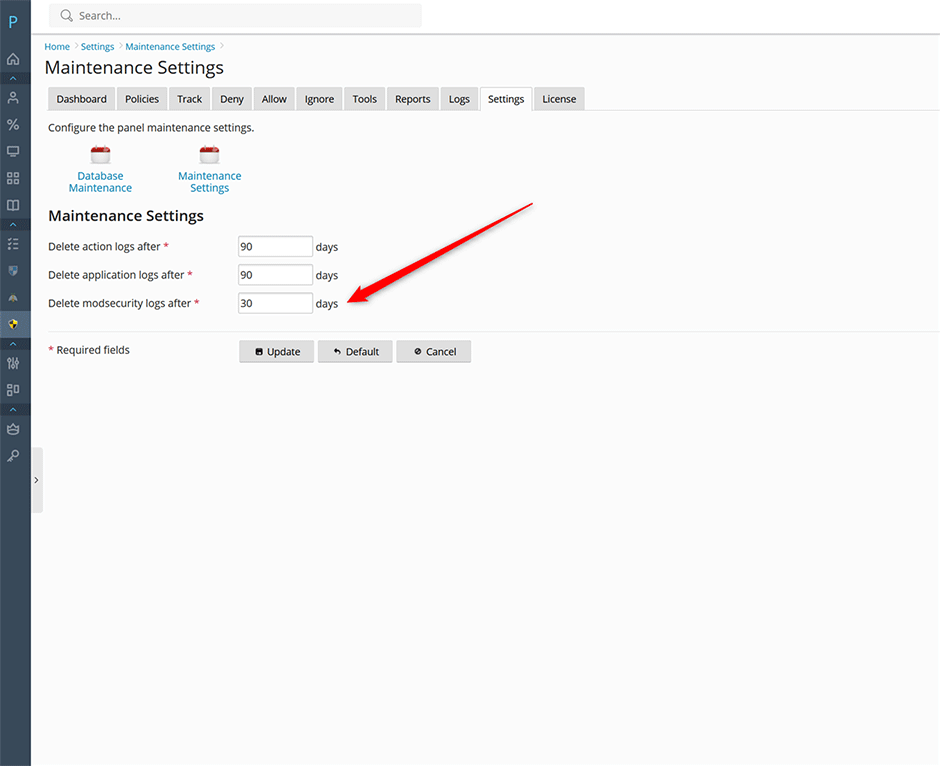
To manage disk space and comply with data retention policies, administrators can configure how long audit log records are stored:
- Navigate to Juggernaut Firewall -> Settings -> Database Maintenance.
- Select the Maintenance Settings tab.
- Locate the Delete modsecurity logs after field and specify the desired retention period in days.
Troubleshooting & Common Issues
- Empty Audit Logs: Verify that SecAuditEngine is set to On or RelevantOnly. If using RelevantOnly, confirm that the regular expression in SecAuditLogRelevantStatus correctly matches the expected HTTP status codes.
- Excessive Log Volume: Replace part C with part I in SecAuditLogParts to exclude large file uploads from the audit log. Additionally, adjust the data retention period to automatically purge older records.
- Missing Response Data: Ensure that ModSecurity is explicitly configured to intercept response bodies if parts E or F are required in your logging strategy.
