
Overview
Juggernaut Security and Firewall supports blocking traffic based on Autonomous System Numbers (ASN). This functionality allows administrators to deny all IP subnets assigned to a specific organization or network provider.
Lookup an ASN
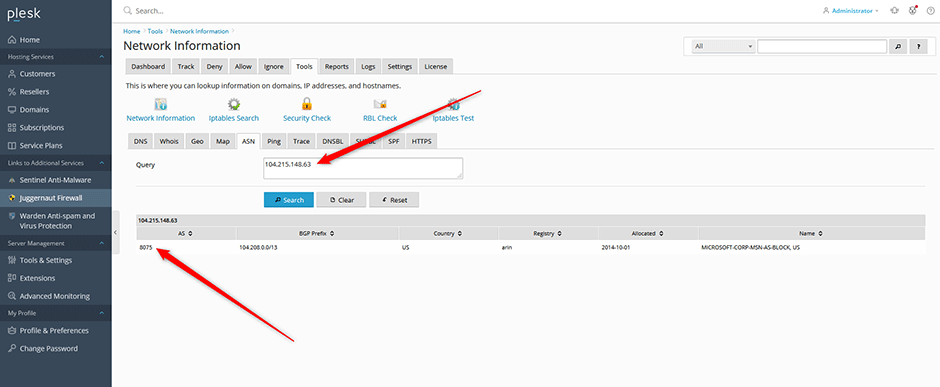
- Navigate to Juggernaut Security and Firewall > Tools > Network Information > ASN.
- Enter a target IP address in the search field and click Search.
- The corresponding ASN will be displayed in the first column of the results table.
Block an ASN
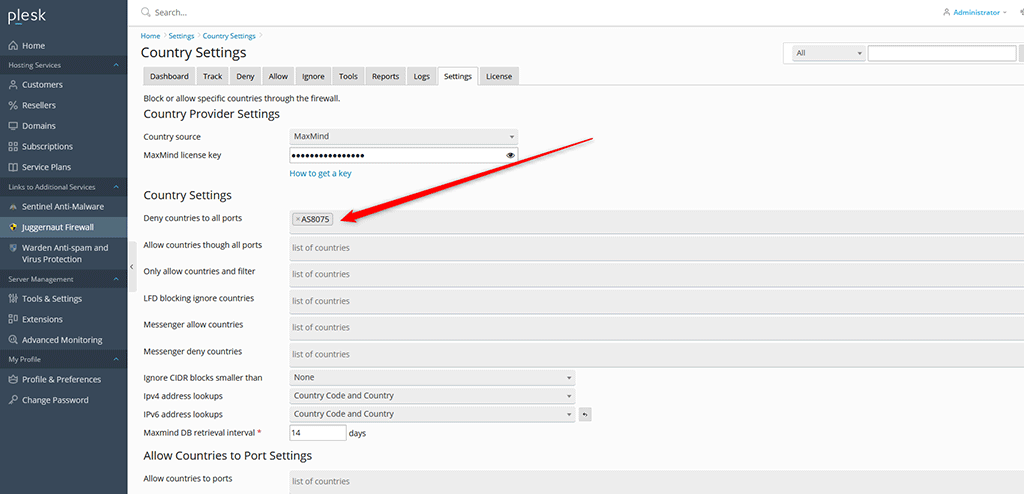
- Navigate to Juggernaut Security and Firewall > Settings > Country Settings.
- In the Deny countries to all ports field, enter the target ASN prefixed with
AS. For example:
Press the spacebar after entering each value to register it.AS8075 - Click Update to apply the configuration changes.
- Click Save Page & Restart to restart the Login Failure Daemon (LFD). This action triggers the daemon to download and block all IP networks associated with the specified ASN.
- Monitor the process by navigating to Logs > LFD log. The log will display entries confirming the network downloads and firewall rule updates.
Troubleshooting
- Verify that the correct format (
ASfollowed by numeric values) is used in the configuration field. - Review Logs > LFD log for errors related to network downloads or daemon restart failures.
