
Overview
The "Unit is masked" error occurs when attempting to start the SpamAssassin service manually. This behavior is intentional and expected in environments utilizing Warden. The SpamAssassin daemon is deliberately masked because Amavis handles spam filtering directly, rendering a standalone SpamAssassin service unnecessary. Running the service concurrently would consume additional memory and server resources without providing functional benefits.
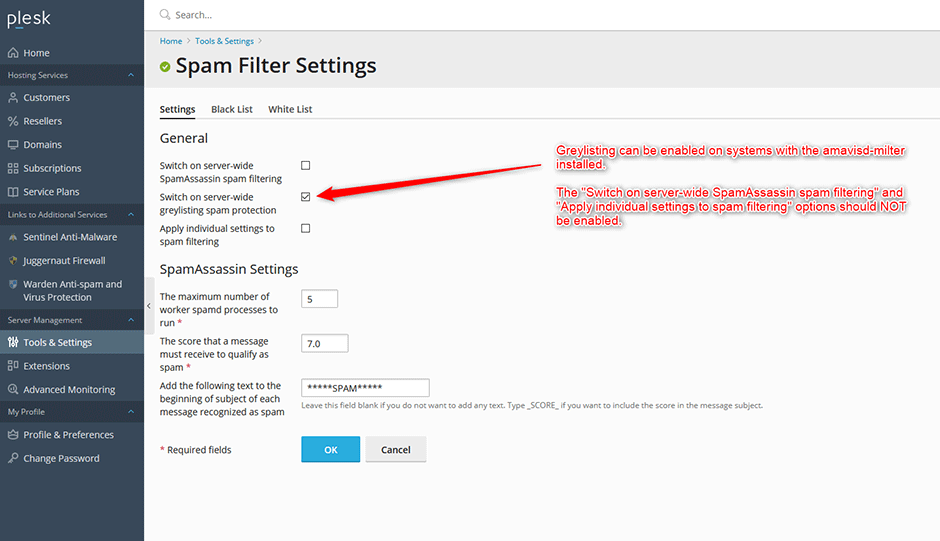
Restoring Default Configuration
If legacy spam filter settings were inadvertently enabled, execute the following commands to disable them and restore the default masked state for the SpamAssassin service. Ensure you run these commands with root privileges.
systemctl unmask spamassassin
/usr/local/psa/bin/spamassassin --update-server -status false
/usr/local/psa/bin/spamassassin --update-server -status false -personal-conf false
/usr/local/paa/admin/sbin/spammng --disable
systemctl mask spamassassin
Troubleshooting
If the service fails to re-mask or legacy configurations persist after executing the commands, verify that no custom scripts or third-party automation tools are overriding the default Warden settings. Confirm that all commands were executed with appropriate administrative privileges and check system logs for permission-related errors.
