
How can I change the interface language of the extension?

Overview

This article provides instructions on how to change the interface language within the application configuration.

Procedure

  1. Navigate to Settings.
  2. Select Application Settings.
  3. Locate the Locale option and select the desired language from the available list.
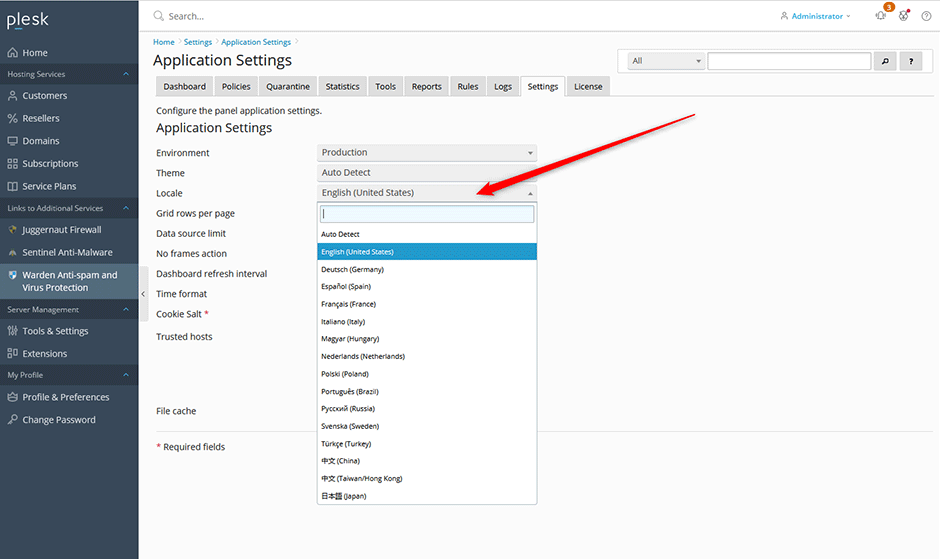
Screenshot of Application Settings showing the Locale configuration option

  • language, locale
  • 0 Users Found This Useful
Was this answer helpful?

Related Articles

Where are the configuration files for Juggernaut Firewall located?

Configuration files are located in the /etc/csf/ directory with the main firewall configuration...

Can I use Juggernaut Firewall to block Wordpress bruteforce attacks?

Yes we support blocking attacks like these very easily. See below for more information: How can...

How can I install or upgrade the extension?

We provide free installation and configuration for all our paid licenses. Open a support ticket...

How can I install or upgrade the extension?

We provide free installation and configuration for all our paid licenses. Open a support ticket...

How can I install or upgrade the extension?

We provide free installation and configuration for all our paid licenses. Open a support ticket...
