
We are pleased to announce the release of Warden Anti-spam and Virus Protection 6.00 under General Availability. This is a major release release and all users are encouraged to upgrade.
Spam Reports
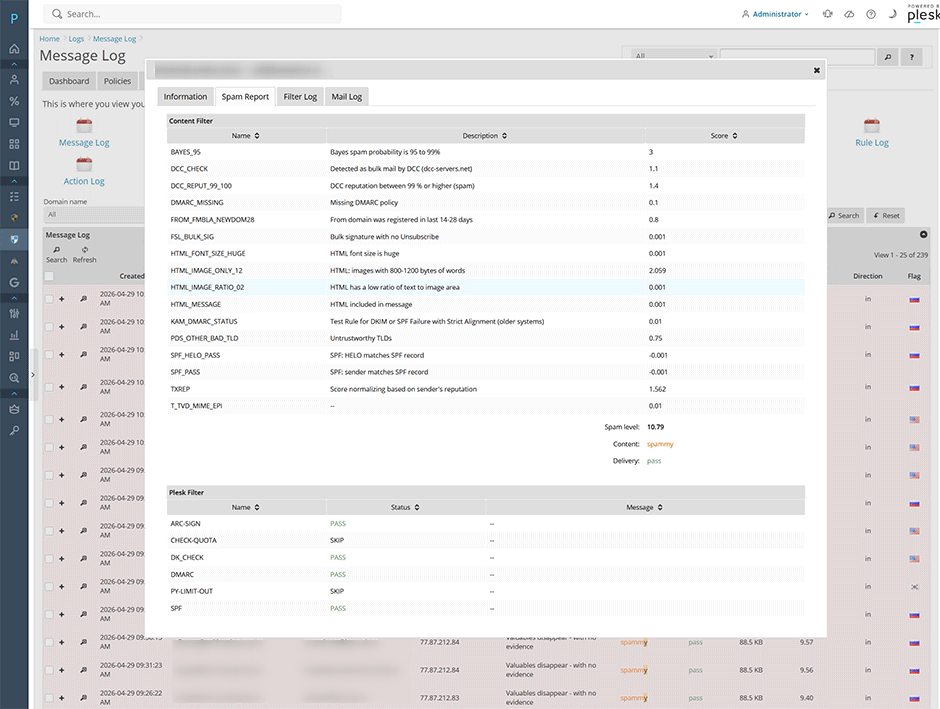
We've added a new spam report page when clicking the magnifying glass under Logs -> Message log. This give users the ability to view filter checks, anti-spam rules, and scoring for each message without having to look at the mail headers.
Rule Scores
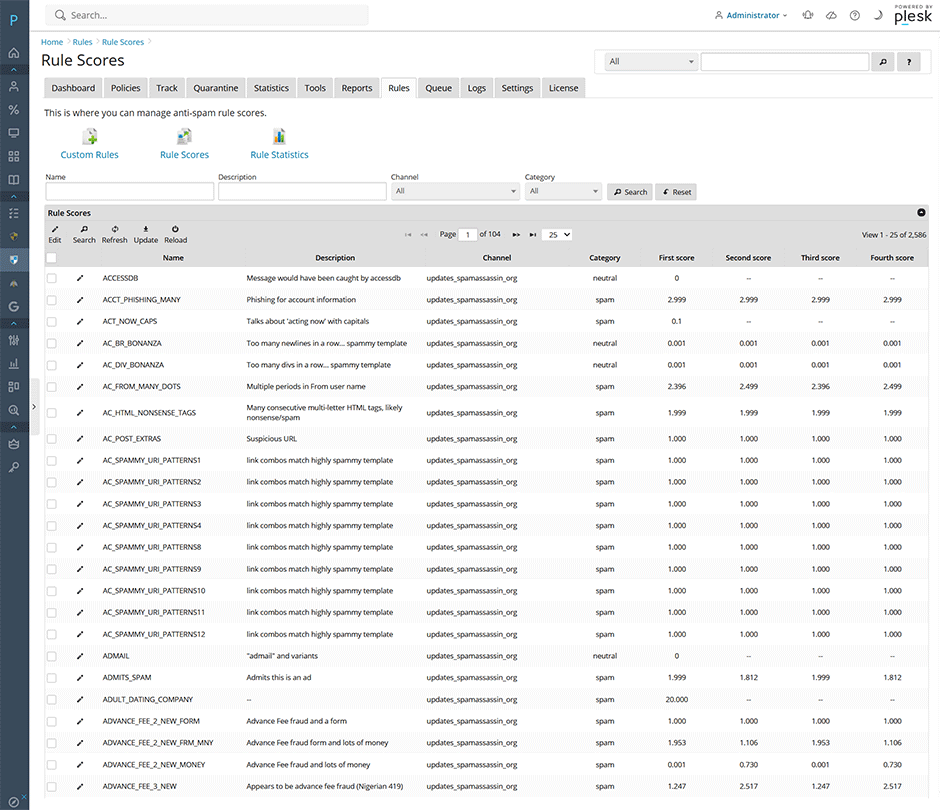
We've added a new page under Rules -> Rule Scores for viewing and managing SpamAssassin rule scores.
Rule Statistics
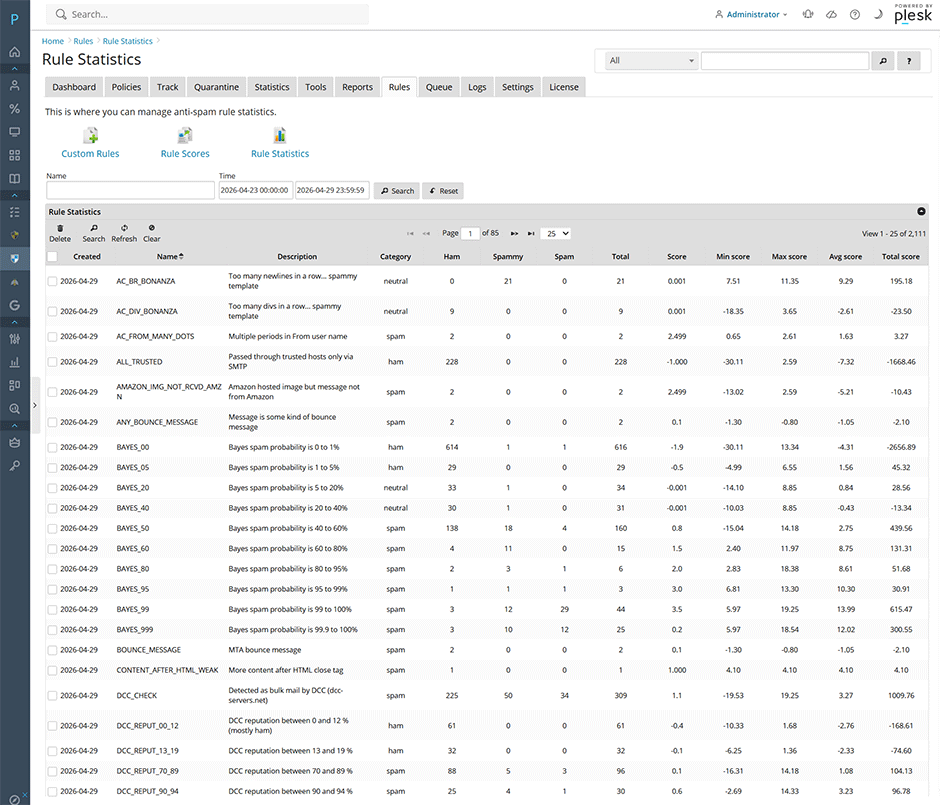
We've added a new custom RuleStatistics plugin for logging real-time per-rule statistics for each email, allowing admins to easily analyze rule performance and identify false positives/negatives.
Changelog
[+] Added a new page under Rules -> Rule Scores for viewing and managing SpamAssassin rule scores.
[+] Added a CLI interface for managing and searching for rule scores. Admins can use the CLI command: warden --task=antispam:rules:rulescores. See here for more information.
[+] Added a new custom RuleStatistics plugin for logging real-time per-rule statistics for each email, allowing admins to easily analyze rule performance and identify false positives/negatives. The plugin can be enabled under Settings -> Plugin Settings -> RuleStatistics or using the CLI with warden --task=antispam:plugins --RuleStatistics=1 --reload=yes . After enabling the plugin you can view the rule statistics under Rules -> Rule Statistics.
[+] Added new rule statistics reports under the reports tab.
[+] Added a spam report page when clicking the magnifying glass under Logs -> Message log. This give users the ability to view filter checks, anti-spam rules, and scoring for each message without having to look at the mail headers.
[+] Added a view spam report permission for customers or resellers. Customers and resellers can view spam reports by default. Admins can find it under Settings -> Panel Application -> Permissions or using the CLI command: warden --task=application:permissions
[+] Added support for using Valkey instead of Redis as a Bayes storage engine now that Valkey is used by default on EL10 due to Redis licensing changes.
[+] Added a subject search field to the message log and quarantine pages.
[+] Added an actions popup menu for the subject column in the message log and quarantine pages.
[+] Added additional service checks when enabling Postscreen. Disabling then re-enabling Postscreen will apply the new service checks to make sure that your Postfix configuration is valid when using Postscreen.
[+] Added the Mail ID and Amavis ID fields to the mail information page when clicking on a message in the message log. This makes it easier for admins to search for and reference specific messages in the message log.
[=] Updated the installer to detect and use utf8mb4 as the default database character set on new installations. This character set supports the full Unicode standard, including emojis and rare characters. We have also created a KB article for administrators who want to convert their Warden database to use the utf8mb4 character set. See here for more information.
[=] Further optimized the log parser so it works better on busy servers with persistent systemd-journal logging enabled.
[=] Renamed the rules page to custom rules. The command line task has also been renamed from warden --task=antispam:rules to warden --task=antispam:rules:customrules.
[=] User interface improvements for select lists and auto suggests to handle longer values better.
[=] Updated machine translated locales for better accuracy.
[=] Updated the Warden custom button to be hidden if a subscription user was created using an external email address since they do not have access to manage Warden.
[=] Updated the default LogSyslog options for ClamAV to be no on Debian/Ubuntu to prevent duplicate log entries.
[=] Installer/uninstaller improvements.
[=] Tools -> Spam report improvements.
[-] Fixed a bug where the ClamAV 1.4.0+ options ScanImage and ScanImageFuzzyHash where getting added to the clamd.conf for older versions of ClamAV which may have not yet been upgraded.
[-] Fixed a bug where the grid menu pop-up for search -> sender access and recipient access was not working properly.
[-] Fixed a bug when throwing some exception types.
[-] Fixed a bug where the validation for Network Tools Settings -> Name servers was not allowing 127.0.0.1.
[-] Fixed a bug where the auto-detection of Chinese locales was not working properly.
How to To Upgrade
Administrators can upgrade the extension using our product updater under Warden -> Settings -> Panel Application -> Application update or from the command line using the command below:
plesk bin extension --install-url https://www.danami.com/clients/downloads/warden.zipYou can view the upgrade process using the command: tail -f /var/log/plesk/panel.log
Full changelog
https://docs.danami.com/warden/basics/changelog
Product Information
https://www.danami.com/products/plesk-extensions/warden-antispam-and-virus-protection
Maandag, Mei 18, 2026
