Overview
If an email appears in the Warden message log but is absent from the recipient's mailbox, it has likely been discarded by a Plesk mail handler during processing.
Identifying Discarded Messages
To verify if messages are being discarded, search the system mail logs using the following command:
# zgrep discarded /var/log/maillog*A typical output will resemble the following:
/var/log/maillog.processed:May 17 16:15:18 web8 postfix-local[913896]: message discarded by a mail handler
/var/log/maillog.processed.2.gz:May 11 04:33:58 web8 postfix-local[2121107]: message discarded by a mail handler
/var/log/maillog.processed.3.gz:May  9 07:57:44 web8 postfix-local[3185723]: message discarded by a mail handler
/var/log/maillog.processed.3.gz:May  9 07:57:47 web8 postfix-local[3185815]: message discarded by a mail handler
/var/log/maillog.processed.3.gz:May  9 07:57:50 web8 postfix-local[3185826]: message discarded by a mail handler
/var/log/maillog.processed.3.gz:May  9 07:57:53 web8 postfix-local[3185840]: message discarded by a mail handler
Troubleshooting & Configuration
The presence of the message discarded by a mail handler entry indicates that the email failed validation checks enforced by Plesk. This behavior is typically caused by strict anti-spam or authentication policies.
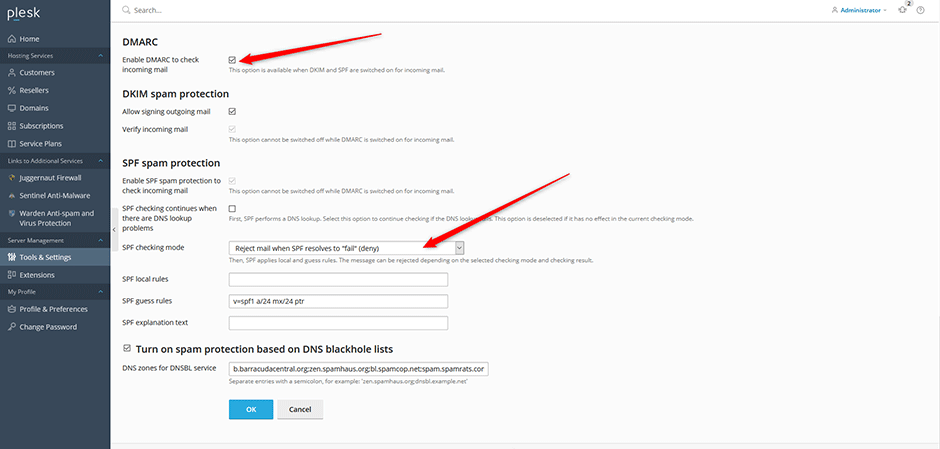
To resolve this issue, review and adjust the following settings within the Plesk interface:
- Enable DMARC to check incoming mail
- SPF checking mode configured as reject email when SPF resolves to fail (deny)
Navigate to Tools & Settings > Mail Server Settings to modify these policies. Adjusting the configuration to a less restrictive mode will prevent legitimate messages from being silently discarded while maintaining security standards.