
Overview
High server load and system unresponsiveness may occur when multiple sa-learn processes run concurrently. This behavior is typically triggered by configuration issues within SpamAssassin or Dovecot, causing the real-time spam learning sieve filter to enter a loop while attempting to train on email messages.

Immediate Mitigation Steps
To restore normal server performance, execute the following commands to halt the process loop:
- Stop the Dovecot service:
systemctl stop dovecot - Terminate all active
sa-learnprocesses to reduce system load:pkill -f sa-learn
Note: Do not restart the Dovecot service until you have applied one of the resolution steps outlined below.
Alternative Configurations
If immediate mitigation is insufficient, adjust the spam training methodology through the Warden interface to prevent real-time processing loops.
Disable Real-Time Learning
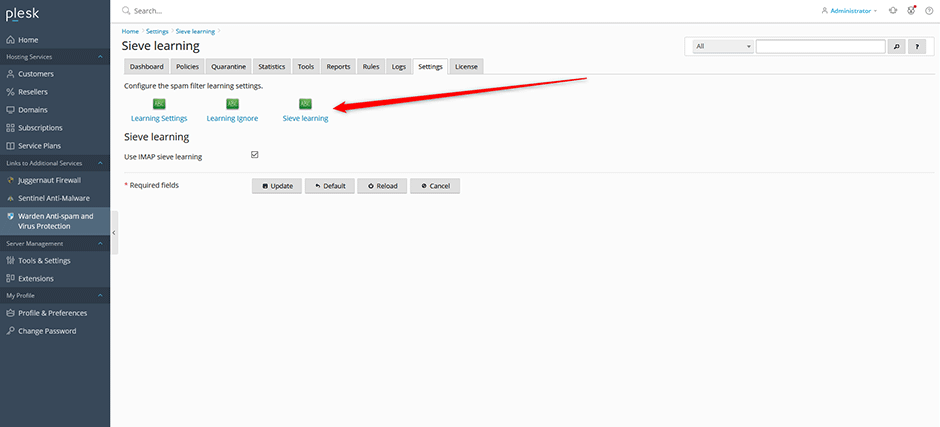
Navigate to Warden -> Settings -> Learning Settings -> Sieve learning. Uncheck the Use IMAP sieve learning option and save your changes.
Enable Scheduled Training
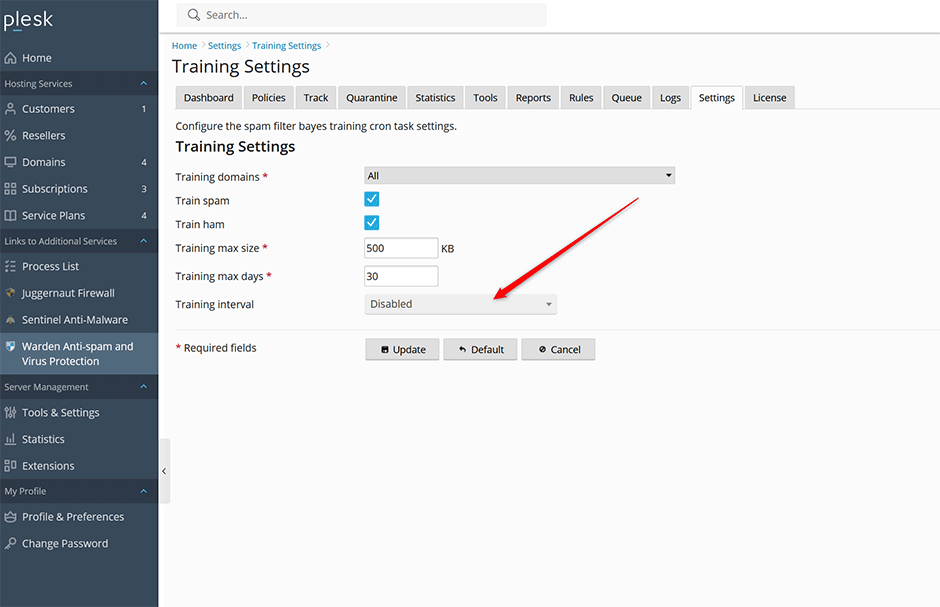
As an alternative to real-time processing, configure nightly training by navigating to Warden -> Settings -> Training Settings and enabling the scheduled job.
Troubleshooting
Address the underlying configuration issue to prevent recurrence. After implementing your chosen resolution, restart the Dovecot service:
systemctl start dovecotSpamAssassin Configuration Validation
Verify that the SpamAssassin configuration contains no syntax or logical errors by running the following command. A successful execution will return no output:
spamassassin --lintDovecot Mailbox Cache Limit Exceeded
This issue may also occur if mailbox dovecot.index.cache files exceed the default 512MB limit enforced by Warden. To resolve this, increase the vsz_limit parameter as documented in the following knowledge base article:
