
We are pleased to announce the release of Warden Anti-spam and Virus Protection 5.06 under General Availability. All users are encouraged to upgrade. See the important notes below as manual action is required after upgrading to Plesk 18.0.73+.
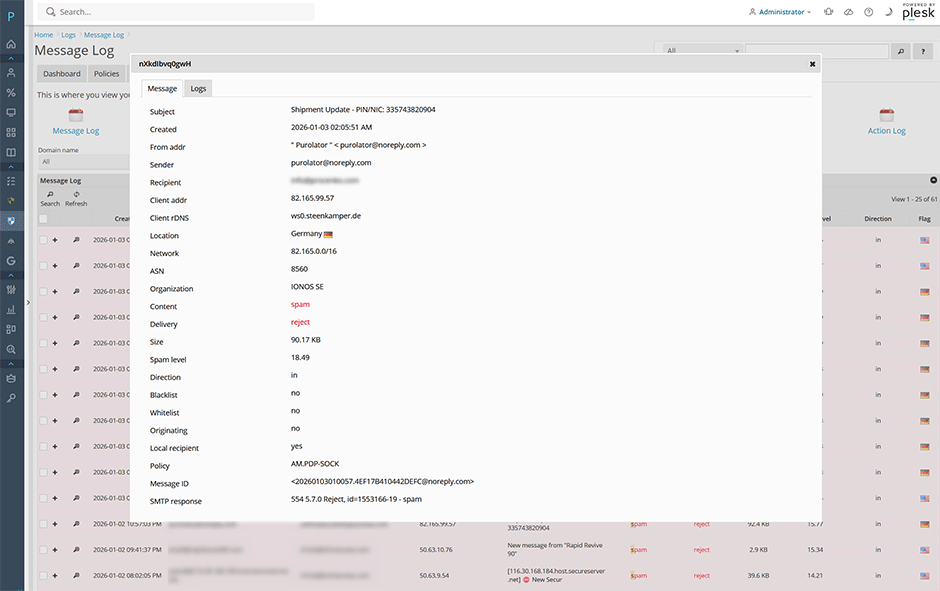
View Message Information
We've added a new page when clicking on the magnifying glass under Logs -> Message log. This page will show you more detailed information that was logged by Amavis.
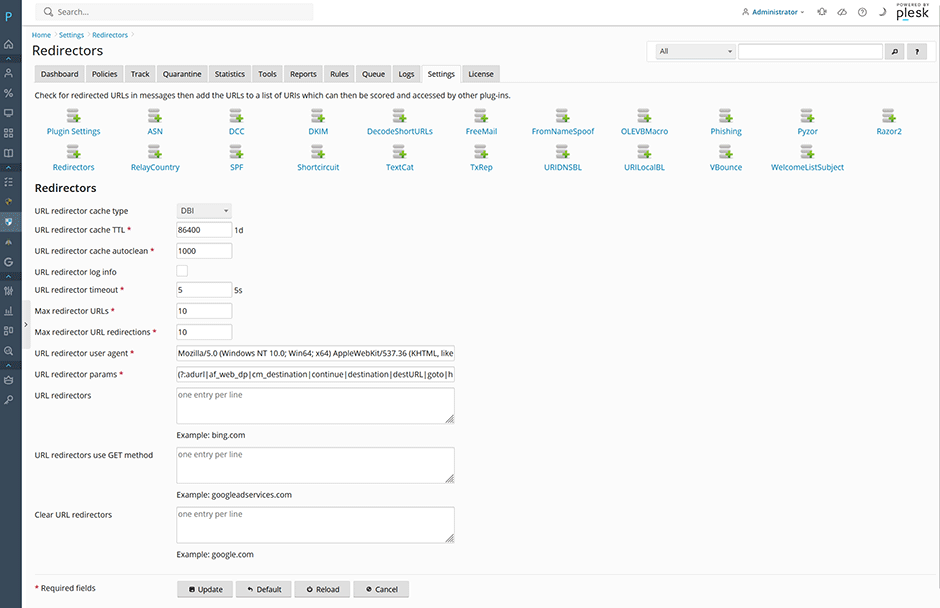
Redirectors Plugin Support
We've added support for the Redirectors plugin which was added in SpamAssassin 4.0.2. This plugin looks for URLs redirected by a list of URL redirector services. Upon finding a matching URL, the plugin will send a HTTP request to the redirector service and retrieve the Location-header which points to the actual redirected URL. It then adds this URL to the list of URIs extracted by SpamAssassin which can then be accessed by URI rules and plugins such as URIDNSBL.
Changelog
[+] Added a new message information page when clicking on the magnifying glass under Logs -> Message log.
[+] Added support for the SpamAssassin 4.0.2+ Redirectors plugin. This plugin looks for URLs redirected by a list of URL redirector services. Upon finding a matching URL, the plugin will send a HTTP request to the redirector service and retrieve the Location-header which points to the actual redirected URL. It then adds this URL to the list of URIs extracted by SpamAssassin which can then be accessed by URI rules and plugins such as URIDNSBL. See here for more information. Administrators using SpamAssassin 4.0.2 can enable it using the command: warden --task=antispam:plugins --Redirectors=1 --reload=yes
[+] Added support for the SpamAssassin 4.0.2+ DecodeShortURLs plugin option url_shortener_custom_user_agent. This option allows a custom HTTP user-agent to be used for specific domains instead of the default specified in url_shortener_user_agent. This is required for some services like t.co to return a blocked URL correctly.
[+] Added support for the ClamAV 1.4.0+ options ScanImage and ScanImageFuzzyHash under Settings -> Anti-virus Settings -> Scanning Settings.
[+] Added the ability to perform database maintenance on the redirect URL cache and short URL cache used by the DecodeShortURLs and Redirectors plugins.
[+] Added a KB article for how administrators can enable persistent systemd-journal logging and increase the log retention time. See here for more information.
[=] Updated the default url_shortener_cache_type option to dbi to enable the DecodeShortURLs database cache on new installations. Administrators can enable it on existing installations using the command: warden --task=antispam:plugin:decodeshorturls --url_shortener_cache_type=dbi --reload=yes
[=] Further optimized the log parser so it works better on busy servers with persistent systemd-journal logging enabled.
[=] Updated the settings import to skip certain options which should not be imported on a new server.
[=] Updated javascript vendor libraries to their latest versions.
[-] Fixed a validation bug when saving URL shorteners starting with a dot on the DecodeShortURLs plugin page.
[-] Fixed a bug where the spam level in the quarantine was being displayed rounded to one decimal places instead of two.
[-] Bug fixes and performance improvements to the global search.
How To Install or Upgrade
Administrators can install or upgrade the extension using our new product updater under Warden -> Settings -> Panel Application -> Application update or from the command line using the command below:
plesk bin extension --install-url https://www.danami.com/clients/downloads/warden.zipYou can view the upgrade process using the command: tail -f /var/log/plesk/panel.log
Important - Manual Action Required
After upgrading to Plesk 18.0.73+ and Warden 5.06 administrators must run the command below to upgrade their Warden dovecot configuration to be compatible with new dovecot 2.4 (otherwise dovecot will not start after the Plesk upgrade):
warden --task=antispam:learning:sieve --rebuild=yes --restart=yesExplaining the Plesk 18.0.73+ Upgrade Process
- Make sure that you have Warden 5.06 installed.
- Upgrade Plesk to Plesk 18.0.73+.
- Run the command: warden --task=antispam:learning:sieve --rebuild=yes --restart=yes It will detect that Plesk 18.0.73+ is now installed and rebuild the Warden configuration for dovecot 2.4 then restart dovecot.
Full changelog
https://docs.danami.com/warden/basics/changelog
Product Information
https://www.danami.com/products/plesk-extensions/warden-antispam-and-virus-protection
Onsdag, Januar 7, 2026
